%201.svg)
Scalable Test Orchestration for CI/CD Pipelines



Testing in CI/CD pipelines isn't just about automation - it's about orchestration. This means managing workflows, dependencies, and environments efficiently. Without proper orchestration, testing becomes a bottleneck, especially as teams scale. For example:
- 73% of test automation projects fail due to poor dependency handling and unaddressed QA risks.
- 36.5% of organizations still rely on manual processes, slowing pipelines.
- Companies like Google and Netflix have slashed test times by 88% and 80%, respectively, through orchestration.
The article compares five tools - Jenkins, Harness, GitLab CI/CD, Kubernetes/Docker, and Testkube - on scalability, integration, cost, and performance and QA metrics. Here's a quick summary:
- Jenkins: Highly customizable but requires heavy maintenance.
- Harness: AI-driven, reduces testing time but involves migration efforts.
- GitLab CI/CD: Streamlines workflows with DAG pipelines but ties testing to its ecosystem.
- Kubernetes/Docker: Great for large-scale, containerized testing but has a steep learning curve.
- Testkube: Decouples testing from CI/CD, ideal for Kubernetes users but demands Kubernetes expertise.
Each tool has trade-offs, and the best choice depends on your team's needs, existing infrastructure, and long-term goals.
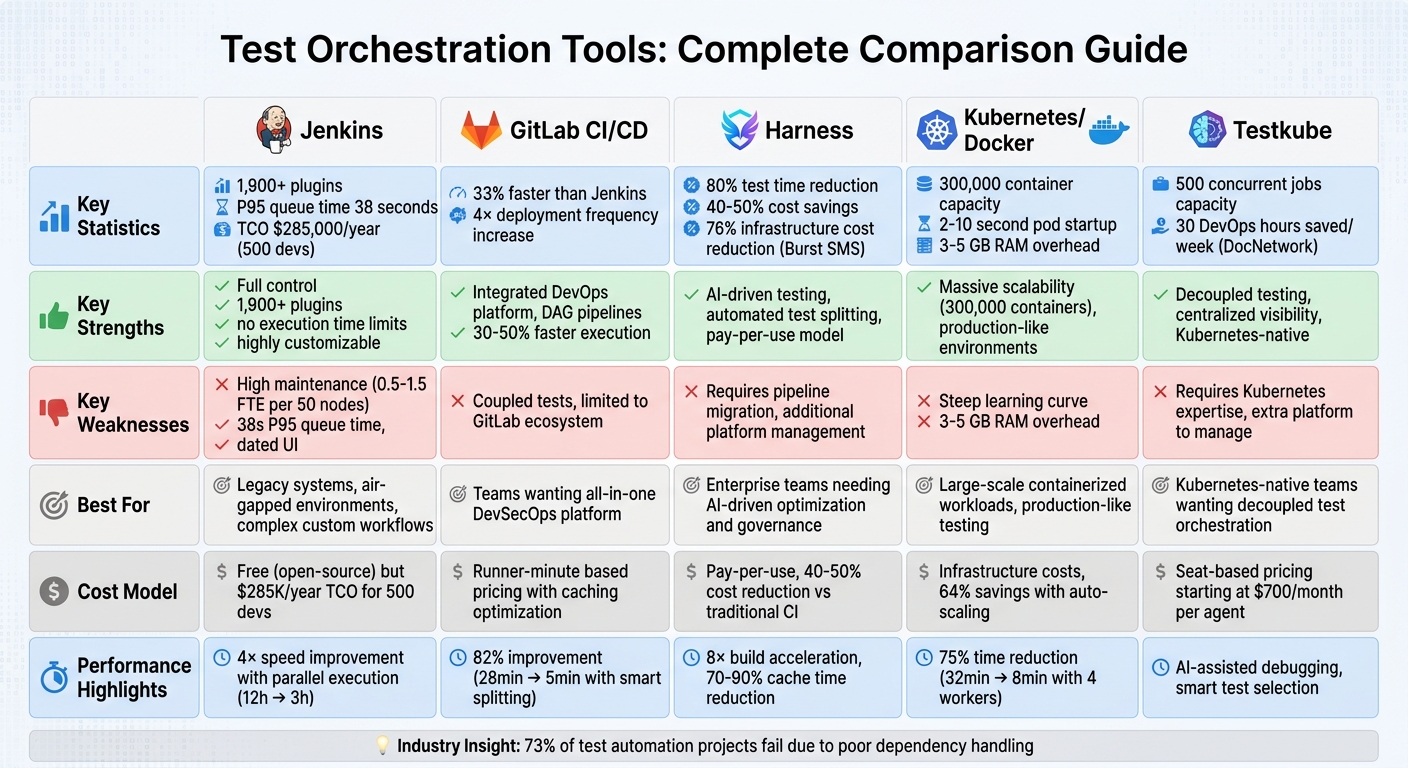
CI/CD Test Orchestration Tools Comparison: Jenkins vs GitLab vs Harness vs Kubernetes vs Testkube
Testing in Modern CI/CD Pipelines: The Good, The Bad, and The Ugly | Cortney Nickerson & Ole Lensmar
sbb-itb-7ae2cb2
1. Jenkins
Jenkins is often described as the workhorse of enterprise CI/CD, thanks to its robust controller-agent architecture. This setup allows workloads to be distributed across multiple machines. The controller handles scheduling and the user interface, while agents take care of executing the builds.
Scalability
Jenkins is built to scale horizontally, though teams often face challenges in scaling test automation, making it easy to add more agents as needed. By leveraging the Kubernetes plugin or EC2 Fleet, you can create temporary agents that shut down once a job is completed. This ensures you’re only paying for active resources. For resource planning, the general recommendation is to allocate 1 CPU core per 100 jobs, with each controller instance handling about 500 jobs (executor sizing formula: jobs × 0.03).
A great example of Jenkins' scalability comes from DevOps engineer Rohit Shinkar, who cut a regression pipeline’s runtime from over 12 hours to under 3 hours in September 2025. He achieved this by switching from sequential to parallel execution, grouping 40+ applications by speed, and isolating outliers into a "Heavy Jobs" track. This approach resulted in a 4× speed improvement, and as Shinkar noted:
"At scale, CI/CD efficiency is not a nice-to-have, it's a productivity multiplier."
Integration Depth
Jenkins offers over 1,800 plugins, making it compatible with nearly every tool you might use. Its Groovy-based Jenkinsfile provides the flexibility of a programming language, enabling conditional logic, shared libraries, and complex workflows that go beyond what YAML-based tools can handle. This makes Jenkins particularly useful in air-gapped environments where external code access is restricted.
However, the extensive plugin ecosystem can lead to "plugin sprawl", which teams need to manage carefully to avoid unnecessary complexity.
Cost Efficiency
While Jenkins itself is free and open-source, the total cost of ownership (TCO) can be significant. A 2026 analysis estimated the annual TCO for an organization with 500 developers running 10,000 builds per month at $285,000. Maintenance accounts for a large portion of this cost, often requiring one full-time engineer for every 1,000 builds to handle issues and optimizations.
| Cost Category | Annual Cost (500 Devs) | % of Total |
|---|---|---|
| Maintenance (Human Capital) | $128,250 | 45% |
| Infrastructure (Cloud/Hardware) | $99,750 | 35% |
| Plugins & Support | $57,000 | 20% |
| Total TCO | $285,000 | 100% |
For a redundant AWS setup with 60 controllers, monthly costs hover around $16,200, covering compute, storage, and data transfer. Security and preventing late-stage bugs can also add to the cost. A 2025 audit revealed that 68% of Jenkins instances had at least one critical misconfiguration, underscoring the importance of proper security management.
Performance
Jenkins' performance depends heavily on its durability settings. By default, Jenkins writes frequently to disk for crash recovery, which can create I/O bottlenecks. Switching to PERFORMANCE_OPTIMIZED mode reduces disk writes and improves performance for standard pipelines. Running Jenkins on SSD-backed storage is also crucial to avoid the limitations of older magnetic drives.
Parallel execution is another key performance booster. For example, a test suite that takes 8 hours on a single node can be completed in just 2 hours using 4 parallel agents. Using the parallel {} block in your Jenkinsfile helps maximize agent utilization and speed up workflows. Additionally, for Groovy-heavy logic, the @NonCPS annotation can bypass durability overhead and improve execution times.
For controllers with larger memory allocations (over 6 GB of heap), garbage collection tuning may be necessary to prevent long pause times that can disrupt builds. As the Jenkins documentation cautions:
"The Pipeline DSL is not designed for arbitrary networking and computation tasks - it is intended for CI/CD scripting."
Next, we’ll take a closer look at Harness to see how its orchestration features compare.
2. Harness
Harness uses AI-driven Test Intelligence to simplify test orchestration, offering a sharp improvement over older approaches. By analyzing code changes, it ensures only relevant tests are executed, cutting test cycles by up to 80% and reducing CI pipeline times by over 40%.
Scalability
Harness tackles scalability with automated test splitting and parallel execution. It divides test suites based on historical timing data, running them simultaneously. This method helped Burst SMS lower infrastructure costs by 76% by March 2026 after adopting Harness CI's dedicated infrastructure. Additionally, ephemeral, on-demand build environments eliminate "noisy neighbor" issues found in shared setups.
For teams with intricate deployment needs, Harness offers Environment Blueprints. These allow developers to create production-like environments on their own, bypassing manual, ticket-based delays. Steve Day, Enterprise Technology Executive at National Australia Bank, highlighted its impact:
"Partnering with Harness has helped us give teams self-service access to environments directly within their workflow, so they can move faster and innovate safely, while still meeting the security and governance expectations of a regulated bank."
Integration Depth
Harness integrates seamlessly with major tools like GitHub, GitLab, and Bitbucket, while also connecting to Jira and ServiceNow for governed delivery actions. It supports a variety of testing frameworks, such as JUnit, TestNG, pytest, Jest, Mocha, and RSpec, making it flexible for diverse tech stacks. For teams transitioning from Jenkins, Harness provides tools that automate up to 80% of the migration process.
The Cursor Plugin extends functionality into IDEs, enabling developers to trigger pipelines, manage deployments, and debug issues using natural language - all without leaving their editor. Additionally, Cache Intelligence minimizes redundant dependency downloads and Docker layer builds, reducing build times by 70% to 90%. These integrations complement Harness's scalable design, delivering both efficiency and performance improvements.
Cost Efficiency
Traditional CI setups often involve static clusters that are underutilized but still costly. Harness, however, uses a pay-per-use model with autoscaling containers, cutting operational costs by 40% to 50%. Its AI capabilities skip unnecessary tests, while intelligent caching reduces compute demands. Unlike legacy systems like Jenkins, which require 2–5 engineers for daily upkeep (consuming up to 20% of a platform team's capacity), Harness's cloud-native design requires minimal maintenance, allowing engineers to focus on more strategic tasks. Chinmay Gaikwad, Technical Expert at Harness, summed it up well:
"Giving slow pipelines more computing power is like buying a faster car to get through traffic: you're still stuck in the same traffic jam, but you have to pay more."
Performance
Harness boosts performance through parallel execution, test sharding, and flaky test isolation. Its AI identifies and isolates flaky tests, while stage-level parallelism ensures unique artifacts without naming conflicts. By combining selective test execution and smart caching, Harness can accelerate builds by up to 8× compared to traditional setups. Teams can also set maxConcurrency limits to control resource usage and maintain predictable costs. This combination of speed and control makes Harness particularly effective for managing large test suites and complex release processes.
Next, we'll explore how GitLab CI/CD approaches test orchestration on a large scale.
3. GitLab CI/CD
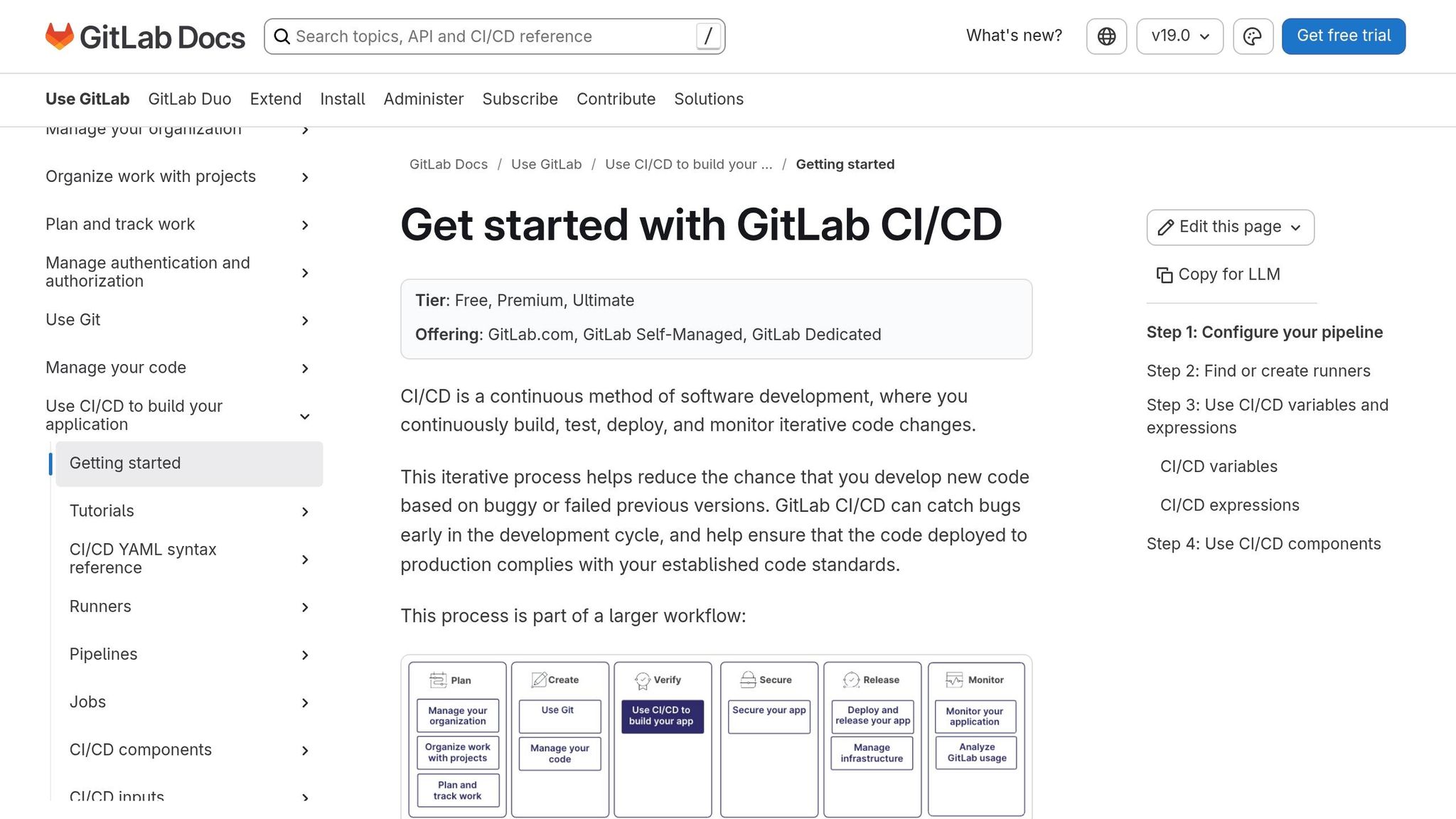
GitLab CI/CD streamlines testing with its Directed Acyclic Graph (DAG) execution. By using the needs keyword, jobs can start as soon as their specific dependencies are ready, skipping the need to wait for entire stages to finish. This setup minimizes idle time and speeds up the pipeline's critical path.
Scalability
GitLab employs smart architectural patterns to manage large-scale testing efficiently. For instance, Parent-Child Pipelines in monorepos trigger only the necessary sub-pipelines, simplifying configurations and avoiding unnecessary resource usage. For microservices, Multi-Project Pipelines coordinate dependencies across repositories, ensuring backend changes are validated against frontend or other dependent systems.
To scale infrastructure, GitLab uses autoscaling runners through Kubernetes or Docker Machine. These runners can spin up hundreds of instances for parallel testing and scale down during downtime to save costs. Additionally, GitLab supports dynamic pipeline generation, adjusting the number of parallel jobs or tests at runtime based on code changes or historical data.
A practical example of optimization comes from January 2021, when GitLab's engineering team tackled a bottleneck in their frontend-fixtures job. By implementing parallel: 2 and leveraging the Knapsack gem to distribute RSpec tests, they reduced the job's runtime by 3 minutes. Further improvements, like splitting generator files into smaller batches, shaved off another 3.5 minutes.
Integration Depth
GitLab simplifies test reporting by parsing JUnit XML artifacts and displaying results directly in merge request widgets, eliminating the need for external tools. It integrates seamlessly with popular frameworks like Playwright, Cypress, Jest, RSpec, and pytest, offering specialized Docker images and sharding capabilities for efficient testing. Review Apps create dynamic environments for each merge request, enabling automated end-to-end testing against live, temporary versions of the application.
Security and quality are baked into the platform, with features like SAST, DAST, container scanning, and dependency scanning available in the Ultimate tier. Teams adopting these integrated CI/CD tools alongside branch protection policies have reported a fourfold increase in deployment frequency. As Yuri Kan, Senior QA Lead, highlights:
"GitLab's integrated test reporting transformed our MR review process. When test failures and coverage drops appear directly in the merge request interface, quality conversations happen at the right time - before the code is merged, not after the release."
This deep integration also contributes to cost and efficiency improvements across pipelines.
Cost Efficiency
GitLab helps cut costs by reducing unnecessary jobs and execution times. For example, the rules keyword ensures only relevant tests run, so backend tests are skipped when changes are limited to the frontend. The interruptible keyword cancels outdated pipelines when new commits are pushed, and predictive testing prioritizes tests likely to fail based on code changes before running full suites.
While parallel runs increase runner-minutes, features like smart caching help offset these costs. By using options like cache:policy: pull for read-only jobs, redundant work is avoided. For example, a Node.js application with 500 tests saw its execution time drop from 28 minutes (sequential) to just 5 minutes using smart splitting and caching - a massive 82% improvement.
Performance
DAG pipelines significantly cut execution times, reducing them by 30% to 50% compared to traditional linear stage execution. Basic parallelization across four nodes can make pipelines 68% faster than sequential runs. GitLab itself runs about 500 merge request pipelines daily to support its development. Nawaz Dhandala explains the advantage:
"Parallel testing can reduce your CI pipeline time from hours to minutes by distributing tests across multiple runners simultaneously."
Fail-fast patterns also play a role in boosting efficiency. By running high-failure-probability jobs like linting or unit tests early, teams get immediate feedback and conserve resources. Historical timing data enables intelligent test splitting, preventing long-running jobs from delaying the entire pipeline. Additionally, using lightweight Docker base images like debian-slim and multi-stage builds reduces download and initialization times, further trimming job runtimes.
Up next, we’ll dive into container-focused orchestration using Kubernetes and Docker.
4. Kubernetes/Docker
Kubernetes and Docker approach testing differently by treating tests as native workloads rather than just another step in a CI pipeline. Instead of relying on traditional CI runners, Kubernetes runs tests as pods - the same components used for production apps. This setup allows for massive parallelization and elastic scaling, which aligns with the fast-paced nature of modern development. With AI-assisted coding tools driving commit rates from 5 to 50 per week, this method keeps up with the demand. This is especially critical as teams integrate AI in QA to predict bugs before they reach production. Let’s dive into how Kubernetes and Docker excel in scalability, integration, cost management, and performance.
Scalability
Kubernetes excels at managing large test suites by using sharding and parallel execution across distributed pods. For example, a 200-test end-to-end suite that would take 32 minutes to run sequentially can be completed in just 8 minutes when divided across 4 workers.
The platform also dynamically scales infrastructure through elastic worker pools, which expand based on the size of the test suite rather than relying on fixed runner availability. Teams can set workflow-level concurrency limits to ensure resource-heavy tests don’t overload the cluster during peak usage. As Bruno Lopes notes:
"Testing becomes an independent, continuously available capability rather than a stage within a pipeline."
Integration Depth
Kubernetes ensures that tests run in production-like environments, replicating real-world traffic patterns. This approach works seamlessly with any containerized testing tool, such as Selenium, JMeter, k6, or Cypress, without requiring additional customization.
Test environments are defined using declarative YAML configurations, making them version-controlled and easy to replicate across development, staging, and production environments. Additionally, multi-stage Dockerfiles allow developers to include test stages directly within the build process, ensuring that the exact artifact intended for production is validated before finalizing the image. Bryan Semple, Product Marketing Manager at Testkube, highlights this benefit:
"Kubernetes lets you define environments as code, making them version-controlled, reproducible, and consistent across dev, staging, and prod."
Cost Efficiency
Kubernetes optimizes costs by enabling ephemeral environments that create isolated test infrastructure on demand and automatically tear it down once the tests are complete. This ensures resources are only used when necessary. Teams can also utilize existing cluster capacity for testing instead of investing in dedicated external infrastructure or costly third-party runners.
Auto-scaling further reduces expenses by turning idle resources into elastic capacity. For instance, replacing a dedicated c5.xlarge instance costing $1,460/year with an auto-scaled fleet featuring a 10-minute idle timeout can lower costs to $520/year - a 64% savings. In the case of Selenium Grid, using KEDA (Kubernetes Event-Driven Autoscaler) can cut monthly infrastructure costs from $500–$800 for a static grid to just $100–$150 with a pay-per-use model.
Performance
Running tests within the Kubernetes cluster minimizes latency by keeping data and traffic on the internal network instead of relying on external systems. Matrix testing enables simultaneous testing across multiple configurations - such as different Node.js versions or operating systems - within a single workflow, eliminating the need for sequential runs.
Efficiency can be further improved by using -alpine images and effective caching, which reduce image pull times by 50–80% and cut pipeline execution times by 60–80%. For database-heavy integration tests, mounting tmpfs on data directories can significantly boost I/O performance.
Next, we’ll explore how Testkube leverages Kubernetes for test orchestration.
5. Testkube
Testkube builds on Kubernetes' native testing capabilities by providing a dedicated test orchestration layer. This layer allows tests to run independently, decoupled from CI/CD pipelines. As a result, tests can be triggered by tools like Jenkins, GitHub Actions, GitLab, or Tekton without being tied to any specific workflow syntax. Katie Petriella, Senior Growth Manager at Testkube, sums it up well:
"Testkube makes the most sense when testing has grown complex enough that embedding it in CI/CD creates more problems than it solves."
Scalability
Testkube enhances Kubernetes' native features by running tests as Kubernetes jobs. This approach takes advantage of Kubernetes' RBAC, network policies, and resource quotas. The platform supports pod-level scaling using the Kubernetes cluster autoscaler and can handle up to 500 concurrent jobs before requiring adjustments like dedicated node pools or resource optimizations. Teams can configure parallelism levels and distribute workloads using matrix or shard setups. For example, sharding large Playwright test suites across pods can dramatically cut down execution time.
One real-world example is The Aspen Group, which manages around 90 microservices, with 85% of its workloads running on Kubernetes. They use Testkube as a shared testing platform. Joel Vasallo, Director of Platform Engineering at The Aspen Group, explains:
"Triggering tests as Kubernetes jobs meant I could integrate them into our workflows, Argo, Spinnaker, whatever. It just worked."
Integration Depth
Testkube’s flexibility allows seamless integration with any containerized testing tool. It supports frameworks like Playwright, Cypress, Selenium, Postman, JMeter, k6, and SoapUI through a "Bring Your Own Tool" model. For instance, TomTom migrated its tests - originally triggered by Azure DevOps pipelines, including SOAP UI functional tests, JMeter performance tests, and Selenium UI tests - into Testkube. These tests now span development, testing, acceptance, and production environments. As of 2025, TomTom is transitioning its CI trigger to GitHub Actions while continuing to use Testkube as its orchestration layer.
A single control plane manages tests across clusters using lightweight runner agents, centralizing logs, artifacts, and execution history for better visibility.
Cost Efficiency
Testkube uses a seat-based pricing model rather than billing by minutes, helping teams avoid unexpected cost spikes as test volumes grow. By utilizing existing infrastructure and the cluster autoscaler for elastic scaling, Testkube eliminates the need for external runners. Additionally, its AI-driven Smart Test Selection feature analyzes code changes to run only the affected tests, reducing resource usage at scale. This approach is similar to prioritizing test cases based on risk and impact to optimize execution. DocNetwork reported saving 30 DevOps hours per week thanks to Testkube’s centralized test visibility. Pricing starts at $700 per month per agent, and a 30-day free trial is available without requiring a credit card.
Performance
Running tests as Kubernetes jobs keeps data and traffic within the internal network, reducing latency. AI-assisted debugging streamlines the process by comparing test runs and pinpointing failure points automatically, saving teams from manually searching through logs. Test Workflows allow for nesting, sequential, and parallel execution of complex test suites. Teams can also use Kubernetes labels for dynamic test selection and route specific tests to designated Runner Agents to manage resource-intensive tasks.
These features highlight Testkube’s unique approach to test orchestration, paving the way for a deeper comparison of orchestration strategies.
Advantages and Disadvantages
Looking at the comparisons above, it's clear that each orchestration tool comes with its own set of trade-offs, especially when it comes to scalability, cost, and performance.
Jenkins is a powerhouse of customization, offering over 1,900 plugins and Groovy-based scripting. This makes it a top choice for environments with strict control requirements, like air-gapped systems or intricate workflows. But with great power comes great responsibility - managing Jenkins at scale can be resource-intensive. For instance, running a 50-node fleet may require 0.5 to 1.5 full-time engineers, and its P95 queue time of 38 seconds lags behind managed solutions, which average 14 seconds. As DevOps Engineer Kaustubh Saha points out:
"Never run builds directly on the Controller... running resource-heavy tasks... can exhaust its memory or CPU".
GitLab CI/CD and Harness shine when it comes to reducing maintenance burdens. Harness, in particular, uses a serverless model and AI-driven test intelligence to cut operational costs by 40% to 50%. Its pay-per-use pricing avoids the need for static clusters, but both platforms have their limitations. For example, testing is embedded within pipeline stages, making it tricky to run tests independently without rebuilding workflows.
For container orchestration, Kubernetes and Docker cater to different needs. Docker containers are quick to start, taking just 50–200 milliseconds, while Kubernetes pods can take 2–10 seconds due to API overhead. Kubernetes offers immense scalability, supporting up to 300,000 containers per cluster - three times the capacity of Docker Swarm. However, this comes at the cost of a steeper learning curve and a 3–5 GB RAM requirement for its control plane. As ThePrimeagen, a former Netflix engineer, observes:
"Kubernetes is powerful but often over-applied to problems that Docker Compose solves more simply".
Testkube takes a unique approach by running tests as native Kubernetes jobs, completely separating them from CI/CD pipelines. This setup saved DocNetwork 30 hours per week by improving visibility. It also scales efficiently to handle up to 500 concurrent jobs before resource adjustments are needed. However, Testkube requires upfront expertise in Helm and Kubernetes, making it best suited for teams already working with containerized workloads.
| Tool | Key Strengths | Key Weaknesses |
|---|---|---|
| Jenkins | Full control; 1,900+ plugins; no execution time limits | High maintenance; 38-second P95 queue time; dated UI |
| GitLab CI/CD | 33% faster than Jenkins; integrated DevOps platform | Coupled tests; limited to GitLab ecosystem |
| Harness | AI-driven testing; automated test splitting; pay-per-use and AI test case prioritization | Requires pipeline migration; additional platform management |
| Kubernetes | Handles up to 300,000 containers | Steep learning curve; 3–5 GB RAM overhead |
| Docker | Quick startup (50–200ms); low overhead | 95,000 container limit; manual scaling only |
| Testkube | Decoupled testing; centralized visibility | Requires Kubernetes expertise; extra platform to manage |
This breakdown highlights the strengths and challenges of each tool, offering a clear picture of how they fit into different operational needs.
Conclusion
Choosing the right orchestration tool comes down to matching its strengths with your team's specific needs. Jenkins stands out for its high level of customization and control, especially for legacy systems, though it comes with a heavier maintenance burden. GitLab CI/CD provides an all-in-one DevSecOps solution, integrating source control, security scanning, and CI/CD in a single platform. Harness, with its enterprise governance features and AI-driven test intelligence, is a strong contender but may require migrating existing pipelines. For smaller teams, Docker offers an easier setup, while Kubernetes excels at scaling container-native workloads, albeit with a steep learning curve and resource demands. Meanwhile, Testkube takes a unique approach by decoupling testing from CI/CD pipelines, running tests as native Kubernetes jobs. This approach has been a game-changer for companies like DocNetwork, saving them 30 DevOps hours per week by centralizing visibility.
The industry is clearly moving toward treating testing as an independent orchestration layer rather than embedding it within pipeline stages. Katie Petriella from Testkube explains this shift perfectly:
"There is no T (testing) in CI/CD. That is the gap Testkube fills".
This separation helps avoid pipeline sprawl and allows teams more flexibility to switch CI tools without needing to rewrite their test logic.
To maximize efficiency, teams should also consider incorporating AI-powered testing tools. For example, Ranger's AI-powered QA testing automates test creation and maintenance, enabling faster bug detection while scaling test execution. It integrates seamlessly with tools like Slack and GitHub, providing real-time testing updates to catch bugs earlier. As Dmitry Fonarev, CEO of Testkube, points out:
"Test orchestration won't magically fix underlying quality issues like flaky tests... Consider using AI assistants for test debugging and analysis".
Ultimately, the best tool for your team will depend on your specific challenges and priorities. Whether you value tight control, seamless integration, predictable costs, or Kubernetes-native functionality, there's an option to suit your needs. For instance, CircleCI consistently maintains queue times under 30 seconds even during high demand, while GitHub Actions can experience median queue times exceeding 22 minutes under similar conditions. Carefully assess your pain points and choose the tool that aligns with your goals.
FAQs
When should we separate testing from our CI/CD pipelines?
Separating testing from CI/CD pipelines can significantly boost speed, scalability, and feedback efficiency. Tests that are slow or require heavy resources - like end-to-end or manual tests - can create bottlenecks when integrated directly into the pipeline. By isolating these tests, you allow for:
- Faster developer feedback: Developers can quickly identify and resolve issues without waiting for lengthy test cycles.
- Better resource allocation: Critical resources aren't tied up in tests that don't need to run for every deployment.
- More focused validation: Teams can target specific areas for testing without slowing down the entire pipeline.
Additionally, leveraging AI-powered tools such as Ranger for end-to-end testing can simplify workflows while ensuring quick and consistent deployment cycles. This approach keeps the process efficient without compromising on quality.
How do we choose between pipeline-based and Kubernetes-native test orchestration?
Choosing between pipeline-based and Kubernetes-native test orchestration comes down to the size and complexity of your environment.
Pipeline-based orchestration works by embedding testing directly into CI/CD pipelines. This approach is a good fit for simpler workflows, but it can struggle to scale effectively in large, distributed systems.
On the other hand, Kubernetes-native orchestration taps into Kubernetes' capabilities for scaling and automation. It's better suited for large-scale, cloud-native setups that demand efficient resource management and seamless integration with Kubernetes workloads.
When deciding, think about your scalability and automation requirements.
What’s the fastest way to reduce CI test time without adding more infrastructure?
Parallel testing is a game-changer for cutting down CI test times without needing extra infrastructure. By running tests simultaneously across multiple machines or containers, you can slash execution time by 50% or more. To push this even further, techniques like intelligent test sharding and timing-based distribution come into play. These approaches ensure that tests are evenly distributed, so the overall runtime is determined by the longest-running test group - not the total sequential test time. This can lead to a 60-70% reduction in runtime, making your pipeline much faster and more efficient.
Related Blog Posts
Stop babysitting your coding agents. Use Ranger
%201%20(1).svg)
More signals, less noise, faster launches
Let Ranger be your guide to sustainable QA testing.

.png)