%201.svg)
Common CI/CD and Cloud Testing Integration Mistakes


Integrating CI/CD pipelines with cloud testing can boost software delivery speed and reliability - but only if done correctly. Many teams face challenges like environment mismatches, flaky tests, and resource bottlenecks, which slow down deployments and erode trust in automation. Missteps in test orchestration, environment setup, and error handling often lead to delays, higher costs, and undetected bugs in production.
Here’s a quick summary of the six most frequent pitfalls and their solutions:
-
Embedding Tests in CI/CD Pipelines: Causes resource conflicts and delays.
Solution: Decouple tests from pipelines; run them independently on scalable infrastructure. -
Inconsistent Environments: Leads to "works on my machine" issues.
Solution: Use containerized, standardized environments with tools like Docker. -
Lack of Parallelization: Slows feedback loops and disrupts productivity.
Solution: Implement parallel testing with intelligent resource allocation. -
Skipping Key Test Types: Allows critical bugs to slip through.
Solution: Build multi-stage pipelines with unit, integration, and end-to-end tests. -
Weak Debugging Tools: Makes error analysis time-consuming.
Solution: Centralize logs, use correlation IDs, and integrate observability tools. -
Using Non-Scalable Tools: Limits flexibility and increases costs.
Solution: Choose cloud-native platforms that scale independently of CI/CD.
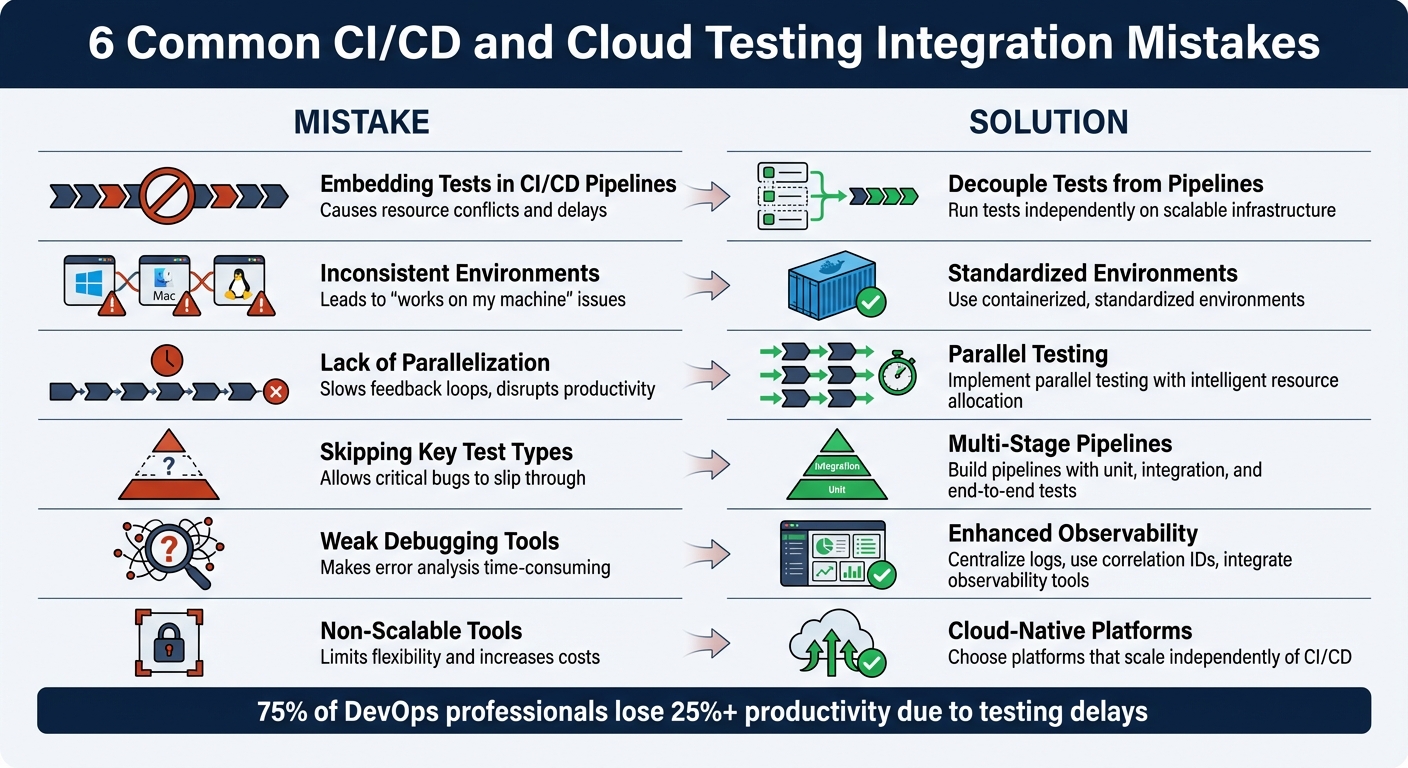
6 Common CI/CD Cloud Testing Mistakes and Solutions
How to scale automated testing beyond CI/CD pipelines
sbb-itb-7ae2cb2
Mistake 1: Embedding Tests Directly Into CI/CD Pipelines
When teams embed test orchestration directly into CI/CD pipelines, they unintentionally create competition for resources between tests, builds, and deployments. As Bruno Lopes, Product Leader at Testkube, puts it:
"When test orchestration lives inside your CI system, every test run competes for pipeline resources."
This resource competition leads to bottlenecks. Tests often wait in line behind builds and deployments, bringing progress to a halt until everything is completed. Even worse, if a single test fails due to a temporary issue, the entire pipeline needs to be re-triggered. Scaling becomes another headache - adding test capacity means scaling the entire CI infrastructure, which can quickly become inefficient and expensive as development ramps up.
Another issue is control. QA teams are often at the mercy of DevOps teams to make changes to CI/CD pipelines, limiting their ability to adapt and evolve testing processes. Ole Lensmar, CTO of Testkube, highlights this challenge:
"Handing test automation to CI/CD teams leaves QA with limited control and insight, slowing testing evolution."
These issues point to a clear solution: separating testing from pipeline execution.
Solution: Separate Test Orchestration From Pipeline Execution
Decoupling test orchestration from CI/CD pipelines solves resource conflicts, scaling problems, and control limitations. Instead of embedding tests directly into pipeline stages, testing should function as an independent process, triggered asynchronously by CI events, schedules, or manual requests.
This approach offers several advantages. Tests can run on elastic infrastructure, such as Kubernetes, allowing for parallel and distributed execution. Pipelines can trigger tests via API and move on without waiting for results, which can then be delivered asynchronously. If a test fails, you can re-run just that test instead of restarting the entire pipeline.
Platforms like Ranger make this process seamless. Ranger integrates with tools like GitHub and Slack, triggering tests based on commits or pull requests but running them in its own execution environment. It also provides a centralized dashboard to view results across various test types, so you’re not stuck digging through CI logs.
Here’s a quick comparison to illustrate the difference:
| Feature | CI/CD-Bound Testing | Decoupled Test Orchestration |
|---|---|---|
| Resource Usage | Competes with build/deploy tasks | Runs on independent, scalable infrastructure |
| Scaling | Tied to CI runner capacity | Scales elastically via Kubernetes |
| Reruns | Requires full pipeline re-trigger | Tests can be re-run independently |
| Feedback Loop | Blocked by long-running tests | Runs in parallel without blocking |
| QA Control | Managed by DevOps/SRE | QA teams have direct control |
Mistake 2: Inconsistent Environments Across Local, CI, and Cloud Testing
Ever had a test pass flawlessly on your laptop but fail miserably in CI? The culprit usually isn’t the test - it’s the environment mismatch. Developers' machines often hold onto leftover configurations like cached authentication, cookies, or environment variables. Meanwhile, CI environments start fresh every time. As Katie Petriella, Senior Growth Manager at Testkube, puts it:
"The mismatch is where flakiness lives. Not in your assertions. In the layers of infrastructure between your test runner and your application."
This mismatch can wreak havoc on test consistency. Shared CI VMs, for instance, often throttle CPU and memory, delaying browser startups and rendering. Then there’s configuration drift, which happens when developers update tools like Node.js or Python locally but forget to align these changes with CI configurations. Network topology mismatches add even more complexity: local tests might use localhost to access processes directly, but CI and cloud environments often route traffic through Kubernetes Services, ingress controllers, or service mesh proxies. These layers introduce latency and potential points of failure.
Here’s a startling stat: environment inconsistencies account for 40% of bugs that aren’t actual code bugs and cost developers about 4 hours per week - roughly 200 hours per year. If your test flakiness rate climbs above 5–10%, it’s time to revisit your test setup instead of dismissing failures as random noise.
Solution: Use Containerized and Standardized Environments
The best way to tackle these inconsistencies? Standardization. A uniform approach can eliminate the dreaded "works on my machine" problem.
Containerization is the backbone of this strategy. Tools like Docker package everything - OS, runtime, and tools - into one image, ensuring consistency across local, CI, and production environments. This creates a single, reliable runtime for your application.
To lock things down further, avoid using "latest" tags for dependencies in your Dockerfiles or package managers. Instead, pin specific versions and commit lock files like package-lock.json, yarn.lock, or poetry.lock. These files capture exact dependency versions, including transitive ones, ensuring no surprises. In CI pipelines, use deterministic commands like npm ci instead of npm install to guarantee dependencies are installed exactly as defined.
For Kubernetes setups, run tests as native jobs. This approach allows tests to share network namespaces, DNS, and service mesh, minimizing failures caused by network topology differences. Sergio Valin Cabrera, Senior Software Engineer and DevOps Lead at FunXtion, highlights the importance of this:
"QA processes were scattered across CI pipelines and arbitrary scripts run from multiple places, with no ability to perform testing natively within their Kubernetes clusters."
Platforms like Ranger can take this a step further by offering hosted, consistent infrastructure that eliminates environment drift. Ranger runs tests in standardized cloud environments that mirror production, providing real-time feedback. Integrated with tools like GitHub and Slack, it automatically triggers tests in controlled setups, catching environment-specific issues before they hit production. This ensures what you test is exactly what you ship - no surprises.
Mistake 3: Insufficient Test Parallelization and Resource Allocation
As your test suite grows, running tests one after another can become a serious bottleneck. When test suites stretch to 45 minutes or longer, developers often lose focus or shift their attention elsewhere, disrupting productivity. In fact, 75% of DevOps professionals report losing over 25% of their productivity due to testing delays.
The signs of inefficiency are easy to spot. For instance, uneven test distribution can leave one job wrapping up in just 2 minutes while another lags behind for 15 minutes. This imbalance forces the entire pipeline to wait for the slowest shard to finish. On top of that, resource contention - where tests fight over database connections, file handles, or network ports - leads to failures unrelated to your actual code. Teams using local or self-hosted runners often face crashes or severe slowdowns when pushing beyond a few threads, as their hardware struggles to keep up. It’s no wonder 29% of teams consider test execution the most time-draining task in their DevOps pipelines. The fix? Parallelize your tests and allocate resources more effectively.
Solution: Implement Parallel Testing With Scalable Resources
Parallel testing, especially with intelligent resource allocation, can transform how your test suite performs. By breaking your test suite into concurrent chunks - known as test sharding - you eliminate those frustrating idle waits. Many CI platforms, like GitLab, offer built-in tools for this. For example, GitLab’s CI_NODE_INDEX and CI_NODE_TOTAL variables allow you to split tests across multiple nodes. Instead of dividing tests alphabetically or by file count, rely on historical timing data to distribute tests more evenly. This approach ensures no shard drags behind the others.
The benefits are dramatic. A test suite with 500 tests that might take 28 minutes sequentially can shrink to just 5 minutes with proper sharding and caching - a time savings of over 80%.
Cloud-based platforms, such as Ranger, take this a step further by offering scalable resources on demand. These platforms resolve hardware limitations and scheduling conflicts by running tests in standardized cloud environments. Ranger, for instance, integrates seamlessly with tools like GitHub and Slack, triggering parallel test runs and delivering real-time feedback. Plus, it spares you the hassle of maintaining local machines by handling updates like drivers and OS patches automatically.
To get the best results, fine-tune your worker counts. For CPU-intensive suites, set worker counts to something like --maxWorkers=50% to avoid overwhelming your cores. For database-heavy tests, isolate data using unique schema names tied to the worker index (e.g., test_db_$CI_NODE_INDEX) to prevent interference between parallel tests. These adjustments can make your pipeline faster, more reliable, and far less frustrating.
Mistake 4: Omitting Critical Test Types and Coverage
Relying solely on unit tests can leave significant gaps in identifying issues that arise during component interactions or full user workflows. While unit tests are great for verifying individual functions, they don’t cover problems in service communications, database interactions, or complete user journeys. This oversight can result in bugs slipping into production, where fixing them becomes far more costly.
Skipping robust integration and end-to-end tests often means teams spend up to 40% of their time debugging issues that could have been caught earlier through automation. Standard CI runners also struggle to handle load tests at a realistic scale, leading to unreliable performance data. When critical tests are delayed or skipped, feedback loops can stretch to 45 minutes or more, forcing developers into a frustrating process some call "debugging archaeology" - trying to reconstruct the context of code they wrote hours earlier. Additionally, without proper integration or end-to-end testing, failures might be misdiagnosed as code bugs when they’re actually infrastructure issues, such as misconfigured staging databases.
"If AI helps you ship features 2–3x faster, but you're catching integration issues in production, you're creating incidents 2–3x faster."
- Atulpriya Sharma, Sr. Developer Advocate, Testkube
As AI accelerates development, comprehensive automated testing becomes non-negotiable for catching integration problems early. The solution lies in adopting a well-planned, multi-layered testing strategy.
Solution: Build Multi-Stage Testing Pipelines
To avoid these pitfalls, implement a structured testing pipeline that aligns with the testing pyramid: unit tests at the base (about 70% of your efforts), integration tests in the middle, and end-to-end tests at the top. Start by focusing on 3–5 key user journeys - like product search, checkout, or account management - that account for 80% of your business value. These should be prioritized for end-to-end testing. Integration tests should target critical data boundaries, such as API contracts, database interactions, and external services.
Here’s an example: In August 2025, TomTom's B2C IAM team revamped its pipeline on a cloud-based Kubernetes platform, significantly cutting troubleshooting time by centralizing logs in Prometheus. Led by Expert Systems Engineer Iakym Lynnyk, the team adopted a phased, multi-stage approach. They began with functional tests (SOAP UI) for authentication, followed by performance tests (JMeter) for load and stress, and finally Selenium-based UI tests. By running these tests as Kubernetes jobs across development, testing, acceptance, and production environments, they ensured the test environment mirrored production.
The key to success is decoupling test execution from your CI pipeline. While the CI tool triggers the tests, they should run as native jobs within your application’s cluster. This ensures the tests share the same network, DNS, and resource constraints as production. Running tests this way also reduces the risk of "flaky" tests - those that pass locally but fail in CI due to environment inconsistencies. Tools like Ranger can simplify this process by leveraging AI to create detailed test suites with human oversight. Ranger integrates directly with platforms like GitHub and Slack, triggering multi-stage test runs and providing real-time feedback without the usual infrastructure challenges.
Adopting fail-fast logic is another crucial step. This approach halts pipelines immediately when integration tests fail, saving both time and resources. Start small - focus on 3–5 critical integration points and user journeys - then expand as needed. This method transforms testing from a bottleneck into a safeguard, catching problems before they ever reach production.
Mistake 5: Weak Error Handling and Debugging Capabilities
Pipeline failures can quickly spiral into a time-consuming mess when teams are forced to sift through scattered log sources - like GitHub Actions, Jenkins, or Kubernetes clusters - without a single, unified view of what went wrong. Traditional debugging tools often just state that a job failed, leaving teams to figure out the "why" and "where" on their own. This lack of context can turn what should be quick fixes into hours of frustrating detective work.
Unclear error messages only make things worse. Messages like "PERMISSION_DENIED" or "Secret version not found" from cloud providers provide little actionable guidance. Add to that the common issue of environment mismatches - such as differences in Node.js versions, operating system case sensitivity, or missing dependencies between local setups and CI runners - and you’ve got a recipe for pipeline tests that pass locally but fail remotely [34, 36]. As DevOps engineer Opaluwa Emidowo aptly puts it:
"Traditional debugging tools often stop at the surface, only showing failed jobs without the context of why they failed or where in the system the fault actually lies".
Resource constraints also play a role. CI runners often have less CPU and memory than local machines, leading to silent crashes or timeouts during resource-heavy test suites. Flaky tests - those that fail sporadically due to timing issues, network delays, or rate limits - add another layer of confusion [34, 36]. Without proper tools for observability, teams can end up chasing phantom bugs that are actually infrastructure problems.
"Modern CI/CD pipelines are no longer linear scripts – they are now complex, distributed systems... observability gives you insight, not just data."
- Opaluwa Emidowo
This complexity underscores the need for a robust observability strategy that turns raw data into actionable insights.
Solution: Add Better Logging and Observability
Improving error diagnostics not only reduces debugging time but also strengthens the reliability of CI/CD workflows and cloud testing. Just as containerized environments (Mistake 2) and decoupled orchestration (Mistake 1) improved processes, centralized logging and observability are key to better error handling.
Start with centralized log aggregation. Instead of jumping between disconnected logs, use a unified system that combines structured logs, metrics, and traces. This helps reconstruct pipeline failures and spot patterns before they escalate into larger problems. Standardize logs using JSON with fields like timestamp, log level, service, message, and correlation_id to make searching easier.
Leverage correlation IDs. Assign a unique UUID to every pipeline run and propagate it across all services. This allows you to trace the journey of a request end-to-end. For instance, LogQL queries like {job="ci_cd", build="build123"} |= "failure" can pinpoint issues by filtering logs with specific labels.
Automation can also make a big difference. In April 2025, DevOps engineer Kantinstephane showcased how integrating Jenkins with OpenAI’s API could transform debugging. His system used a Python script to pull the last 100 lines of a failed Jenkins log and send it to GPT-4, which returned specific debugging tips - like identifying a status code 1 error and suggesting a review of environment variables. These AI-generated insights were then shared in a Slack channel (#ci-debug) through the Slack Notification Plugin, turning cryptic logs into actionable advice and cutting debugging time significantly.
"With just a bit of scripting and OpenAI's API, Jenkins becomes way smarter - turning cryptic logs into human-friendly explanations and actionable suggestions. This can drastically reduce debugging time and improve pipeline reliability."
- Kantinstephane, DevOps Engineer
Beyond automated log analysis, build diagnostic steps directly into your pipeline. Include "Environment Diagnostics" to print system details, environment variables, disk space, and tool versions whenever a failure happens. Use health checks for dependencies like PostgreSQL or Redis to ensure they’re ready before running tests. For particularly tricky issues, tools like tmate let you SSH into a failed CI runner for real-time troubleshooting.
Platforms like Ranger simplify this process further by integrating centralized logging and real-time debugging with tools like GitHub and Slack. Their AI-powered system identifies whether a failure stems from code or infrastructure, delivering detailed notifications to the appropriate team members. This shifts debugging from a tedious guessing game to a streamlined, data-driven process that keeps pipelines running smoothly.
Mistake 6: Choosing Tools That Don't Scale or Integrate Well
One common challenge in testing is selecting tools that can't scale independently or integrate seamlessly with your workflows. When your testing processes are tightly tied to your CI/CD pipeline, test runs end up competing for resources with builds. This creates delays and bottlenecks - especially as AI copilots churn out commits at an extraordinary pace.
Traditional CI tools often run tests in isolated environments like VMs or containers with mocked dependencies. While this setup works for some scenarios, it doesn't account for Kubernetes-specific factors like resource limits, network policies, or RBAC. These gaps let bugs sneak into production even when tests pass. On top of that, relying on various specialized frameworks - like Cypress for UI testing, JMeter for load testing, and Postman for APIs - requires significant manual effort to integrate everything into a CI pipeline. Without a unified dashboard to connect the dots, spotting patterns and making informed release decisions becomes much harder. This fragmented process slows developers down, forcing frequent context switches. Scaling tests often means scaling the entire CI infrastructure, which increases both complexity and costs.
To address these issues, a shift to cloud-native, scalable testing platforms is critical.
Solution: Choose Cloud-Native, Scalable Testing Platforms
The key to solving these scaling problems is decoupling test orchestration from your CI/CD pipeline. By doing this, testing becomes a standalone, always-available capability that doesn’t block builds. This means pipelines can trigger tests without delays, tests can rerun without restarting builds, and the testing infrastructure can scale independently. As one expert put it:
"Testing becomes an independent, continuously available capability rather than a stage within a pipeline. Pipelines can trigger tests without blocking, tests can rerun without re-triggering builds, and test execution can scale on its own infrastructure."
When searching for a solution, consider framework-agnostic platforms that support any containerized testing tool. This avoids being locked into specific tools and reduces integration headaches. One industry expert highlighted this advantage:
"One of the biggest friction points at scale is tool lock-in... Cloud-native testing removes this barrier: any test tool that runs in a container works out of the box."
Ranger is a great example of this approach. It integrates easily with tools like GitHub and Slack, while its AI-powered test creation and automated maintenance reduce the need for manual intervention. With Ranger hosting the test infrastructure, your testing can scale independently of your CI pipeline. This reduces feedback delays and keeps developers focused. Its real-time signals and automated bug triaging also consolidate everything into one dashboard, simplifying release decisions.
When evaluating testing platforms, here are some key factors to prioritize:
- Containerization: Ensure the platform supports identical environments across local, CI, and cloud stages.
- Multi-cluster support: If you need to orchestrate tests across multiple Kubernetes clusters or regions, look for a platform that can manage this from a single control plane.
- Secure integrations: Check that the tool works with secure configuration managers like HashiCorp Vault or AWS Secrets Manager, avoiding hardcoded credentials.
- Unified dashboard: A "single pane of glass" view that combines logs, artifacts, and metrics from multiple frameworks is essential for efficiency.
Quick Reference: Common Mistakes and Their Solutions
Here’s a quick guide to help you pinpoint common CI/CD and cloud testing pitfalls and how to tackle them effectively.
| Mistake | Impact on Software Delivery | Solution |
|---|---|---|
| Embedding Tests Directly Into CI/CD Pipelines | Creates pipeline bottlenecks and delays builds due to long test runs. | Separate test orchestration from CI; execute tests as scalable, independent workloads. |
| Environment Drift | Leads to "Works on my machine" issues, production bugs, and unreliable tests. | Standardize environments with Docker and Infrastructure-as-Code (IaC) across all stages. |
| Sequential Testing | Slows feedback loops; extends deployment time to 8–12 hours instead of 2–4 hours. | Use cloud-based grids to enable parallel test execution. |
| Automating Everything | Increases maintenance costs and pipeline noise, slowing feedback cycles. | Focus on high-risk features and repetitive regression tests; follow the test pyramid. |
| Flaky Tests | Undermines trust in automation; critical bugs may be ignored as "false alarms." | Replace fixed timers with smart waits; isolate unstable tests into non-blocking suites. |
| Hardcoded Test Data | Causes data collisions in parallel runs and limits test scalability. | Adopt data-driven testing with dynamic data generation or external CSV/JSON sources. |
| Single Browser Testing | Misses up to 40% of environment-specific bugs; detects only 60% of bugs pre-release. | Use cloud-based cross-browser and platform testing to boost detection rates to 90%. |
| Weak Observability | Slows down failure analysis with scattered logs and increases MTTR. | Centralize logs into a unified dashboard; capture screenshots, videos, and stack traces automatically. |
| Fragile Locators | Tests frequently break on minor UI changes, consuming 20+ hours of weekly maintenance for 55% of teams. | Use stable attributes like data-testid or ARIA labels; integrate AI-powered self-healing tools. |
| Tool Lock-In | Limits flexibility and scalability; complicates integration with new tools. | Opt for framework-agnostic, cloud-native solutions that support containerized testing. |
Following these strategies can help you streamline CI/CD and cloud testing workflows while minimizing disruptions.
As Pavel Vehera from aqua cloud aptly states:
"A test that passes one run and fails the next without code changes teaches your team to dismiss all failures. The entire investment becomes worthless".
Conclusion
Integrating CI/CD pipelines with cloud testing can remove friction and reduce delays in software development. The common thread among the mistakes discussed - such as embedding tests directly into pipelines or overlooking environment standardization - is the tendency to view testing as an afterthought. Shifting the focus to testing as a standalone capability, along with standardizing environments through containers and Infrastructure-as-Code, turns testing into a driving force rather than a roadblock caused by legacy QA.
This approach isn't just practical; it's backed by industry leaders. As Bruno Lopes explains:
"Testing becomes an independent, continuously available capability rather than a stage within a pipeline".
With the rapid pace of AI-driven development, scalable testing infrastructure is no longer optional - it’s critical.
Teams that embrace automated testing see measurable benefits: deployment times shrink from 8–12 hours to just 2–4 hours, and pre-release bug detection during cross-browser testing jumps from 60% to 90%. These gains translate into faster, more reliable feature releases.
Modern tools like Ranger simplify the process by offering AI-powered test creation, seamless Slack and GitHub integrations, and scalable infrastructure. By automating test workflows and ensuring consistent results, teams can spend less time debugging and more time building.
To maximize the impact of testing, focus on automating repetitive regression tests and high-risk areas, invest in observability, eliminate environment inconsistencies, and use tools that grow with your team's needs. The ultimate goal isn’t just faster testing - it’s creating a continuous feedback loop that empowers your team to release features with confidence. By adopting these strategies, testing evolves from a bottleneck into a key accelerator for your development process.
FAQs
When should we decouple tests from our CI/CD pipeline?
When tests in your CI/CD pipeline become slow, unreliable, or costly to execute, it's time to decouple them. Doing so can significantly improve feedback times, boost scalability, and enhance reliability. This approach allows you to adopt practices like parallel execution and elastic scaling, which streamline the testing process. Tackling these issues ensures your testing remains efficient and supports fast-paced development cycles effectively.
How can we eliminate environment drift between local, CI, and cloud tests?
To avoid inconsistencies in your environments, focus on creating setups that are consistent and repeatable across local, CI, and cloud stages. One effective way to achieve this is by using infrastructure as code (IaC). With IaC, you can automate the creation of environments using shared configuration files, ensuring uniformity.
Keep environment variables, dependencies, and data states aligned across all stages. Regularly update and version your configuration files to minimize mismatches and enhance the reliability of your testing processes. This approach not only saves time but also reduces the risk of errors caused by environment drift.
What’s the fastest way to reduce flaky tests without slowing releases?
To cut down on flaky tests without slowing down your release process, swap out fixed waits for dynamic waits that adjust based on test conditions. Make sure your tests are fully isolated - steer clear of shared states or external dependencies that can cause instability. Opt for stable identifiers rather than fragile selectors to keep your tests robust. You can also use AI-driven tools like Ranger to quickly identify and address flaky behavior, ensuring your CI/CD pipelines stay dependable while keeping up with fast-paced release schedules.
Related Blog Posts
Stop babysitting your coding agents. Use Ranger
%201%20(1).svg)
More signals, less noise, faster launches
Let Ranger be your guide to sustainable QA testing.

.png)