%201.svg)
Common Challenges in Scaling Test Automation


Scaling test automation is critical for fast, reliable software deployments, but it comes with challenges that can slow teams down and increase costs. Here's a quick breakdown of the main issues and solutions:
Key Challenges:
- Longer Test Durations: Growing test suites can cause feedback delays, stretching CI cycles from minutes to hours.
- Infrastructure Bottlenecks: Limited resources lead to timeouts, slow responses, and unpredictable failures.
- Flaky Tests: Inconsistent results from poor isolation or timing issues erode trust in automation.
- High Costs: Fixed infrastructure, whether on-premises or cloud-based, often leads to wasted resources during downtime.
Solutions:
- Dynamic Resource Allocation: Use cloud-based, elastic scaling to adjust resources on-demand, reducing idle time and bottlenecks.
- Parallel Execution: Distribute test workloads across multiple executors to cut runtimes significantly.
- Ephemeral Test Environments: Isolate environments for each test run to eliminate residual issues and ensure consistency.
- Cost Management: Implement scaling caps, monitor usage, and optimize resource allocation for different test types.
Tools and Practices:
- Elastic scaling platforms like Kubernetes or managed services (e.g., AWS, Azure).
- Historical data-driven test orchestration to prioritize critical tests.
- CI/CD tools with autoscaling support (GitHub Actions, GitLab, Jenkins).
- AI-driven tools like Ranger for smarter test creation, maintenance, and infrastructure management.
By addressing these challenges with dynamic scaling and smarter orchestration, teams can maintain fast feedback loops, control costs, and ensure reliable automation at scale.
Common Problems When Scaling Test Automation
Growing Test Suites and Slower Feedback
As applications evolve, test suites often balloon from a handful of tests to thousands. For instance, a test suite might grow to around 2,000 tests in just six months, with execution time increasing from 10 minutes to a staggering 3 hours. This extended runtime is particularly troublesome for U.S.-based development teams. When CI builds take 30–60 minutes or longer, developers are limited to just a few feedback cycles per day. This delay often leads to engineers batching commits to avoid waiting, or skipping full regression tests locally. These shortcuts can stall code reviews, increase integration risks, and undermine the efficiency of continuous delivery pipelines.
Infrastructure and Environment Limits
Once test suite growth slows feedback, resource constraints further complicate CI pipelines. Running tests concurrently at scale creates competition for limited resources like CI agents, CPUs, memory, databases, and external APIs. This competition can result in timeouts, sluggish responses, and failures unrelated to code issues. Shared environments exacerbate the problem, causing data collisions, race conditions, and leftover states that lead to unpredictable failures. Configuration mismatches between development, test, and production environments add another layer of instability. Tests might pass in one setup but fail in another. Without containerized, temporary environments to clean up after each job, tests risk inheriting residual issues from previous runs.
Flaky Tests and Inconsistent Results
Flaky tests are a persistent headache, often caused by poor isolation, fixed timing issues (like hardcoded sleeps instead of adaptive waits), and reliance on external dependencies. Overloaded infrastructure can make things worse, introducing resource contention that destabilizes tests. When teams increase parallelization to speed up execution, concurrency and ordering problems may emerge, turning occasional test failures into regular disruptions. This inconsistency erodes trust in automated testing and makes it harder to rely on results.
High Costs of Fixed Test Infrastructure
Beyond performance setbacks, static test infrastructure can be a financial burden. Whether using on-premises servers or a fixed pool of cloud instances, teams often have to plan for peak usage. This approach means paying for idle resources during slow periods while still facing delays and bottlenecks during busy times. As test suites grow, companies may try to fix the problem by investing in more powerful hardware or additional licenses. However, without dynamic scaling and orchestration, costs can spiral without significantly improving throughput. On top of that, static environments require constant upkeep - like patching, scaling storage, updating tools, and managing licenses - which diverts DevOps teams from more impactful tasks.
How Dynamic Resource Allocation Fixes Scalability Problems
Elastic Scaling of Test Infrastructure
Dynamic resource allocation tackles capacity issues by enabling teams to deploy test infrastructure only when it’s needed. Instead of keeping static servers idle, cloud-based containers and auto-scaling runners step in to provide extra capacity automatically when test queues start to grow. For instance, if a CI build triggers and more than five jobs are stuck waiting for over two minutes, additional executors are launched. Once the tests are done, these resources shut down, saving costs by avoiding idle infrastructure.
Tools like Kubernetes make this process seamless by distributing test containers across available nodes and spinning up more pods when CPU usage exceeds a set threshold - often around 70% sustained for five minutes. Many teams also tie scaling rules to their working hours, ramping up aggressively between 8 a.m. and 8 p.m. for faster feedback, while enforcing stricter limits after hours to control expenses. Adding parallel capacity can significantly reduce runtime, cutting it from three hours to something more manageable.
Better Test Orchestration
Elastic scaling is just one piece of the puzzle - efficient test distribution is equally important. Dynamic orchestration uses historical data to allocate tests evenly across available executors. By splitting tests based on past runtimes and prioritizing critical cases like smoke tests, teams can slash feedback cycles from 60–90 minutes to as little as 15–20 minutes, even as test suites grow into the thousands.
Dynamic load balancing assigns new tests to the first available worker, avoiding delays caused by one slow shard holding up the entire pipeline. This approach ensures developers get quick pass/fail results - often within minutes - while the full regression tests continue running in the background.
Environment Isolation for Stability
Ephemeral test environments are temporary setups - complete with application, services, database, and configuration - that are spun up for each pull request or branch and dismantled afterward. These environments start fresh every time, eliminating leftover data or settings that could interfere with test results. This isolation prevents flaky failures caused by multiple pipelines sharing a single QA database or cache.
Dynamic provisioning makes this process straightforward by using CI variables like PR_ID or BRANCH_NAME to create isolated environments. For example, when a pull request is created, the pipeline might deploy an environment named pr-1234.example.internal, which is removed once the pull request is merged or closed. This ensures every test run operates under consistent, production-like conditions, avoiding race conditions and data conflicts - an especially critical feature for teams working across different U.S. time zones.
Cost-Effective Scaling Strategies
Scalability and performance are essential, but keeping costs under control is just as important. Elastic scaling must include strict budget management. Setting limits on parallelism, such as capping concurrent test jobs at 50 per pipeline, helps prevent unexpected cost spikes while still accommodating typical peak demands. Teams can also use time-based triggers to scale more aggressively during core hours and enforce tighter limits overnight or on weekends, when fewer commits are made.
Queue-based thresholds add another layer of cost control by provisioning extra capacity only when job wait times or queue lengths exceed a set target. Choosing the right instance types also plays a big role - reserving cost-effective, appropriately sized instances for routine testing while saving high-CPU nodes for performance or load tests. By tracking costs per test run or pull request in dollars and reviewing monthly trends, teams can fine-tune shard sizes, parallelism caps, and environment durations to keep feedback efficient without overspending the quarterly budget.
How to scale automated testing beyond CI/CD pipelines
sbb-itb-7ae2cb2
Setting Up Dynamic Resource Allocation in CI/CD Pipelines
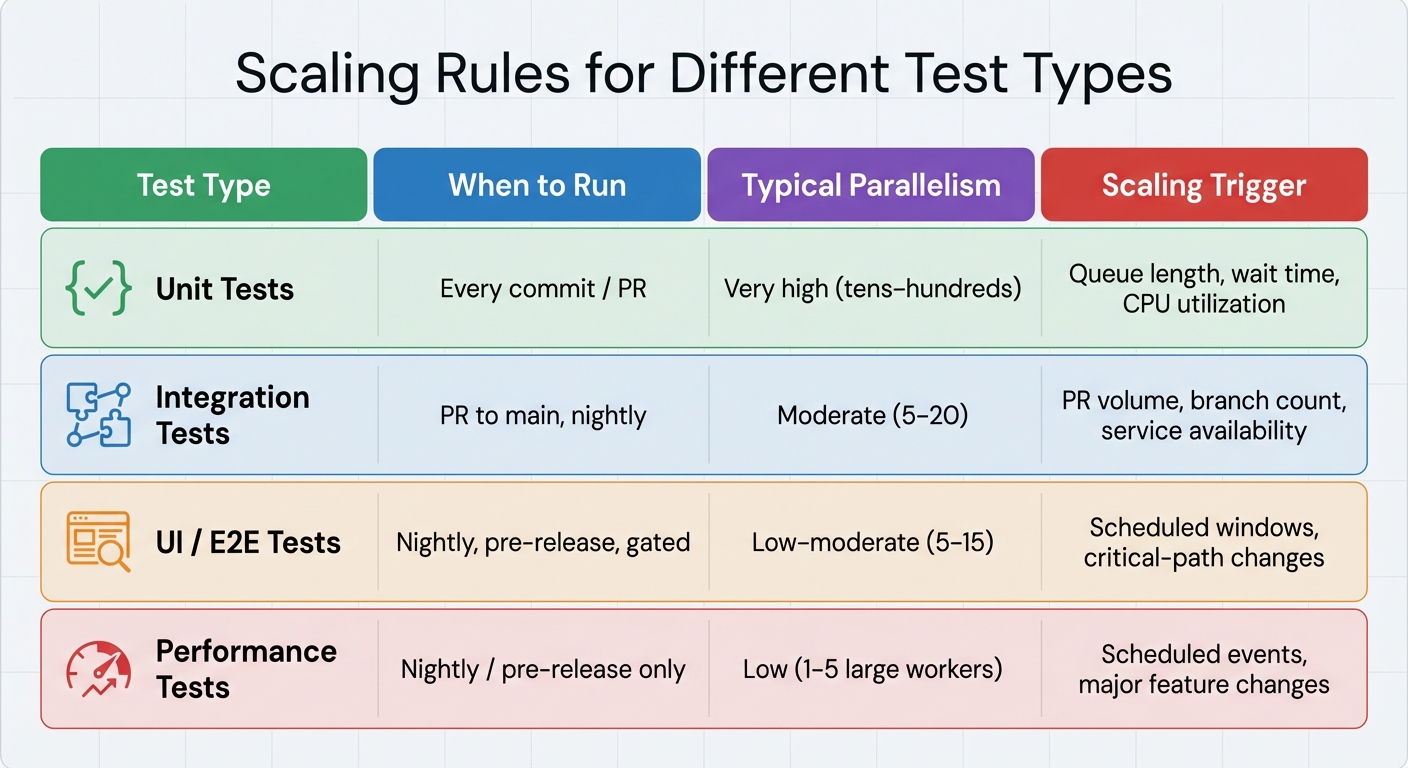
Scaling Rules for Different Test Types in CI/CD Pipelines
Core Components for Scalable Infrastructure
To build scalable infrastructure for your CI/CD pipelines, start with a platform that supports autoscaling runners. Options like GitHub Actions self-hosted runners, GitLab runners, Jenkins agents, or CircleCI resource classes are great choices. Pair these with a cloud provider such as AWS, Google Cloud, or Azure to enable on-demand compute resources. Alternatively, you can use a Kubernetes cluster to efficiently manage and distribute test workloads across nodes.
Run your tests in ephemeral containers to avoid environment drift and minimize resource contention. Store build artifacts, test reports, and dependency caches in centralized storage solutions like S3 or Google Cloud Storage. This ensures quick startup for your ephemeral environments. For real-time performance monitoring, set up centralized logging and monitoring systems such as Prometheus and Grafana. To streamline infrastructure management, use tools like Terraform or Helm to define and version your scaling policies as code.
Once your containerized infrastructure is ready, establish specific scaling rules tailored to each type of test.
Scaling Rules for Different Test Types
Scaling rules should align with the unique demands of each test category. For example:
- Unit Tests: These are lightweight and need high parallelism. They should run on every commit, with scaling triggers based on queue length or wait times. Add more runners when queues start backing up.
- Integration Tests: These tests often require isolated services or databases. Run them on pull requests and main branches, scaling based on the number of active feature branches or pull request activity.
- UI and End-to-End (E2E) Tests: These tests are slower and more brittle. Schedule them to run nightly or on critical paths, using test sharding to distribute the load. To avoid overloading, cap parallel browser sessions at 10–20 per namespace.
- Performance Tests: Resource-intensive by nature, these tests are best suited for nightly runs or pre-release checks. Use dedicated clusters for specific test windows, scaling them back after completion.
| Test Type | When to Run | Typical Parallelism | Scaling Trigger |
|---|---|---|---|
| Unit Tests | Every commit / PR | Very high (tens–hundreds) | Queue length, wait time, CPU utilization |
| Integration Tests | PR to main, nightly | Moderate (5–20) | PR volume, branch count, service availability |
| UI / E2E Tests | Nightly, pre-release, gated | Low–moderate (5–15) | Scheduled windows, critical-path changes |
| Performance Tests | Nightly / pre-release only | Low (1–5 large workers) | Scheduled events, major feature changes |
Maintaining Reliability and Stability
Dynamic resource allocation is powerful, but maintaining reliability requires setting clear guardrails. Start by capping the maximum number of parallel jobs for each test type. For instance, limit integration tests to 20 concurrent jobs to avoid overwhelming shared resources like databases or message queues. Use global concurrency caps within your CI system and Kubernetes namespaces to safeguard core infrastructure.
To handle flaky tests, implement automatic retries with a backoff strategy - retrying once or twice is usually sufficient. Track historical pass/fail rates to detect flakiness, and automatically quarantine highly unstable tests into separate, non-gating jobs.
Health checks are another key element. Use readiness and liveness probes on application services and test runners to ensure all systems are functioning before tests begin. Pre-flight checks can confirm that required services are reachable and that databases are properly seeded. Tools like Ranger simplify this process by offering elastic test infrastructure with built-in health checks and AI-based flakiness detection.
How Ranger Supports Scalable Test Automation
Ranger tackles the challenges of scaling test automation by offering solutions that work seamlessly with CI/CD pipelines, ensuring efficiency and reliability for development teams.
AI-Powered Test Creation and Maintenance
Ranger leverages AI to analyze application behavior and recent code changes, focusing on generating tests that maximize coverage and minimize risks. Instead of running a bloated suite of tests, it prioritizes high-value scenarios. For instance, if a US fintech team modifies checkout logic, Ranger concentrates on payment flow tests rather than running thousands of unrelated UI tests for every commit.
The platform's AI delves into DOM structures, APIs, and historical failures to automatically suggest test steps and assertions. It converts high-level user flows into executable Playwright code. When UI or API updates occur, Ranger uses semantic understanding to adapt locators and workflows - ensuring that minor changes, like renaming a button or moving an element, don't disrupt tests as long as the behavior remains consistent. This capability significantly reduces the maintenance workload. Teams that previously spent hours each sprint fixing broken tests can now rely on Ranger to handle locator issues, refactor tests, and clean up obsolete ones, cutting maintenance time by 30–60%.
Real-Time Insights and Human Oversight
Ranger keeps teams in the loop with real-time notifications sent to Slack channels whenever critical tests fail. These alerts include stack traces, screenshots, and video replays, allowing engineers to quickly address issues without switching tools. It also integrates with GitHub, commenting directly on pull requests with summarized test results, affected scenarios, and categorized failures. This helps differentiate new problems from known flaky tests, supporting practices like trunk-based development and frequent deployments - common among US-based teams.
While AI handles test creation and execution, human QA Rangers review all test code to ensure accuracy and readability. They also verify automatically triaged test failures to confirm whether they indicate real bugs. This dual approach ensures reliability - especially for industries like payments, healthcare, and compliance, where teams must document human-reviewed tests and their associated risk categories. As Brandon Goren, Software Engineer at Clay, remarked:
"Ranger's innovative testing approach delivers E2E benefits with significantly less effort."
These capabilities also inform proactive infrastructure optimizations, which are discussed below.
Hosted Elastic Test Infrastructure
Ranger eliminates the headaches of managing testing infrastructure by automating scaling and environment setup. Its managed, cloud-based execution grid provisions and tears down containers, browsers, devices, and other resources as needed. This means teams don’t have to design scaling policies or maintain Kubernetes clusters - Ranger handles capacity planning, scaling, and health checks automatically. For instance, if a nightly regression grows from 500 to 5,000 tests, Ranger scales up parallel workers and isolates environments for each run, avoiding the need for manual intervention or overprovisioning resources.
| Aspect | In-House Dynamic Infra | Using Ranger |
|---|---|---|
| Provisioning & Scaling | Requires Kubernetes/VM auto-scaling, custom scripts, and tuning | Automatically scales workers based on workload, no extra infra code needed |
| Environment Setup | DevOps manages images, dependencies, and updates | Fully managed, up-to-date environments for web, API, and mobile |
| Reliability & Flakiness | Teams troubleshoot node failures, network issues, etc. | Ranger ensures isolation, retries, and node health for stable runs |
| Observability | Custom dashboards/log aggregation across tools | Built-in dashboard with test history, trends, and environment metrics |
For US startups, this approach shifts costs from unpredictable cloud bills and DevOps overhead to predictable, usage-based subscriptions. As Matt Hooper, Engineering Manager at Yurts, explained:
"Ranger helps our team move faster with the confidence that we aren't breaking things. They help us create and maintain tests that give us a clear signal when there is an issue that needs our attention."
Conclusion
CI/CD test automation often runs into four key challenges: bloated test suites that drag down feedback times, infrastructure bottlenecks, unreliable (flaky) tests, and steep fixed costs. Without a way to dynamically allocate resources, testing times can spiral out of control within just six months as test volumes increase - defeating the purpose of continuous integration.
Dynamic resource allocation offers a solution by making the test infrastructure flexible. Teams can create temporary environments for each branch, scale workers as needed, and shut everything down once tests are complete. This keeps feedback times short - often just minutes - even as testing demands grow. Plus, it replaces high fixed costs with predictable, usage-based expenses.
Ranger takes this concept further by combining AI-driven test creation with human oversight. It eliminates the need for custom Kubernetes clusters or orchestration scripts. Instead, teams gain access to managed environments that automatically scale and isolate test runs. Ranger’s AI prioritizes high-impact scenarios, while QA experts review failures to distinguish actual bugs from noise.
The result? A testing process that’s both efficient and dependable. Teams can save over 200 hours annually and receive accurate test signals without the hassle of managing complex infrastructure. For US-based teams working with frequent deployments and trunk-based development, this means faster feature rollouts with confidence that critical workflows remain intact - even as both the application and its test suite expand.
FAQs
How does dynamic resource allocation help lower test automation costs?
Efficient resource use is key to keeping test automation costs in check, and that's where dynamic resource allocation shines. By adjusting testing capacity to match real-time needs, it prevents over-provisioning and cuts down on idle time. This smart approach not only trims unnecessary infrastructure costs but also allows teams to scale their testing efforts seamlessly without breaking the budget.
How can flaky tests be managed effectively in test automation?
Managing flaky tests calls for a well-organized strategy to maintain dependable results in your test automation efforts. Begin by introducing retries with set limits to minimize false negatives. Next, isolate flaky tests to dig into their root causes - this could involve tackling timing problems or addressing dependencies. It's also crucial to routinely update and maintain your test cases, ensuring they stay stable and in sync with changes in your application.
On top of that, tools powered by AI, like Ranger, can be a game-changer. They can streamline the process of detecting and resolving flaky tests, boosting the reliability of your tests while freeing up valuable time for your QA team.
How does running tests in parallel boost test automation efficiency?
Running tests in parallel means multiple tests are executed simultaneously, cutting down the overall testing time. This approach speeds up feedback for developers, allowing teams to spot and fix issues faster.
With fewer testing delays, parallel execution keeps development cycles on track and helps release features sooner. It also boosts the efficiency of your CI/CD pipelines, keeping everything running smoothly.
Related Blog Posts
Stop babysitting your coding agents. Use Ranger
%201%20(1).svg)
More signals, less noise, faster launches
Let Ranger be your guide to sustainable QA testing.

.png)