%201.svg)
How AI Enhances Continuous Testing in DevOps

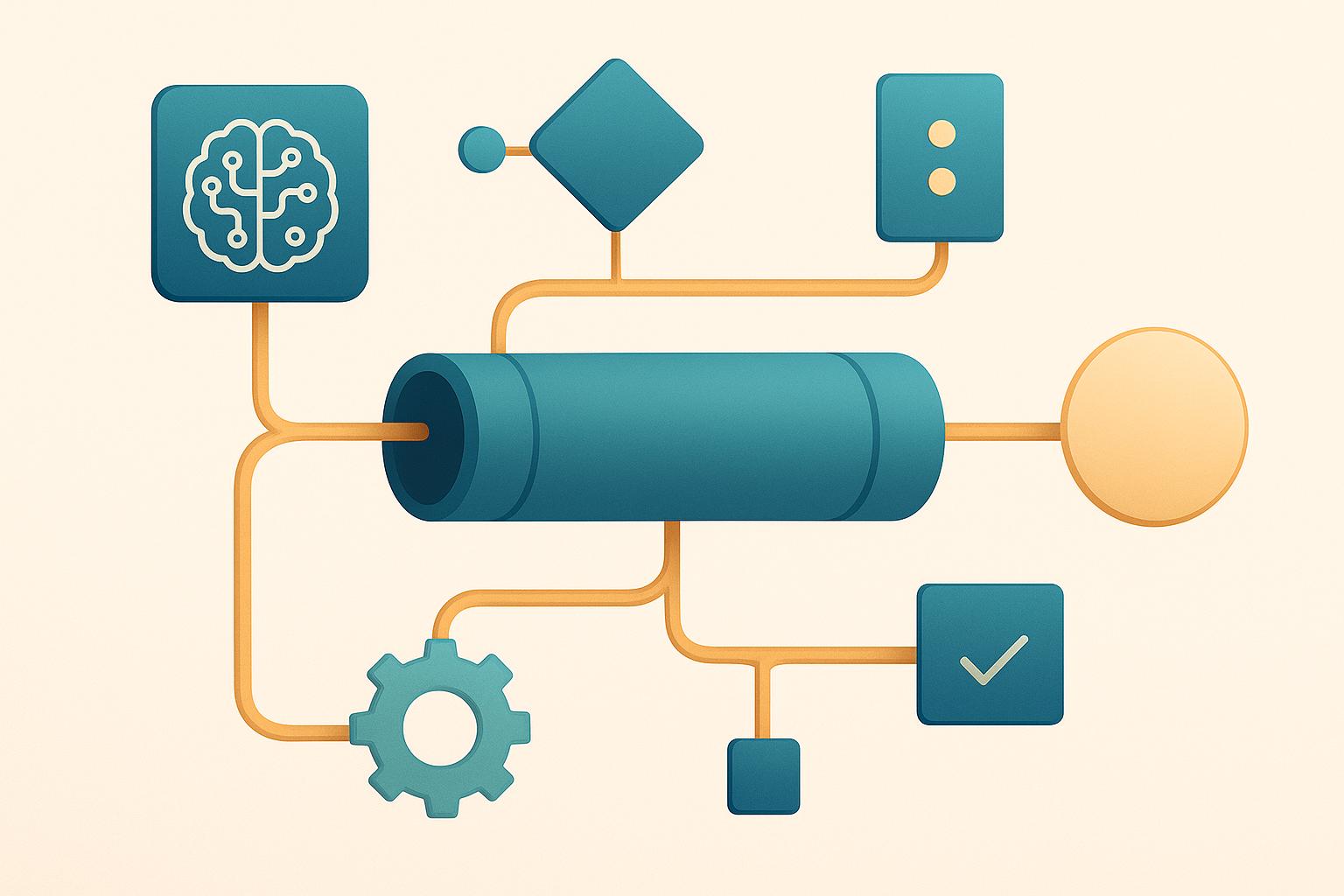
AI is transforming how DevOps teams handle continuous testing. It addresses common challenges like flaky tests, slow feedback loops, and time-consuming maintenance. By automating tasks such as test creation, self-healing scripts, and root cause analysis, AI saves time, reduces errors, and speeds up deployments. For example:
- Self-healing tests: Automatically adjust to UI changes, reducing maintenance by up to 88%.
- Root cause analysis: Cuts defect resolution time by 75% through pinpointing issues faster.
- Smart test prioritization: Focuses on critical tests, improving feedback cycles.
This guide explains how to identify areas where AI can streamline your testing process, integrate AI tools into your CI/CD pipeline, and measure their impact with clear metrics like reduced defect rates and faster test execution times. Whether you're dealing with flaky tests or lengthy regression cycles, AI can help your team deliver high-quality software faster and with less effort.
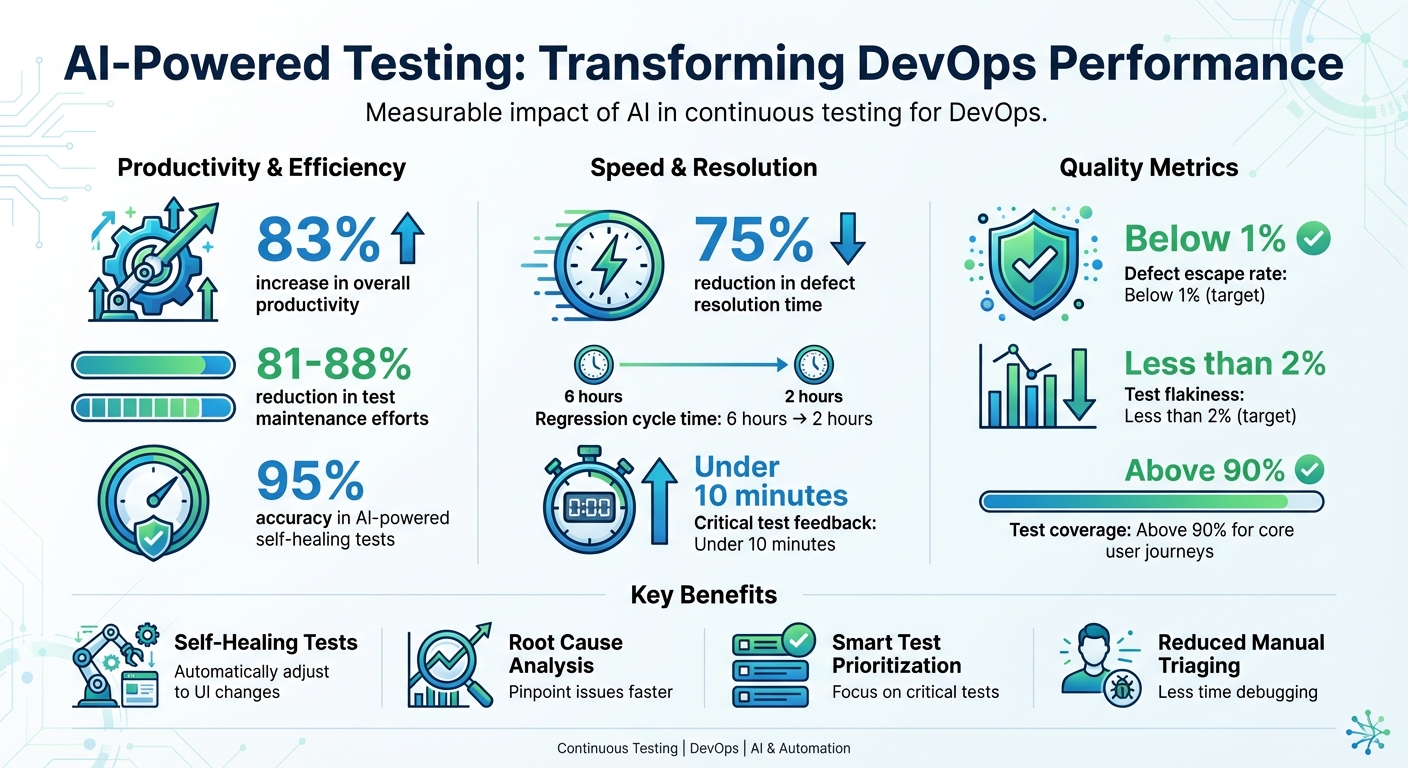
AI Testing Impact: Key Performance Metrics and Benefits in DevOps
The Future of DevOps: AI-Driven Testing
Finding Where AI Can Help Your Testing Process
Before jumping into AI adoption, it's crucial to identify where it can make the most impact. Start by analyzing your current pain points, assessing your existing tools, and setting clear, measurable goals that align with your DevOps objectives. This ensures AI is integrated in a way that complements and strengthens your testing process.
Common Problems in Continuous Testing
Continuous testing often comes with its own set of headaches, and many DevOps teams face recurring challenges that slow down their pipelines. One big issue is test flakiness - tests that fail unpredictably due to UI changes or environmental inconsistencies. This forces developers to waste time rerunning and debugging tests. Another problem is low test coverage, which leaves critical user journeys or edge cases untested, increasing the risk of bugs making it to production. Then there’s the bottleneck of manual triaging - engineers spending hours poring over logs and stack traces instead of focusing on building new features. On top of that, lengthy test execution times can disrupt the fast feedback loops that are critical to CI/CD workflows.
Here’s where AI steps in. Research shows that AI-powered self-healing tests can adapt to changes with up to 95% accuracy, slashing test maintenance efforts by 81–88%. Similarly, AI-driven root cause analysis can pinpoint the exact code or configuration causing a failure, cutting defect resolution times by about 75%.
"Ranger helps our team move faster with the confidence that we aren't breaking things. They help us create and maintain tests that give us a clear signal when there is an issue that needs our attention."
- Matt Hooper, Engineering Manager, Yurts
Review Your Current Tools and Workflows
Once you've identified common challenges, take a closer look at your existing tools and workflows to find where AI can fit in. Map out your testing process from commit to production, and document inefficiencies like slow regression suites, flaky tests, or frequent UI updates. Over two to four sprints, track key metrics such as test failure rates, flaky test percentages, average maintenance hours per sprint, and the mean time to detect and resolve defects.
Next, examine your DevOps toolchain for opportunities to integrate AI. Look for areas where AI can connect through APIs or webhooks - whether it’s your CI server (e.g., Jenkins or GitLab CI), test frameworks (e.g., Selenium or Playwright), or communication tools (e.g., Slack or GitHub). The goal isn’t to overhaul your entire stack but to address specific gaps. For example, if your team spends too much time updating selectors after every UI change, AI-driven self-healing automation can handle that. Solutions like Ranger can integrate with tools like Slack and GitHub to automate test creation and maintenance while delivering actionable insights directly into your existing workflows.
Define Your Testing Goals
To tackle these issues effectively, set clear and measurable testing goals. Avoid vague objectives - focus on SMART goals (Specific, Measurable, Achievable, Relevant, Time-bound). For instance:
- "Reduce flaky test failures by 50% within three months."
- "Cut regression cycle time from six hours to two hours."
- "Lower escaped critical defects by 30% over two quarters."
Prioritize metrics that matter to your team, such as reducing defect escape rates (aim for below 1%), speeding up feedback loops (under 10 minutes for critical tests), improving reliability (less than 2% flakiness), and increasing test coverage (above 90% for core user journeys).
Track these metrics consistently after each sprint to evaluate AI's effectiveness and identify areas for improvement. Start small - focus on one or two high-impact use cases, like replacing flaky UI tests with AI self-healing or automating triage for nightly regression failures. Once you’ve seen success, scale AI adoption across your testing process.
Adding AI to Your Testing Pipeline
Once you've pinpointed where AI can make an impact, the next step is weaving it into your existing tools and processes. The goal isn't to replace everything overnight but to enhance what you already have. Focus on three key areas: automating test creation and maintenance, prioritizing test execution, and integrating AI into your CI/CD pipeline. Here's a closer look at each.
AI-Powered Test Creation and Maintenance
AI is transforming how teams create and maintain tests, addressing long-standing challenges in test maintenance. Instead of writing every test manually, AI tools can now generate test cases by analyzing requirements, user stories, code changes, and even defect histories. For example, AI can take natural language inputs or code diffs and suggest a detailed test suite, saving your team hours of scripting. Tools like Ranger's AI web agent can navigate your site, auto-generate Playwright test scripts, and present them for review by QA experts.
Another game-changer is self-healing tests. When your UI changes - like updated button IDs, layout tweaks, or new elements - machine learning models step in. They evaluate alternative strategies for identifying elements and apply fallback mechanisms, ensuring tests continue to run smoothly as your application evolves. Ranger takes this a step further by automatically updating tests to reflect new features, keeping core workflows intact without requiring manual intervention.
"Ranger has an innovative approach to testing that allows our team to get the benefits of E2E testing with a fraction of the effort they usually require."
- Brandon Goren, Software Engineer, Clay
Smart Test Selection and Prioritization
Running every test with every commit can bog down your pipeline, but AI helps by prioritizing which tests to run. It analyzes code changes, historical failures, and risk factors to focus on the most critical areas. For instance, if a developer updates the checkout logic in an e-commerce app, AI will prioritize tests for payment processing, cart functionality, and order confirmation - while skipping tests for unrelated features.
This risk-based approach uses predictive analytics to identify high-risk areas based on past bugs, user behavior, and affected components. The result? Faster feedback loops and smarter test execution. Teams can run essential tests on each commit while scheduling full regression suites during off-peak times.
Connecting AI Testing to CI/CD Pipelines
For AI testing to deliver real-time insights, seamless integration with your CI/CD pipeline is essential. Configure your AI testing tools to trigger automatically whenever code is committed, whether you're using Jenkins, GitHub Actions, GitLab CI, or another platform. Ranger simplifies this process by handling the infrastructure setup, spinning up browsers and test environments consistently and efficiently.
The results integrate directly into your workflow. For example, updates can flow into GitHub pull requests or Slack channels, ensuring developers get instant feedback without leaving their tools. AI also optimizes resource usage by scaling test execution based on workload and running tests in parallel, which minimizes pipeline delays.
"They make it easy to keep quality high while maintaining high engineering velocity. We are always adding new features, and Ranger has them covered."
- Martin Camacho, Co-Founder, Suno
When tests fail, AI steps in with root cause analysis. It clusters errors by their likely causes and links them to specific commits, files, or configurations. This targeted approach can reduce defect resolution time by as much as 75%, freeing up developers to focus on building features instead of sifting through logs.
sbb-itb-7ae2cb2
Using AI to Analyze Tests and Improve Over Time
Bringing AI into the testing process creates a self-improving system that gets smarter with every iteration. By learning from test results, production data, and how users interact with the system, AI refines testing strategies over time. This feedback loop not only enhances testing but also lays the groundwork for diagnosing issues and driving meaningful improvements.
AI-Powered Failure Analysis and Triage
When a test fails, AI does far more than just raise a red flag. It dives into the details, analyzing logs, stack traces, screenshots, and recent code changes to pinpoint the likely causes. Through pattern recognition, AI groups similar failures based on their error messages or log signatures. This often boils down dozens of issues into a few clear categories, like "authentication service timeout" or "UI locator change in cart page". These clusters make it easier to focus on the root cause, speeding up defect resolution by identifying the specific commit, file, or configuration responsible for the issue.
AI also helps distinguish between different types of failures - whether it’s a genuine regression, a flaky test, or an infrastructure glitch. For example, if a failure only occurs on a particular browser or operating system, AI can flag it as an environment-specific issue rather than a code defect. Tools like Ranger take this a step further by blending AI-driven insights with human QA reviews.
However, human oversight remains a critical piece of the puzzle. QA engineers and SDETs should review the clusters, root-cause analyses, and auto-assigned issue owners before promoting them to blocking status. Many U.S. teams treat AI as a decision-support tool, requiring human sign-off on new AI rules - like thresholds for marking a test as flaky. Teams often hold biweekly retrospectives to compare AI-generated triage results against human assessments, ensuring the system stays reliable.
Improving Tests with Production Data
AI doesn’t stop at automated test creation - it also uses production data to refine test scenarios. By analyzing clickstreams and error logs, AI can identify key user behaviors, such as "search, filter, add to cart, pay", and propose regression tests that mimic these high-value flows. It even incorporates realistic data, like U.S. dollar price formats and local tax calculations, to ensure the tests align with real-world conditions. Similarly, AI scans error logs to detect recurring patterns, such as timeouts during peak load, and creates stress or negative tests to replicate those issues in pre-production.
To use production data responsibly, U.S. teams anonymize sensitive information by replacing real data with synthetic equivalents. This ensures compliance with regulations like SOC 2, HIPAA, and PCI-DSS. Tools like Ranger streamline this process by enabling safe test data management and masking, making it easier to reuse realistic scenarios without exposing private information.
By leveraging production insights, teams can continuously refine their testing models, ensuring they remain relevant and effective.
Creating a Continuous Improvement Loop
AI thrives on feedback, and testing is no exception. By analyzing past test executions, defect histories, code changes, and production incidents, AI updates its models to improve test selection, prioritization, and failure prediction. Each sprint provides valuable data - highlighting which tests uncovered critical bugs, which rarely fail, which areas of the code are most prone to issues, and which failures were false alarms. Over time, AI learns to prioritize tests that yield the most value, isolate flaky ones, and recommend new tests for troublesome modules.
In advanced DevOps setups, this improvement cycle is often visualized through dashboards. These dashboards track metrics like reduced defect escape rates, faster detection times, and more stable nightly test runs. By reviewing these trends each quarter, U.S. teams can make informed decisions about tuning AI thresholds, retraining models, or adjusting governance policies. For example, they might tighten the rules for when AI can automatically quarantine flaky tests or block a deployment.
This continuous feedback loop ensures that testing evolves alongside the software, delivering better results with each iteration.
Best Practices for Scaling AI Testing
To scale AI testing effectively, it's crucial to establish disciplined governance and clear ownership. Assigning a dedicated platform team or product owner ensures proper management of AI testing tools, model updates, and CI/CD integration. Implement Role-Based Access Control (RBAC) to limit who can modify test-generation rules, machine learning models, and data connections, while granting broader teams read-only access for transparency. Keep track of all changes through centralized audit trails tied to your CI/CD system for complete traceability. For regulated U.S. environments, ensure AI tools comply with privacy standards by masking sensitive data such as personally identifiable information (PII) and financial details in USD.
Managing and Monitoring AI Testing Systems
AI testing systems should be equipped with dashboards that monitor execution health, including metrics like pass/fail rates, flaky test counts, and rerun frequencies. Maintenance activities, such as self-healing events, and pipeline durations should also be tracked. Set up alerts for unusual patterns - like sudden spikes in auto-healed locators or unexpected drops in failure rates - which might indicate overly aggressive self-healing or classification errors. Logs must clearly document AI decisions, such as why a test was prioritized, skipped, or flagged as flaky, to aid in investigations and audits.
To maintain quality, conduct weekly reviews of a sample of AI-generated or AI-healed tests. These reviews help validate accuracy and prevent silent degradation. For critical workflows, such as checkout processes, payment systems, or healthcare transactions, ensure human QA approval. Tools like Ranger combine AI with human oversight, offering added confidence for business-critical paths.
With monitoring practices in place, the next step is to measure AI's impact using well-defined metrics.
Tracking Success with Key Metrics
Evaluate the success of AI testing by tracking key performance indicators (KPIs). For instance, pipeline duration - the time from commit to deployment - can demonstrate how AI-driven test selection and parallelization shorten feedback cycles without sacrificing coverage. Another critical metric is the defect escape rate, which measures defects discovered in production per release. Effective AI testing should reduce this rate over several sprints.
Test coverage is another vital metric. This includes code coverage, requirements coverage, and coverage of critical user journeys, particularly in high-risk areas identified through past defects and production telemetry. AI self-healing capabilities can also significantly lower maintenance effort, measured in engineer-hours per sprint spent fixing broken tests. Some teams report reductions of over 80% in maintenance time with mature AI setups. Additionally, track metrics like the flaky test rate and mean time to diagnosis (MTTD) for failures. AI-powered root-cause analysis and log mining can drastically cut down triage time and address intermittently failing tests, which is especially helpful for U.S.-based teams spread across time zones.
To calculate ROI in USD, consider the time saved (e.g., 40 engineer-hours per sprint) multiplied by fully loaded hourly rates. Add the reduced costs from fewer production bugs and subtract the expenses for AI tool licensing and infrastructure.
Start Small and Scale Gradually
Begin with a focused approach by targeting one or two specific services or applications that have frequent releases and clear regression risks. Examples include a checkout microservice, user sign-up flow, or internal API gateway. Start by applying AI to test maintenance and flakiness reduction, such as self-healing locators and automatic retry policies, to stabilize the system quickly. Another low-risk pilot is AI-driven test selection for regression runs, where AI prioritizes tests based on recent code changes and historical failure patterns, while still running full nightly suites for safety.
Run the pilot for a few U.S.-style sprints (e.g., 2–3 two-week iterations) and compare baseline metrics to post-AI results. Measure improvements in terms of time saved, reduced outages, and other KPIs in USD. Once the pilot demonstrates value - such as shorter pipeline durations or fewer escaped defects - expand AI testing to additional services, repositories, and test types like performance, security, and contract tests. Gradually increase AI autonomy while monitoring metrics closely to ensure consistent performance.
Throughout the process, use feature flags to adjust AI behavior for each service and maintain fallbacks to full test suites for high-risk areas, such as those in U.S. finance or healthcare sectors. Vendors like Ranger can simplify this rollout by integrating AI testing into tools like GitHub, Slack, and existing CI platforms at each stage of implementation.
Conclusion
AI is reshaping continuous testing by delivering faster feedback, self-healing tests, and pinpointing root causes with precision. These advancements are transforming DevOps, driving measurable improvements in productivity, quality, and scalability. For instance, organizations using AI in their testing pipelines have reported an impressive 83% boost in productivity. Self-healing tests cut maintenance efforts by over 80%, AI-driven root cause analysis reduces defect resolution time by up to 75%, and smarter test selection speeds up feedback cycles without sacrificing coverage. The result? Faster releases, fewer incidents, and more room for innovation.
But the impact doesn’t stop there. AI’s role in continuous testing extends well beyond immediate benefits. By analyzing trends, predicting high-risk areas, and adapting tests as systems evolve, AI enables testing to scale effortlessly, even for complex microservices and cloud-native architectures. This eliminates the need for proportional growth in QA teams. Early adopters are already setting new benchmarks for agility and reliability, giving them a competitive edge in the U.S. market as they prepare for future challenges.
However, while AI excels in speed, scale, and pattern recognition, human expertise remains a vital piece of the puzzle. In DevOps, this collaboration ensures that automation enhances quality rather than undermining it. Humans are crucial for setting risk priorities, interpreting nuanced failures, and ensuring that tests align with real-world user behavior. Tools like Ranger strike this balance perfectly. By combining AI-powered test creation and maintenance with human oversight, platforms like Ranger ensure reliable, actionable results. Features such as GitHub and Slack integration, hosted infrastructure, and auto-updating tests make it easy for U.S.-based DevOps teams to adopt AI-driven testing without requiring in-house data science expertise.
To get started, consider piloting AI on a single service. Demonstrate its value by tracking reduced maintenance, shorter pipelines, and lower defect rates. Once the return on investment is clear, gradually expand AI coverage. By capturing baseline KPIs and scaling incrementally, teams can move from small experiments to a robust, organization-wide approach that supports faster, higher-quality releases.
FAQs
How does AI help resolve flaky tests in continuous testing?
AI plays a key role in tackling flaky tests by spotting patterns in test behavior and pinpointing the inconsistencies that lead to unreliable outcomes. It can automatically adjust or prioritize tests, cutting down on false positives and negatives. This helps create more stable and reliable testing results.
With AI handling these challenges, teams can save valuable time and concentrate on the most critical aspects of testing. This not only boosts efficiency but also enhances the overall quality of the software.
How does AI improve continuous testing in CI/CD pipelines?
Integrating AI into CI/CD pipelines transforms continuous testing by automating repetitive tasks and delivering faster, more precise results. With AI-powered tools, development teams can pinpoint real bugs more accurately, cutting down on false positives and saving time that would otherwise be spent on unnecessary troubleshooting.
AI also simplifies the process of creating and maintaining tests, reducing manual workload while ensuring consistent quality across the software lifecycle. This allows teams to roll out updates more efficiently without compromising on performance or functionality.
How does AI prioritize the most important tests during development?
AI simplifies the testing process by examining elements such as test history, recent code updates, and high-risk areas. By pinpointing the tests most likely to reveal critical issues, it helps teams prioritize their efforts effectively. This approach not only saves valuable time but also boosts the reliability of results during development.
Related Blog Posts
Stop babysitting your coding agents. Use Ranger
%201%20(1).svg)
More signals, less noise, faster launches
Let Ranger be your guide to sustainable QA testing.

.png)