%201.svg)
AI in Continuous Testing: Solving Adoption Challenges



AI is transforming continuous testing by addressing speed, reliability, and maintenance hurdles. Teams adopting AI-driven tools like Ranger report faster releases, fewer production issues, and reduced manual effort. Yet, only 41% of testing processes are automated due to barriers like test instability, high upkeep, and technical complexity.
Key insights:
- AI tools improve efficiency: Automating test creation and maintenance reduces manual scripting and fixes.
- Self-healing tests: AI updates scripts for UI changes, cutting maintenance time significantly.
- Integration ease: Modern AI tools seamlessly connect with DevOps pipelines, unlike older frameworks.
- Human oversight remains crucial: AI supports decision-making but keeps testers in control.
1. Traditional Continuous Testing Methods
Automation Level
Traditional continuous testing frameworks struggle with challenges in scaling test automation beyond basic levels. On average, teams have automated only 41% of their testing processes. The main obstacle isn’t the technology itself - it’s the significant time and effort required to create and maintain these tests. In fact, over 50% of testing professionals cite "lack of time" as the biggest hurdle to advancing their automation efforts.
As applications grow and evolve, every new feature demands additional manual scripting. Even minor changes to the user interface can break existing tests, leading to a growing maintenance burden. This cycle often results in tests that are brittle and unreliable, diminishing the value of automation.
Reliability
Traditional automated tests are prone to frequent failures - not because the software is defective, but due to issues like unstable test data, environmental inconsistencies, or small UI changes (e.g., a renamed button ID). These failures create a high noise-to-signal ratio, making it difficult for teams to separate real bugs from broken test scripts.
The maintenance workload is overwhelming. Fixing broken tests typically takes about 20 minutes of developer time for diagnosing issues, updating selectors, and re-running the tests. A Software Engineering Lead described the challenge succinctly:
"To be able to maintain automated tests, especially with a small dev team, just takes time".
This constant need for updates and fixes often leads teams to abandon their automated test suites altogether.
Integration Ease
Integration presents another significant challenge. Traditional testing tools struggle to fit seamlessly into modern DevOps pipelines, particularly when dealing with end-to-end processes that span multiple interconnected systems , often requiring specialized automated performance testing for CI/CD. These tools often operate in isolation, with separate dashboards requiring testers to switch contexts and manually update test management systems. Legacy infrastructure and outdated APIs further complicate customization, creating bottlenecks that delay test results and hinder timely release decisions.
The limitations of these traditional methods underscore why AI-driven platforms are gaining traction as an alternative to address these persistent challenges.
sbb-itb-7ae2cb2
2. AI-Powered Continuous Testing with Ranger
Automation Level
Traditional testing methods often struggle with low automation rates, but Ranger changes the game. Using machine learning to analyze historical data, logs, and defect trends, it eliminates the need for manual scripting. Ranger automatically generates and prioritizes tests for areas of code that are more likely to have issues, delivering faster and more focused feedback. Instead of running the entire test suite for every code change, Ranger hones in on the tests most likely to catch bugs based on recent updates. This saves time and gives developers more actionable insights.
Reliability
Traditional frameworks often suffer from instability, but Ranger addresses this with its "self-healing" capability. When application changes occur - like updates to UI elements - Ranger’s AI updates test scripts automatically, reducing the time spent fixing broken tests. As JigNect puts it:
"Explainability turns AI from a black box into a trusted sidekick".
Ranger also provides confidence scores and detailed reasoning logs, making it easier to understand why a test passed or failed. This transparency helps teams separate actual bugs from environmental noise, boosting the reliability of the testing process. With these improvements, integrating Ranger into modern development workflows becomes much smoother.
Integration Ease
Ranger tackles the inefficiencies of traditional tools by integrating seamlessly with platforms like Slack and GitHub. It delivers plain-English failure reports and connects directly to CI/CD pipelines through APIs and CLI commands. Acting as a continuous quality gate, Ranger analyzes code changes before tests even run. Its AI determines which tests should be prioritized, offering recommendations that are practical for real-time release decisions.
Human Oversight
While Ranger excels in automation and reliability, it ensures that human testers remain at the center of critical decisions. The platform views AI as a tool for decision support, not a replacement for human judgment. Automated defect detection and low-risk test skipping are always subject to human validation, particularly for high-stakes releases. Teams can tag tests based on their business importance, ensuring that even rarely failing but critical workflows stay prioritized.
This human-in-the-loop approach addresses a key challenge: the trust barrier. Currently, 87.4% of organizations hesitate to fully adopt AI in their testing workflows. As JigNect emphasizes:
"Ultimately, accountability is human. AI supports decision making, but quality is owned by the tester".
AI-Powered Test Automation: Self-Healing + Visual Testing - Selenium & Playwright
Pros and Cons
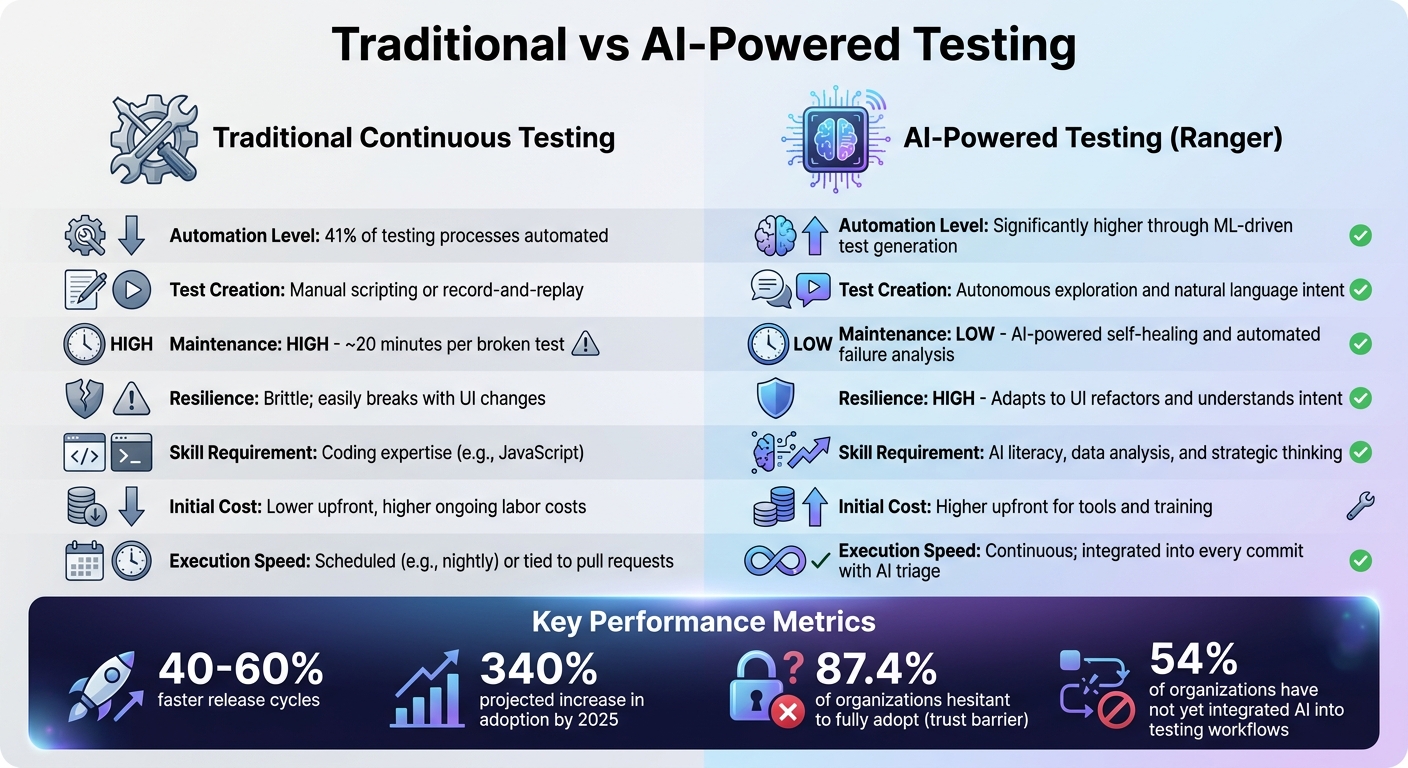
Traditional vs AI-Powered Testing: Key Differences and Performance Metrics
When comparing traditional testing methods with AI-powered solutions, the distinctions are striking, particularly in terms of efficiency and adaptability.
Traditional testing methods rely heavily on manual scripting, which can be a time sink. For instance, even a minor UI tweak can force developers to spend around 20 minutes fixing broken tests instead of focusing on new features. This constant maintenance slows down overall progress.
AI-powered solutions, like Ranger, flip the script. Using autonomous exploration, these tools adapt to UI changes automatically, keeping tests functional for much longer than traditional approaches. Teams that have embraced AI testing report release cycles that are 40–60% faster, effectively addressing the maintenance headaches of traditional continuous testing.
That said, AI-powered testing isn’t without its challenges. The initial investment can be steep, covering infrastructure, tool integration, and training. Teams must also acquire new skills in areas like data analysis and AI governance, moving beyond the coding expertise required for traditional methods. Another hurdle is the need for high-quality data to train AI models effectively; poor data can lead to unreliable results. This is critical because AI QA prevents costly late-stage bugs by identifying issues before they reach production. Notably, 54% of organizations have yet to integrate AI into their testing workflows.
Here’s a quick comparison of the two approaches:
| Feature | Traditional Continuous Testing | AI-Powered Testing (Ranger) |
|---|---|---|
| Test Creation | Manual scripting or record-and-replay | Autonomous exploration and natural language intent |
| Maintenance | High; ~20 minutes per broken test | Low; AI-powered self-healing and automated failure analysis |
| Resilience | Brittle; easily breaks with UI changes | High; adapts to UI refactors and understands intent |
| Skill Requirement | Coding expertise (e.g., JavaScript) | AI literacy, data analysis, and strategic thinking |
| Initial Cost | Lower upfront, higher ongoing labor costs | Higher upfront for tools and training |
| Execution Speed | Often scheduled (e.g., nightly) or tied to pull requests | Continuous; integrated into every commit with AI triage |
This shift in testing isn’t just about swapping tools - it’s about rethinking how teams approach quality assurance. As Plaintest aptly put it:
"The role has shifted from 'person who clicks through the app' to 'person who ensures the AI is testing the right things'".
Traditional methods might still work for teams with stable UIs and dedicated QA engineers. But for fast-paced development cycles, AI-powered approaches like Ranger bring the speed and flexibility required to keep up. These tools are reshaping the landscape of testing, offering a path to more efficient and effective quality assurance.
Conclusion
Traditional testing methods often fall short in keeping up with today’s rapid development cycles. Extended maintenance times can delay releases and frustrate teams, creating a bottleneck in the software delivery process.
AI-powered tools like Ranger tackle these challenges head-on with autonomous exploration and intent-driven testing. According to data, AI testing can lead to 40%–60% faster release cycles, fewer production incidents, and a projected 340% increase in adoption by 2025. This marks a significant shift in the industry - from debating whether to adopt AI to determining which AI solution aligns best with their tech stack.
For teams considering AI testing tools, the priorities are clear. Look for solutions that produce standard, portable code formats - such as Playwright or Maestro - rather than locking you into proprietary systems. This ensures tests are maintainable and compatible with existing CI/CD pipelines. Additionally, choose platforms that excel at failure triage and classification. The real value lies in tools that help teams quickly identify why tests fail and differentiate real bugs from minor UI changes.
By embracing AI testing, QA teams can shift their focus from repetitive tasks like selector maintenance to higher-value work. This includes designing robust test strategies and validating complex business logic. Tools like Ranger strike the right balance by combining AI-driven automation with human oversight, enabling teams to catch critical bugs while speeding up feature delivery. This approach not only addresses long-standing challenges in testing but also sets the stage for more efficient and effective quality assurance.
Start by leveraging autonomous exploration to build a strong foundation, then reallocate QA expertise to strategic oversight. With advanced tools and proven results, the barriers to continuous testing are now within reach of being overcome.
FAQs
What data does AI need to make continuous testing reliable?
AI thrives on data like code changes, test results, and updates to test scripts. With this information, it can focus on the most relevant tests, adjust scripts automatically, and minimize false positives. The result? Continuous testing becomes more precise and efficient.
How can teams trust AI-driven test results without losing human control?
Teams can rely on AI-driven test results by blending automated validation with human oversight. AI-powered tools help minimize issues like false positives, flaky tests, and errors caused by manual processes. They also adjust to changes in UI or code seamlessly. Meanwhile, human involvement ensures that complex outcomes are properly analyzed, strategic decisions are informed, and AI outputs are carefully reviewed. This combination lets teams benefit from AI's efficiency while retaining the critical judgment and control only humans can provide.
What’s the fastest way to add Ranger to an existing CI/CD pipeline?
The fastest way to bring Ranger into your CI/CD pipeline is by linking it directly to your tools, like GitHub or Jenkins, to automate testing with every commit. Set up automated test runs, turn on parallel execution to cut down test times, and take advantage of Ranger’s AI-driven capabilities to create and manage tests automatically. This approach streamlines testing and keeps it seamlessly integrated into your current workflows.
Related Blog Posts
Stop babysitting your coding agents. Use Ranger
%201%20(1).svg)
More signals, less noise, faster launches
Let Ranger be your guide to sustainable QA testing.

.png)