%201.svg)
Self-Healing Test Automation: Tools to Know


Self-healing test automation solves a major pain point in QA: fixing broken tests caused by UI changes. By using AI to automatically repair issues like modified locators, timing problems, or layout shifts, these tools drastically cut maintenance time and improve test reliability.
Here’s what you should know:
- How it works: AI detects failures, diagnoses root causes, and applies fixes without manual intervention.
- Key benefits: Provides AI test maintenance benefits like reducing maintenance from 30–40% to under 10%, decreases false positives by 74%, and minimizes UI test failures by 90%.
- Top tools: Advanced platforms like Ranger combine AI-driven automation with human oversight, ensuring accurate fixes and reliable testing.
For teams managing frequent UI updates, self-healing automation keeps pipelines running smoothly, enabling faster releases and more focus on actual bugs.
Self Healing Test Automation | The Next Big Thing
sbb-itb-7ae2cb2
How Self-Healing Test Automation Works
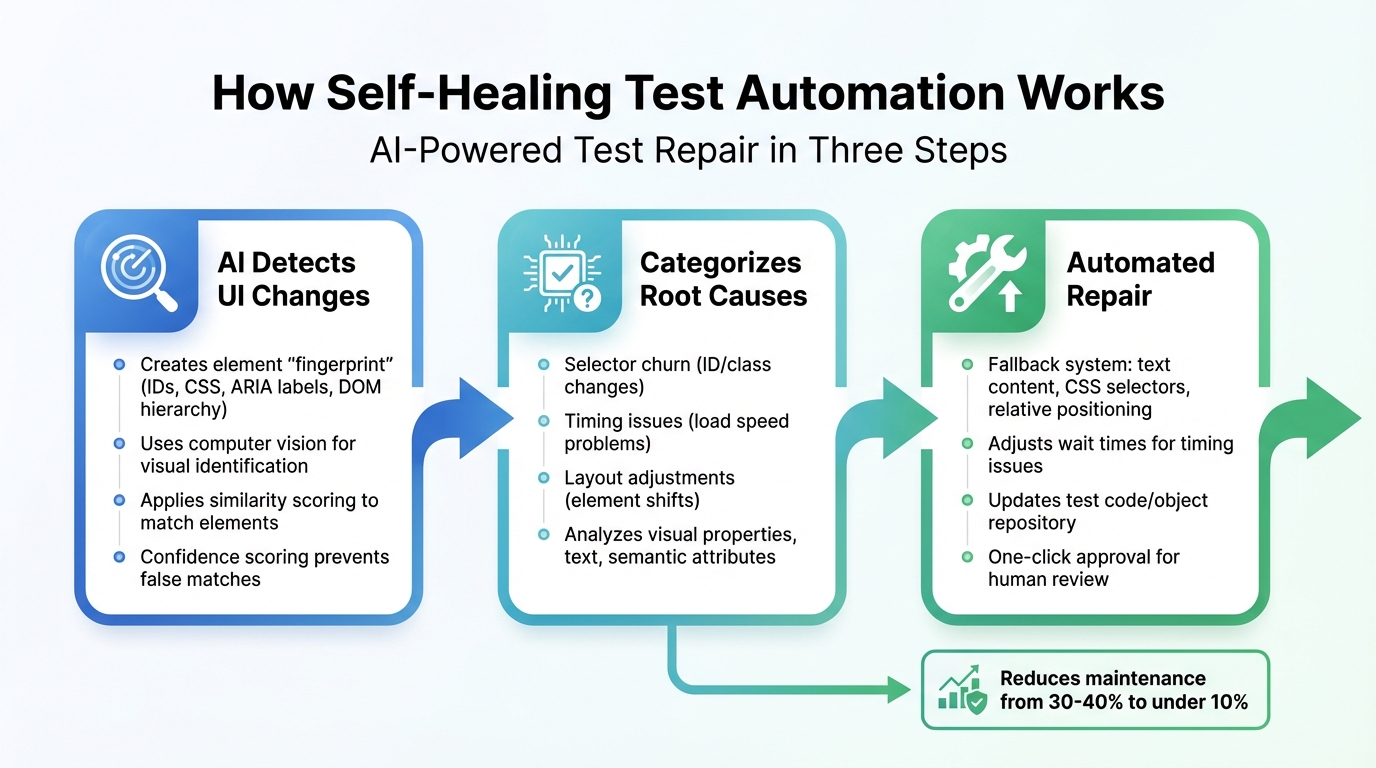
How Self-Healing Test Automation Works: 3-Step AI Process
Self-healing test automation follows a three-step process that mimics how a human tester adjusts to changes in a user interface (UI). It begins by identifying any changes, then diagnosing what caused the issue, and finally applying the appropriate fix - all while keeping your tests running smoothly.
Detecting Failures
When a test encounters a failure, AI tools analyze the UI elements by creating a "fingerprint." This fingerprint includes details like IDs, text, CSS classes, ARIA labels, and the DOM hierarchy, allowing the system to locate elements even if small changes occur.
Some tools move beyond traditional DOM-based selectors by using computer vision to identify elements based on their appearance and position on the screen. If the primary locator fails, the system scans the updated page and uses similarity scoring to find the element that matches the original fingerprint. The tricky part is distinguishing between a minor UI update and an actual bug. To address this, tools rely on confidence scoring to ensure the match is accurate. Many systems also incorporate human reviews to avoid "silent false positives", where changes are incorrectly assumed to be harmless.
Once the system identifies the changed element, it moves on to figure out what caused the issue.
Diagnosing and Categorizing Issues
After detecting a failure, the system performs AI root cause analysis to identify the source of the failure. AI engines group failures into categories such as selector churn (when IDs or classes change), timing issues (when the test runs faster than the application loads), and layout adjustments (when elements shift on the page). This categorization is achieved through a detailed analysis of visual properties (like color and size), text, surrounding elements, and semantic attributes. Advanced tools can even determine whether a failure stems from something simple, like a renamed ID, or a deeper functional issue that needs manual intervention.
Applying Automated Fixes
Once the issue is diagnosed, the system follows a structured approach to apply fixes. For example, if an ID is missing, it can fall back on other attributes like text content, CSS selectors, or relative positioning (e.g., identifying a button based on its position next to a label). This layered fallback system ensures that tests keep running, even when multiple attributes change.
"Instead of failing on the first broken locator, the system recalibrates its understanding of each element and maintains the flow without human intervention."
- Tamas Cser, Founder & CTO, Functionize
Timing issues are addressed by monitoring page states and asynchronous activity, with the system automatically adjusting wait times to prevent flaky tests. Some platforms go a step further by updating the test code or object repository with the new locator. These updates often come with a one-click approval process, allowing developers to review and confirm changes before finalizing them. As Jennifer Shehane from Cypress emphasizes, "Self-healing is only useful when you can trust what changed".
Benefits of Self-Healing Test Automation
Self-healing test automation is changing the game for QA teams by reducing the need for constant script repairs. This approach allows teams to spend more time on high-priority tasks, shrinking maintenance efforts from 30–40% to under 10% of testing cycles. With AI-powered self-healing, maintenance costs can drop by 35%, while test execution speeds increase by up to 70% compared to traditional cloud grids. These advancements highlight how AI-driven self-healing is reshaping everyday testing workflows.
Less Maintenance Work
One of the challenges in scaling test automation is dealing with broken scripts whenever a UI changes. These breaks demand time-consuming manual updates. Self-healing tools solve this by automatically fixing such issues. For instance, in February 2026, La Redoute, a major French retailer, used a statistical model to update over 7,500 tests with more than 90% accuracy, significantly cutting down on manual work .
"Self-healing test automation delivers immediate ROI through drastically reduced maintenance costs while boosting team productivity across development lifecycles."
- Antoine Craske, Quality Engineering Expert
This reduction in maintenance effort means teams can focus on creating more robust and dependable testing environments.
More Reliable Tests
Self-healing tools excel at identifying real bugs while ignoring false failures caused by minor UI changes. This ensures tests fail only when genuine issues arise. These tools can reduce UI-related test failures by over 90% and false positives by 74% . With this level of reliability, teams can confidently deliver faster and more dependable software updates.
Faster Release Cycles
By automating repairs, self-healing tools keep CI/CD pipelines running without interruptions. This enables teams to move toward weekly or even daily releases, while slashing maintenance efforts from 30–40% to under 10% of the QA cycle. Developers benefit from instant feedback on updates, eliminating the need to wait for manual fixes. Notably, about 86% of QA teams are either planning to or actively adopting AI-driven testing processes within the next year.
Self-Healing Test Automation Tools
Self-healing test automation has come a long way, moving beyond simple locator repairs to more advanced capabilities. Modern tools now use multi-attribute element identification through "locator profiles." These profiles include a mix of IDs, CSS selectors, text-based attributes, ARIA labels, and relative positioning. By relying on multiple attributes instead of a single locator like XPath, these tools ensure greater test stability even when individual attributes change. This evolution has paved the way for advanced solutions like Ranger.
What sets newer tools apart is their ability to combine automated script updates with AI-driven analysis. These systems can differentiate between harmless UI tweaks and actual bugs, reducing false positives and simplifying maintenance. When a UI change occurs, the platform updates the test script automatically with new attributes, preventing repeated failures and optimizing future tests.
To ensure enterprise-grade reliability, human-in-the-loop validation plays a critical role. Many platforms offer features like "fixed-by-AI" annotations or dashboards where QA teams can review and approve automated fixes before they’re finalized. This oversight prevents silent false positives, where AI might adapt a test but miss an actual bug.
Another exciting development is the rise of generative AI test creation. Teams can now write tests using plain English or provide a test case title, which the AI translates into executable steps. This process is often supported by a test case generator to ensure comprehensive coverage. This shift toward low-code and no-code solutions has gained traction, with 86% of QA teams planning to adopt AI in their testing processes within the next year. The benefits are substantial - some teams report a 99.5% reduction in test maintenance time, while AI-driven automation speeds up test creation by up to 10x and cuts build failures by up to 40%. Among these advanced platforms, Ranger stands out as a prime example of combining AI with human oversight.
Ranger: AI-Powered QA Testing
Ranger offers an intelligent blend of AI-driven automation and human validation, creating a reliable end-to-end testing solution. The platform uses AI to automatically generate and maintain tests as applications evolve, while human reviewers ensure that fixes align with business logic and effectively catch bugs. This dual approach addresses the risk of silent false positives, where AI might adjust tests without fully understanding the context.
Ranger integrates seamlessly with Slack and GitHub, providing real-time testing updates and allowing teams to review, edit, and commit test code directly into their repositories. This ensures that while much of the maintenance is automated, teams retain control over production tests. Additionally, Ranger’s hosted test infrastructure scales effortlessly with team needs, removing the hassle of managing testing environments and delivering instant feedback on code changes.
For industries like e-commerce, finance, and healthcare - where applications change frequently and reliability is non-negotiable - Ranger’s combination of AI automation and human oversight is a game-changer. Its automatic bug triaging and detailed visual reports, including screenshots, network traces, and replay videos, help developers resolve issues faster, without waiting for manual test repairs.
How to Evaluate Self-Healing Test Automation Tools
Choosing the right self-healing test automation tool means finding one that can accurately identify failures, handle various scenarios, and fit into your existing workflows. Picking the wrong tool could lead to problems like silent false positives, which can hide real bugs.
Accuracy of Failure Diagnosis
A great self-healing tool does more than just fix broken selectors - it digs deeper to find the root cause of failures. Interestingly, brittle selectors and DOM changes only account for about 28% of test failures. The majority - around 70% - are caused by timing issues, bad test data, runtime errors, and rendering problems. Tools that only address selectors miss most of the instability.
"True self-healing AI needs to support all six causes of flakes... systems that only heal selectors solve the easy case and leave the majority of instability untouched." - QA Wolf
Look for tools that provide a detailed audit trail. This should include original locators, analyzed attributes, applied fixes, and confidence scores to indicate when human intervention is needed. While some platforms boast element identification accuracy as high as 99.97%, having verification mechanisms in place is still essential.
The most reliable tools use multi-attribute element identification, analyzing factors like ID, text, CSS, ARIA labels, DOM position, and visual cues instead of relying on a single locator. This reduces the risk of matching the wrong element when the UI changes. Some platforms even use Large Language Models to understand UI context and expected behaviors, further minimizing false positives.
Next, ensure the tool can cover all types of failure scenarios.
Range of Failure Coverage
Once you’ve confirmed accurate diagnostics, check if the tool can handle a variety of failure modes. A robust self-healing solution should address timing issues (like async events or API delays), runtime errors (such as app crashes), test data problems (like expired sessions), interaction changes (e.g., hidden elements), and visual assertion failures.
Test the tool on complex workflows, such as e-commerce checkouts or role-based access control screens, instead of simple login pages (you can use a test scenario generator to map these out). This will expose any weaknesses in its healing logic. Be cautious of "silent passes", where the tool selects a similar but incorrect element, potentially hiding functional bugs. The goal should be to keep the false positive rate below 5%.
Some platforms use vision-based methods that rely on screen coordinates and visual cues rather than DOM selectors. These approaches remain stable even during code refactors, making them especially useful for canvas-based apps or interfaces that change frequently.
Integration and Scalability
Precision and coverage are critical, but the tool also needs to integrate seamlessly into your workflows and scale effectively. Look for platforms that trigger automatically on commits, manage authentication, and report results directly into tools your team already uses. When done right, AI-driven self-healing can cut test maintenance time from 30–40% of the QA cycle to under 10%.
Scalability is also about how much human oversight the tool requires. Some platforms offer a "suggestion mode", where engineers can approve or reject fixes before they’re applied. This approach helps prevent silent false positives while keeping control over production tests. Advanced systems claim to reduce up to 95% of manual test maintenance work.
Check if the tool integrates with your version control system to track, audit, and roll back healed locators if necessary. For teams in regulated industries, using self-healing as a one-time authoring assistant to generate static code for manual review might be a better fit. Finally, ensure the tool can scale with your test suite. Some platforms report 74% fewer false failures, helping keep pipelines running smoothly.
Conclusion
Self-healing test automation has become a game-changer for modern QA teams. As more teams adopt AI-powered tools, the focus is shifting from merely fixing issues to building systems that can adapt and thrive under changing conditions. These tools can slash test maintenance costs by up to 35%.
However, it’s crucial to pick a solution that addresses more than just surface-level problems like selector fixes. Many test failures are caused by fragile scripts rather than actual application bugs.
Take Ranger, for example - a platform that combines AI-driven test generation with human oversight. Its adaptive approach ensures tests evolve alongside your product. By filtering out flaky tests and irrelevant noise, Ranger allows engineering teams to zero in on genuine bugs. In early 2025, OpenAI partnered with Ranger during the development of the o3-mini model, leveraging Ranger's web browsing harness to better capture the model's agentic capabilities.
"I definitely feel more confident releasing more frequently now than I did before Ranger. Now things are pretty confident on having things go out same day once test flows have run".
- Jonas Bauer, Co-Founder and Engineering Lead at Upside
Self-healing isn’t about replacing thoughtful test design - it’s about strengthening your QA framework with smarter automation. Use self-healing on your most fragile test suites, keep an eye on confidence scores, and track healing events to identify unstable UI areas. By weaving these practices into your QA processes, you can transform your team from a maintenance-heavy operation into a key driver of faster, more reliable releases.
FAQs
Is self-healing safe for catching real bugs?
Self-healing test automation is built to handle changes in the user interface (UI) seamlessly. By automatically adjusting to these changes, it minimizes false positives and keeps tests reliable. This means your testing process stays accurate and consistent, allowing you to focus on identifying actual bugs rather than dealing with unnecessary noise.
What kinds of test failures can self-healing fix?
Self-healing test automation tackles challenges like UI changes, including updated or missing locators. It also handles issues such as timing glitches, flaky tests, and runtime errors. By automatically adjusting to these disruptions, it helps maintain test reliability while cutting down on maintenance work.
How do I evaluate a self-healing tool for my CI/CD stack?
When choosing a self-healing tool, prioritize its ability to handle UI or code changes automatically. This reduces the need for constant manual updates. Key features to look for include dynamic locator updates, visual recognition, and pattern learning. It's also important to evaluate how well the tool minimizes false positives, integrates with your CI/CD pipeline, and learns from previous executions to improve over time. Case studies or product demos can provide valuable insights into how easily the tool integrates into your workflow and how well it performs in practical scenarios.
Related Blog Posts
Stop babysitting your coding agents. Use Ranger
%201%20(1).svg)
More signals, less noise, faster launches
Let Ranger be your guide to sustainable QA testing.

.png)