%201.svg)
Ranger vs. setting up Cypress yourself

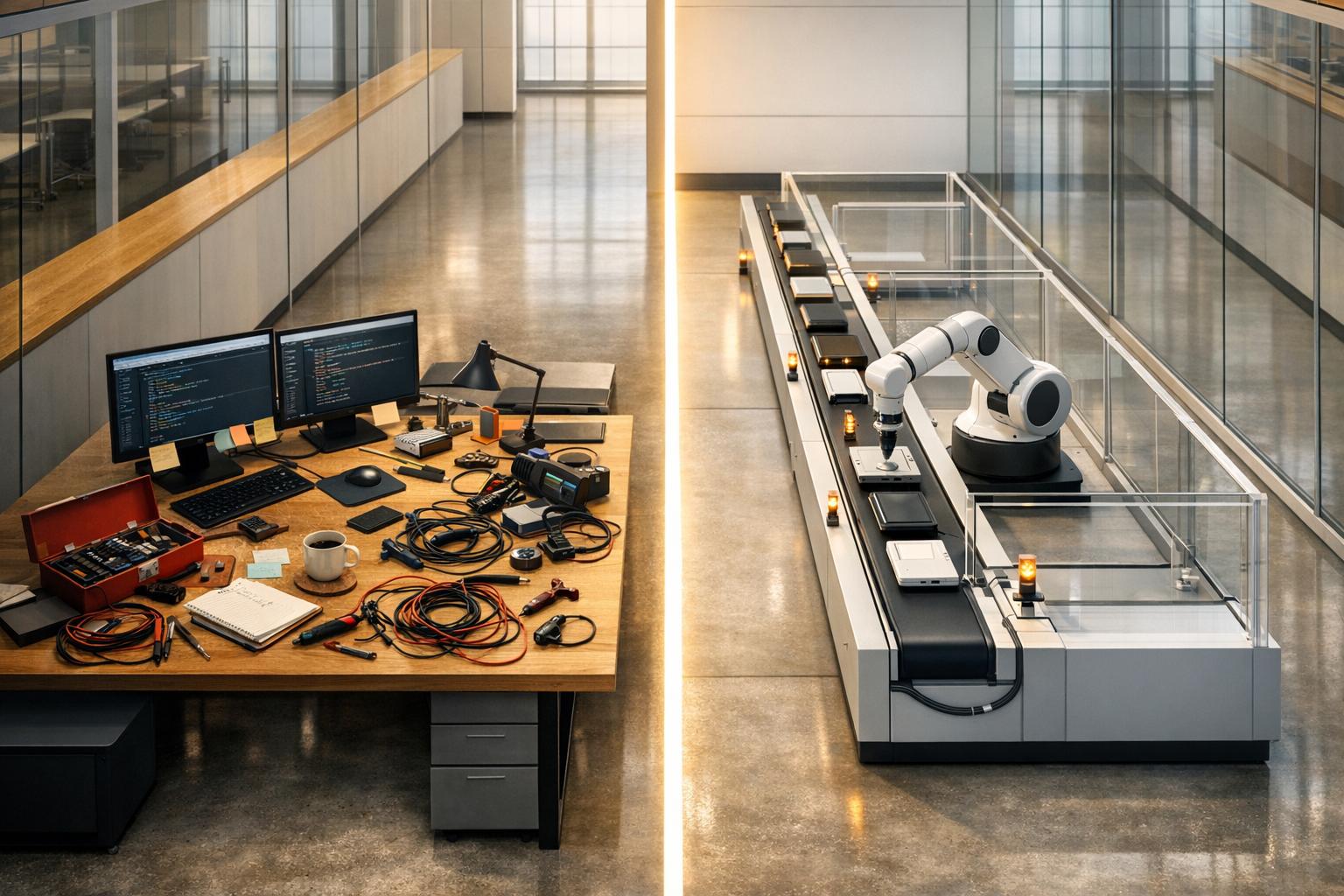
When deciding between managing Cypress manually or using Ranger, here’s the key takeaway: Cypress offers full control but requires significant time and technical effort, while Ranger simplifies the process by automating setup, maintenance, and scaling.
Key Differences:
-
Cypress Manual Setup:
- Offers complete flexibility and control.
- Requires JavaScript/TypeScript expertise.
- Involves ongoing test maintenance, flaky tests, and CI/CD setup.
- Costs include engineering hours, infrastructure, and Cypress Cloud subscriptions.
- Ranger:
Quick Comparison:
| Feature | Cypress (Manual) | Ranger |
|---|---|---|
| Setup Time | Hours to days | Minutes |
| Test Maintenance | Manual updates for flaky tests | AI handles updates with human review |
| CI/CD Integration | Complex YAML, Docker config required | Automated with simple commands |
| Scaling | Manual parallelization setup | Auto-scaling with isolated environments |
| Cost (Year 1) | $8,270–$18,940 | $588–$11,988 |
If your priority is saving time and reducing complexity, Ranger offers a streamlined alternative to managing Cypress manually.
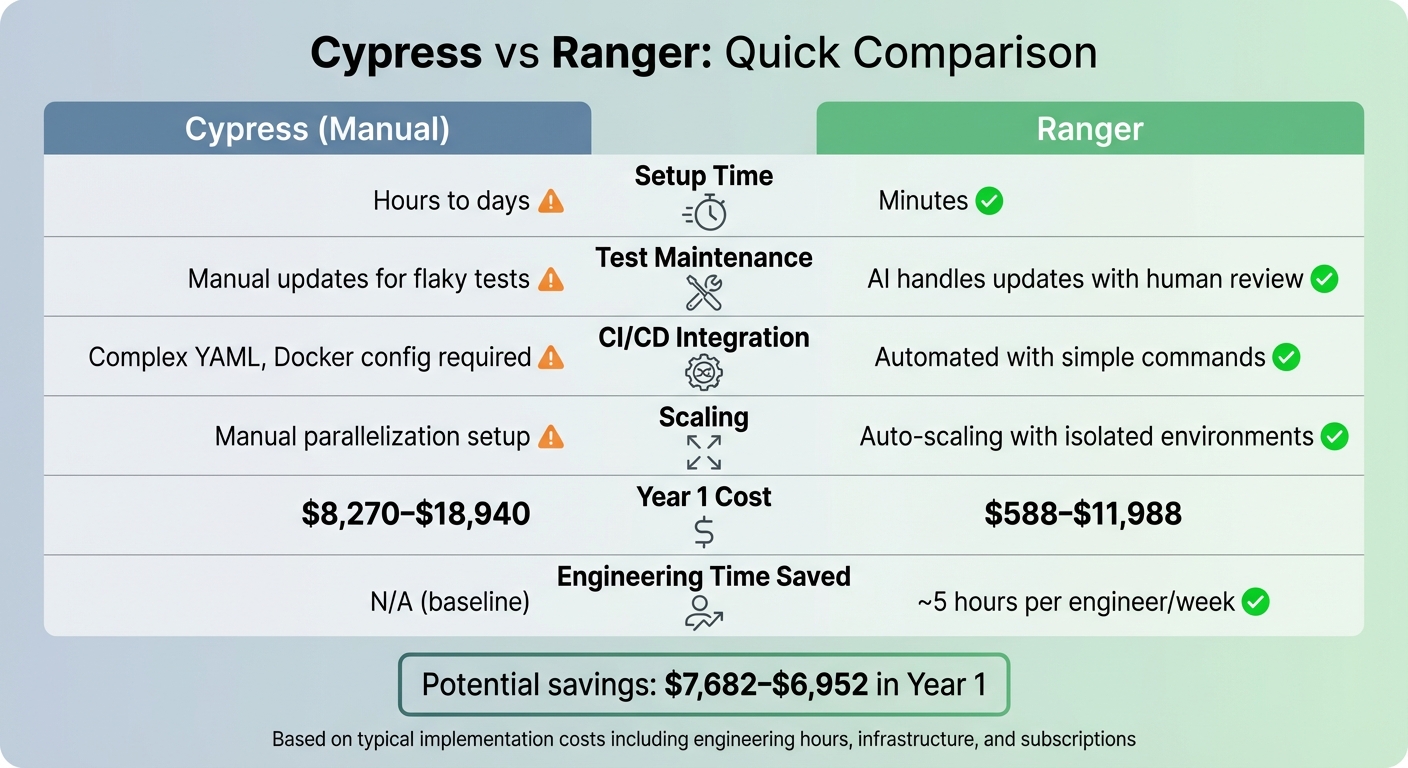
Cypress vs Ranger: Setup Time, Costs, and Maintenance Comparison
Initial Setup Comparison
Setting Up Cypress Manually
To get started with Cypress, you'll need to install Node.js (v18 or later) and run the command npm install cypress --save-dev. Once that's done, running npx cypress open for the first time will generate a default folder structure. This includes directories like e2e/, fixtures/, and support/, as well as the cypress.config.js configuration file.
From there, you'll need to manually configure settings such as base URLs, timeouts, and viewport dimensions in the cypress.config.js file. Tasks like login automation and cookie management require additional custom scripts, which are added to files like cypress/support/commands.js and cypress/support/e2e.js. To keep sensitive data secure, such as API keys, you'll use cy.env() and store credentials as CI/CD environment variables (e.g., GitHub Actions secrets), avoiding the need to hardcode them.
Setting up Cypress for CI/CD workflows involves configuring YAML files, creating wait scripts, handling artifact uploads, and using Xvfb for headless browser execution on Linux systems. This entire process requires a solid understanding of JavaScript or TypeScript, Node.js, and CI/CD tools. The manual nature of this setup highlights the complexity of managing everything yourself.
Getting Started with Ranger
Ranger simplifies all these steps by automating much of the setup process. Instead of dealing with manual configurations, Ranger takes care of environment setup and authentication for you. Start by installing the Ranger CLI with the command npm install -g @ranger-testing/ranger-cli, and then run ranger setup to authenticate and install the required browser binaries automatically - no need to match versions manually. Additionally, the ranger skillup command installs markdown files that guide AI coding agents, such as Claude Code, in creating and verifying test scenarios.
Authentication is straightforward, thanks to a guided browser session. For example, using the command ranger profile add [name] --ci captures and encrypts browser cookies, which eliminates the need to write login scripts manually. These encrypted profiles can be safely committed to version control, and during CI runtime, they are decrypted using the RANGER_CLI_TOKEN stored as a repository secret. Ranger also supports dynamic environments like Vercel preview URLs by allowing you to use ${VAR_NAME} syntax in the profile configuration to handle changing deployment URLs.
Ranger's infrastructure integrates seamlessly with tools like Slack and GitHub. For instance, adding a "preview" label to a pull request in GitHub can automatically trigger the testing environment, streamlining the entire process.
sbb-itb-7ae2cb2
Time and Resource Requirements
Time Required for Self-Managed Cypress
Managing Cypress on your own demands a solid grasp of JavaScript or TypeScript, along with a commitment to ongoing test maintenance. Beyond just setting it up, you'll need to integrate the framework into your entire development pipeline - whether that involves cloud-based CI/CD systems, on-premise setups, or custom environments.
The workload can escalate quickly, especially when dealing with flaky tests. These require constant debugging and updates, as even small changes like application updates, patches, or configuration tweaks can break scripts. This means you'll often need to revise XPath selectors, CSS locators, or test logic. If your application uses complex UIs - like dynamic element IDs or nested iFrames - expect to spend even more time on manual updates. On top of this, orchestrating infrastructure requires ongoing configuration efforts. Hiring a Forward-Deployed Test Engineer to manage these tasks can cost between $80,000 and $120,000 annually. Ranger, however, simplifies these challenges significantly.
Time Savings with Ranger
Ranger takes a different approach, leveraging AI to automate the creation and maintenance of Playwright tests. By using plain English commands, it eliminates the need for deep coding expertise and reduces the learning curve. Thanks to its self-healing capabilities, Ranger can automatically adapt to UI changes, so you won’t have to manually update selectors every time something shifts.
The platform also automates tasks like file handling and content verification, cutting down on repetitive manual work. For example, the entire workflow - from sending a Slack request to having a verified pull request - can often be completed in just 30–60 minutes. Additionally, Ranger offers Forward-Deployed Test Engineers to manage onboarding, test development, and CI/CD integration, removing the need to hire and oversee in-house testing staff. This streamlined process transforms how teams handle their test suites, saving both time and resources.
Test Creation, Maintenance, and Flaky Tests
Managing Tests in Cypress
Creating and maintaining tests in Cypress involves manually coding with structures like describe, it, and commands such as cy.get() and cy.click(). You’ll also need to use hooks like beforeEach to handle application states effectively. However, this manual process comes with a cost. UI changes can easily break brittle selectors, forcing teams to constantly update locators.
"Many teams struggle with test suites that demand excessive maintenance, battle flakiness, and break any time application code changes."
- Bomberbot
Flaky tests are another hurdle. They often arise from asynchronous timing issues or shared states, requiring teams to implement workarounds like stable attributes or custom timeouts. These challenges not only drain time but also slow down the testing process significantly. Ranger offers a solution by automating bug detection to reduce manual effort, making test maintenance less of a burden.
Ranger's Automated Test Management
Ranger takes a different approach by using AI to handle test creation and updates. Instead of writing code, you simply describe your testing needs in plain English, and the platform generates the required test logic. When the UI changes, Ranger’s AI adapts the tests automatically, eliminating the need for constant selector updates. This proactive maintenance helps prevent late-stage bugs that often stem from outdated test scripts.
What sets Ranger apart is how it incorporates human oversight. Unlike some AI systems that self-heal tests autonomously - risking false positives by targeting incorrect elements - Ranger treats these changes like pull requests. A human reviewer must approve the updates before they’re applied. This approach addresses the trust issues that can arise when coverage metrics look good on paper but fail to reflect actual functional accuracy.
"Green doesn't mean correct. It means unchallenged."
- Valdemar, Docker Captain and Cypress Ambassador
"Self-healed tests don't auto-merge. They create a review request. A human looks at what changed. Then decides."
- Valdemar, Docker Captain and Cypress Ambassador
Scaling Your QA Testing
Scaling Cypress Infrastructure
As your test suite grows, running Cypress tests sequentially can become a major bottleneck. For instance, a suite that takes over two minutes on a single machine can be cut down to just 46 seconds by distributing tests across four machines. While this sounds promising, achieving it often requires a lot of manual work.
Manual scaling involves configuring parallel CI/CD runners, managing Docker images, and ensuring proper test isolation. This adds to the engineering workload. Many teams turn to the Cypress Dashboard, which uses historical timing data to distribute tests more efficiently, prioritizing longer-running tests. Alternatively, open-source plugins can help with parallelization, but they come with their own complexities.
If you're using CI providers like GitHub Actions, CircleCI, or Jenkins, you'll need to fine-tune YAML configurations and keep an eye on the "Machines" view to spot underutilized resources. While open-source solutions can save over three times the cost compared to cloud-managed parallelization, they often require more engineering hours for upkeep. These challenges highlight the appeal of automated solutions, like Ranger, for scaling effectively.
Scaling with Ranger
Ranger takes the hassle out of scaling by automating the entire infrastructure setup. It creates dedicated compute instances for each pull request using a "one VM per PR" model. Specifically, Ranger provisions GCP e2-standard-8 instances (8 vCPUs, 32GB RAM) automatically through GitHub Actions. Each environment operates in complete isolation, solving the data collision issues common in manual setups.
The cost? Surprisingly low - just $0.27 per hour for a background agent VM. Even if an instance runs for two full days, the expense remains minimal. Ranger also simplifies database scaling by using tools like Neon to create isolated Postgres forks for each test environment. These branches automatically delete when a pull request becomes stale, thanks to an expires_at parameter, eliminating the need for manual cleanup.
"If you can run your system locally on your machine, you can have background agents that anyone at your company can use to ship features from Slack."
- Daniel Griffin, Ranger
Ranger doesn’t just address cost and efficiency - it also integrates security and access management seamlessly. Features like Identity-Aware Proxy and Tailscale remove the need for managing VPNs or SSH keys. In total, about 500 lines of code handle everything from provisioning to teardown, keeping the process smooth and low-maintenance.
Development Workflow Integration
Integrating Cypress with Your Tools
Getting Cypress up and running in your development workflow can feel like a juggling act. There are several manual steps involved, including writing custom Docker configurations, setting up layer caching, and configuring parallel runners for your CI/CD pipelines. And if your CI runner doesn’t mount the .git folder - which happens often in certain Docker setups - you’ll need to manually define several critical environment variables to ensure proper CI integration.
On top of that, managing secrets requires caution. You'll need .gitignore files to keep sensitive data out of version control. If you're working with AI agents alongside Cypress, the process becomes even more intricate. You'll have to create custom "trust architectures" - scripts that flag self-healed selectors or prevent auto-merges when necessary. These steps highlight just how tricky it can be to align Cypress with other tools in your workflow.
Ranger's Built-In Integrations
Ranger simplifies everything with automation. With just one command - ranger setup - you can authenticate the system and install all the browser dependencies you need. This automation replaces the need for a manual test case generator by handling the environment setup and execution logic automatically. The platform even generates encrypted profiles in the .ranger/ci/ directory. These profiles securely store auth states and cookies, making them safe to commit to version control. At runtime, they’re decrypted using an API token, eliminating the need for manual handling.
Ranger also changes the game with its Slack integration. Team members can simply tag a bot (like @yogi) to kick off a workflow. This workflow handles everything: creating a draft pull request, spinning up a virtual machine, applying code updates, and sharing visual results directly within Slack. What’s more, the integration keeps track of conversation context, ensuring automated fixes align with the ongoing discussions among team members.
"Bringing agents into Slack opened the door to everyone at the company and was one less context switch to get work rolling."
- Daniel Griffin, Ranger
Ranger also includes a "Sandbox mode" (SANDBOX_ENV) to prevent unintended side effects during CI/CD test runs. This mode ensures that no real emails or Slack messages are sent, keeping your testing environment safe and controlled.
Cypress Tutorial: Complete Cypress Crash Course In 3 Hours (For Beginners)
Cost Analysis
This section breaks down the financial aspects of managing Cypress manually versus using Ranger's automated solution.
Costs of Self-Managing Cypress
While Cypress itself is free and open-source, deploying it in a production environment comes with several hidden costs. For instance, advanced features like parallelization and analytics require a Cypress Cloud subscription, starting at $799 per year for the Team Plan or $3,199 annually for higher tiers. Beyond that, you'll need to budget for CI infrastructure minutes, hardware for build agents, and storage for test artifacts - all of which can add up quickly.
The biggest cost, however, lies in engineering time. Setting up production-grade security - such as authentication, audit logging, and secrets management - takes an estimated 28–56 hours, translating to $2,100–$4,200. Once everything is up and running, maintenance tasks like applying security patches and troubleshooting can take 5–10 hours per month, costing $4,500–$9,000 annually. Add infrastructure expenses (e.g., VPS or EC2 instances, bandwidth, and backups) of $35 to $145 per month - or $420 to $1,740 annually - and the numbers escalate quickly.
"Open-source is free to download. It's not free to run."
- Clawctl Team
When you add it all up, the total cost of ownership for managing Cypress in Year 1 falls between $8,270 and $18,940. And that’s without factoring in the opportunity cost - every hour spent managing infrastructure is time taken away from building features. These figures highlight the financial burden of self-management and provide a baseline for comparing Ranger's approach. Understanding these costs is the first step in calculating QA automation ROI for your organization.
Ranger's Cost Structure
Ranger flips the script by eliminating much of the manual labor and ongoing maintenance costs. Setup takes less than a minute, and the platform handles security, infrastructure, and updates for you. This means no need to allocate time or resources for patches, troubleshooting, or incident response.
Ranger uses ephemeral virtual machines (VMs) for testing, costing approximately $0.27 per hour, with most sessions lasting only 15–30 minutes, making compute costs almost negligible.
"The VM costs ~$0.27/hour. A background agent session usually lasts 15-30 minutes... it rounds to free."
- Daniel Griffin, Ranger
In Year 1, Ranger's costs range from $588 to $11,988, depending on your team's specific needs. This translates to potential savings of $7,682 to $6,952 compared to self-managing Cypress. Additionally, by transferring the risk of security incidents (which can average over $25,000 for small-to-medium businesses) to Ranger, your team can focus entirely on shipping features rather than managing infrastructure. Ranger’s streamlined approach not only reduces costs but also minimizes operational headaches, making QA testing more efficient and stress-free.
Conclusion
Deciding between Ranger and setting up Cypress manually depends on how you want to use your team's time and resources. Setting up Cypress on your own often requires significant configuration and ongoing maintenance, which can pull engineers away from building new features. As Ranger CEO Josh Ip explains, "It's kind of like asking the chefs to wash the dishes when they should be focused on making the food." This highlights the need for a tool that helps optimize your QA process by simplifying test creation and upkeep.
Ranger takes that complexity off your plate. With its natural language test creation, your team can write tests in plain English instead of diving into complex JavaScript. Features like automated updates and built-in infrastructure management have already helped companies like OpenAI, Suno, and Clay speed up feature delivery while cutting down on maintenance work.
On average, Ranger can save about 5 hours per engineer each week, adding up to significant productivity gains over the course of a year.
If your goal is to let engineers focus on building features and driving innovation, Ranger offers a faster, more efficient solution. By using Ranger’s AI-powered automation, your team can spend less time on testing and more time pushing your business forward.
FAQs
Can Ranger work with my existing Cypress tests?
Ranger works effortlessly with your existing Cypress tests. It supports coding agents capable of executing shell commands, including those needed to run Cypress. This means you can streamline and manage your current testing workflows with Ranger’s AI-powered automation - without having to start over. It’s a time-saver that boosts efficiency while keeping your processes intact.
How does Ranger prevent AI test updates from masking real bugs?
Ranger helps keep your testing process sharp by identifying the difference between actual defects and minor UI tweaks. This means fewer false positives, reduced flaky tests, and more dependable bug detection - so you can focus on fixing real issues without unnecessary distractions.
What do I need to run Ranger in CI (tokens, profiles, secrets)?
To use Ranger in a CI environment, you'll first need to create an encrypted profile locally. Once that's ready, activate it within the hosted environment. This encrypted profile handles all the essential tokens, profiles, and secrets, providing a secure way to integrate and simplify the configuration process.
Related Blog Posts
Stop babysitting your coding agents. Use Ranger
%201%20(1).svg)
More signals, less noise, faster launches
Let Ranger be your guide to sustainable QA testing.

.png)