%201.svg)
Load Balancing for Faster Test Execution: Best Practices


Load balancing in software testing speeds up test execution and enhances reliability by distributing workloads across multiple machines. This approach reduces bottlenecks, prevents uneven runtimes, and optimizes resource use, directly improving CI/CD pipeline efficiency. For instance, a 2-hour test suite can be completed in 15 minutes with 8 workers running in parallel.
Key highlights:
- Faster Testing: Parallel execution reduces test runtime by 2–10x.
- Improved Reliability: Avoids system overloads and flaky tests by evenly spreading workloads.
- Smarter Resource Use: Balances machine capacity, integrates autoscaling, and minimizes costs.
How it works: Tests are distributed using algorithms like round-robin, weighted round-robin, or dynamic load balancing. Dynamic methods adapt in real time, ensuring efficient resource allocation and faster execution.
Best practices include:
- Using scalable infrastructure (e.g., Kubernetes) for automatic resource adjustment.
- Integrating load balancing into CI/CD pipelines for smoother workflows.
- Monitoring metrics like test durations and node utilization to optimize performance.
Tools like Ranger simplify test distribution with AI-driven insights, cutting execution times by up to 40% and reducing costs by scaling resources intelligently.
Benefits of Load Balancing for Software Testing
Load balancing plays a key role in software testing by distributing test workloads across multiple machines. This approach offers three major perks: faster test execution, improved reliability, and smarter use of resources. These advantages directly influence speed, accuracy, and cost management.
Faster Test Execution
One of the biggest time-savers in testing comes from running tasks in parallel. By splitting test suites across several machines, total runtime is slashed significantly. For example, a regression test suite that takes 90 minutes on a single machine can be completed in just 10–15 minutes when distributed across nine agents, even after accounting for overhead. This parallel execution ensures build cycles stay under 20 minutes, even during heavy workloads.
Improved Test Reliability
Load balancing also helps reduce test failures caused by overloaded systems. When a single machine is overwhelmed by too many tests, it can run out of CPU or memory, leading to timeouts and random failures that have nothing to do with the actual code. By evenly spreading the workload, load balancing prevents these bottlenecks, ensuring all agents share the effort fairly.
Additionally, automated health checks identify and remove unstable nodes from the equation. This means fewer flaky tests and less reliance on "retry to pass" scenarios. With a more stable environment, teams can trust their test results - if something fails, it’s likely due to a real issue, not infrastructure glitches.
Smarter Resource Utilization
Load balancing optimizes how resources are used by distributing jobs evenly across all available machines. It works hand-in-hand with autoscaling, which adjusts capacity based on demand. For teams in the U.S. paying for cloud instances by the minute or hour, this efficiency translates to lower costs by ensuring resources match the workload.
It also simplifies capacity planning. Teams can define clear targets for CPU and memory usage per machine and let the balancer and autoscaling handle the rest. This means no more guessing how many runners to provision, reducing the risk of over-provisioning and cutting unnecessary expenses.
Load Balancing Algorithms for Testing
When it comes to distributing test jobs effectively, load balancing algorithms play a key role. Picking the right approach ensures your agents handle tests efficiently, reducing bottlenecks and idle time. Here’s a closer look at three commonly used methods: round-robin, weighted round-robin, and dynamic load balancing. Each one caters to specific needs and scenarios.
Round-Robin Load Balancing
Round-robin is straightforward - it assigns tests to agents in a rotating sequence. For example, with three agents, the order might go Agent 1, Agent 2, Agent 3, and then back to Agent 1. If you have 300 tests to distribute, this method would divide them into 30 batches of 10, cycling through the agents evenly. It’s a practical choice when all agents have similar hardware and the tests take roughly the same amount of time to run.
That said, round-robin has its limitations. It doesn’t account for the duration of individual tests. If one agent ends up with several longer-running tests, it could finish much later than the others, leaving some resources underutilized.
Weighted Round-Robin Load Balancing
Weighted round-robin builds on the basic round-robin method by factoring in agent capacity. Agents are assigned weights based on their capabilities - like CPU power, memory, or past performance. For example, if you have agents with 2, 4, and 8 vCPUs, you might assign them weights of 1, 2, and 4, respectively. This means the agent with the highest capacity would handle four times as many tests as the smallest one.
This method is particularly useful in setups where agents vary significantly, such as when using different EC2 instance types (e.g., c5.large, c5.xlarge, and c5.2xlarge). However, the weights are typically static, which means they might need manual adjustments over time to reflect changing conditions. If static weights fall short, more dynamic solutions might be required.
Dynamic Load Balancing
Dynamic load balancing takes things a step further by making decisions in real time. Instead of relying on fixed schedules or weights, it uses live performance data - like CPU usage, memory availability, and error rates - to allocate tests. For instance, if one Kubernetes pod is running at 85% CPU utilization while another is only at 35%, the scheduler would send the next batch of resource-heavy tests to the less-loaded pod.
This approach is highly adaptive. If an agent starts underperforming due to network issues or other problems, the scheduler can adjust on the fly - reducing its workload or marking it as temporarily unavailable. While dynamic load balancing is excellent for minimizing test durations and handling unpredictable workloads, it does require advanced monitoring and orchestration tools to work effectively.
Each of these algorithms offers a way to optimize test distribution, depending on your infrastructure and specific requirements. By understanding their strengths and trade-offs, you can select the best fit for your testing environment.
Best Practices for Implementing Load Balancing in Test Execution
Getting load balancing right means having a flexible infrastructure, integrating it into your CI/CD pipelines, and keeping a close eye on performance metrics.
Use Scalable Infrastructure
Platforms like Kubernetes make it easy to adjust test resources to meet demand. Instead of sticking to a fixed number of test runners, you can use a horizontal pod autoscaler to scale up or down based on metrics like CPU usage or how long the test queue is getting. For example, during a nightly regression run, your CI pipeline might scale from five pods to 50 as the workload increases, then shrink back once the tests are done - saving you money while handling peak demand efficiently.
To make this work, your test runners need to be stateless. That means they should load tests and configurations when they start and store results in a central location. This way, scaling up or down won’t risk losing any data. Separating node pools for CPU-heavy and I/O-heavy tests, while setting resource limits for each pod, can also help distribute workloads more effectively.
With a scalable setup in place, it’s much easier to integrate load balancing into your CI/CD workflows.
Integrate with CI/CD Pipelines
For the best results, load balancing should be baked into your CI/CD process. This ensures faster feedback and smoother deployments by orchestrating test execution and splitting tests across multiple agents. Here’s how it works: when you push code to GitHub, a workflow kicks off to build your test container. A distributor service or script then divides the test suite into chunks and assigns them to different agents to run in parallel.
Each CI job acts as a worker, pulling tests from a central queue, running them, and posting results to shared storage. To keep things running smoothly, include retry logic for failed nodes, timeouts for stalled jobs, and tags or environment variables to ensure tests with special requirements run on the right nodes. Using status checks in pull requests ensures that all load-balanced test jobs pass before merging.
Platforms like Ranger can simplify this process by automatically running tests on code changes and sharing results directly in GitHub.
Monitor and Optimize Performance
Monitoring is key to keeping load balancing effective. Track metrics like test queue lengths, average and p95 test durations, node utilization (CPU, memory, and I/O), test pass/fail rates, and overall pipeline time. Tools like Prometheus can collect these metrics, while Grafana dashboards make it easy to spot trends - like whether some nodes are finishing much faster than others or if test distribution is uneven.
Set up alerts for issues like slow test start times (a sign of underprovisioning), high failure rates on specific nodes, or resource saturation. If you notice high CPU or memory usage, it’s time to adjust resources. On the flip side, low utilization could mean you’re overspending and should scale back. Comparing metrics before and after implementing new load-balancing strategies can show whether your changes are working.
Digging into runtime data for individual tests and nodes can reveal problem areas, like long-running tests that dominate a node or unevenly distributed workloads. Switching from a simple round-robin model to one that considers test durations can help balance the load better - spreading longer tests across agents and assigning more work to faster nodes.
If your monitoring shows test queues backing up during peak hours, adjust your autoscaling thresholds or pre-warm additional nodes to handle the load. Real-time notifications, like Slack alerts, can keep your team in the loop when issues arise. This constant visibility turns load balancing into an ongoing process of refinement and improvement.
sbb-itb-7ae2cb2
Ranger: Load Balancing for Faster and Scalable Test Execution

Ranger represents a modern solution for achieving faster and more scalable test execution. By combining AI-driven test distribution with a fully hosted infrastructure, it eliminates the need for manual configuration, offering a seamless way to manage testing within your CI/CD pipelines.
AI-Powered Test Distribution
Ranger's AI takes a smart approach to test distribution by analyzing factors like test complexity, historical execution times, and the current state of your resources. This means tests aren't just divided randomly. For instance, complex UI tests are sent to high-capacity agents, while simpler API tests are assigned to lower-capacity ones.
In one example, a mid-sized e-commerce team leveraged Ranger to distribute over 500 tests across 20 agents. The result? Execution time dropped from 45 minutes to just 12 minutes - a 73% improvement. Ranger achieved this by prioritizing flaky tests on specialized agents and dynamically scaling resources during peak loads. The system also keeps tabs on real-time metrics like CPU usage and memory. If an agent becomes overloaded, Ranger automatically shifts tests to idle agents, ensuring smooth execution. This dynamic adjustment can lead to up to 3x faster execution compared to traditional round-robin methods, cutting overall suite execution time by up to 40% in typical CI/CD workflows.
CI/CD Integration
Ranger integrates seamlessly with tools like GitHub and Slack, fitting right into your existing workflows. For example, when you push code to GitHub, Ranger triggers load-balanced test runs on pull requests via webhooks. Test results, pass/fail updates, and performance summaries are then sent directly to your Slack channels, allowing your team to address issues immediately.
"Ranger helps our team move faster with the confidence that we aren't breaking things. They help us create and maintain tests that give us a clear signal when there is an issue that needs our attention." - Matt Hooper, Engineering Manager, Yurts
These integrations have helped teams reduce pipeline bottlenecks by 50-70%. In one case, a dev team resolved a flaky test suite in under 10 minutes using shared Slack logs, enabling them to move from daily deployments to multiple deployments per day. Ranger also provides dashboards with key metrics like average test duration, throughput, and error rates. You can even set alerts for specific thresholds - like response times exceeding two seconds - and let the system optimize distributions for future runs.
Scalable Hosted Infrastructure
Ranger’s hosted infrastructure is designed to handle the heavy lifting for you. Its cloud-based system automatically scales resources to meet your needs, whether you're running 10 tests or 10,000 in parallel. For example, a SaaS company using Ranger scaled their nightly tests from 100 to 5,000, cutting costs by 60% compared to a self-hosted AWS setup (from $2,500 per month to $1,000) while maintaining test execution times under five minutes.
The platform’s pay-per-test pricing ensures you only pay for what you use, with no flat fees. It dynamically allocates resources based on AI insights, minimizing idle costs. With 99.9% uptime and built-in benchmarking, Ranger ensures reliable performance even during workload spikes, letting you focus on creating tests instead of managing infrastructure.
"Working with Ranger was a big help to our team. It took so much off the plates of our engineers and product people that we saw a huge ROI early on in our partnership with them." - Nate Mihalovich, Founder & CEO, The Lasso
Common Challenges and Optimization Tips
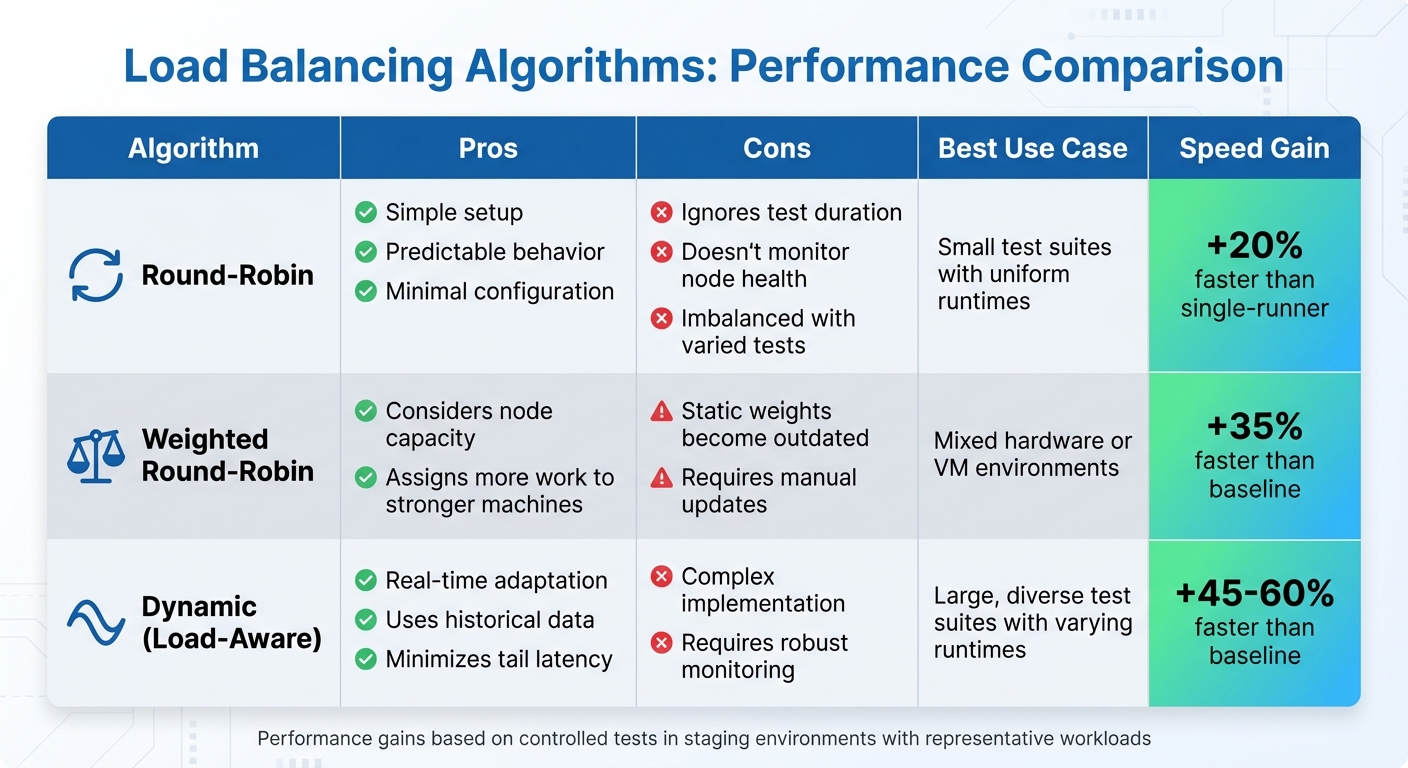
Load Balancing Algorithms Comparison: Performance and Use Cases
Test Flakiness from Uneven Loads
Once you've optimized test distribution, tackling test flakiness becomes a priority. Uneven load distribution can put a strain on system resources, leading to timeouts and sporadic failures. For example, when some test nodes handle more tests or longer-running suites than others, they compete for resources like CPU, memory, and network bandwidth. This imbalance can cause tests that typically pass to fail intermittently, often surfacing only on specific workers.
To address this, dynamic scheduling can be a game changer. Unlike static assignments, dynamic scheduling redistributes tasks in real time based on factors like queue length and node health. You can also use metadata from past test runs to balance workloads more effectively, aiming to distribute the total expected runtime evenly across workers rather than simply counting tests. For instance, spreading slow tests across multiple nodes ensures no single worker gets bogged down. Additionally, implementing targeted retry logic - rerunning failed tests on alternate nodes - can help confirm whether the issue is systemic or isolated, marking tests as failed only after multiple retries.
Avoiding Over-Provisioning Costs
Over-provisioning resources can drive up costs without delivering proportional improvements in speed. To avoid this, it's essential to set realistic concurrency targets based on actual production traffic and agreed-upon SLAs, rather than simply maximizing parallelism for its own sake.
Auto-scaling can help here. Configure scaling rules based on measurable metrics like CPU usage, queue depth, or response times. This ensures nodes scale up only when genuinely needed. Opt for short-lived, ephemeral runners - such as containers or spot instances from U.S. cloud providers - that activate only when your CI pipeline requires them and shut down immediately afterward. This approach not only keeps costs in check but also ensures efficient load balancing. To fine-tune this process, track your cost per test run in dollars. This data helps pinpoint the sweet spot where adding more parallelism no longer justifies the extra expense.
Performance Benchmarking and Monitoring
Performance benchmarking is key to identifying bottlenecks and refining your test infrastructure. Start by tracking metrics like suite duration, node utilization, and queue wait times. For instance, monitor total suite duration (overall wall-clock time), per-node utilization (CPU, memory, and network usage), and queue wait times to determine whether scheduling inefficiencies or capacity limits are causing delays. Additionally, correlate test pass rates and flaky test rates with specific nodes or load levels to uncover instability triggered by load balancing issues.
A practical way to evaluate different load-balancing algorithms is through a benchmark table. Here's an example:
| Algorithm | Pros | Cons | Use Case | Execution Speed Gain % |
|---|---|---|---|---|
| Round-Robin | Simple, predictable, minimal setup | Ignores test duration and node health; imbalance with varied tests | Small suites with uniform test runtimes | 20% faster than single-runner |
| Weighted Round-Robin | Considers node capacity; assigns more work to stronger machines | Static weights can become outdated as workloads evolve | Mixed hardware or VM environments | 35% faster than baseline |
| Dynamic (Load-Aware) | Adapts to real-time utilization and historical data; minimizes tail latency | More complex to implement; requires robust observability | Large, diverse test suites with varying runtimes | 45–60% faster than baseline |
These performance gains are based on repeated, controlled tests in a staging environment with representative workloads. To stay proactive, set up alerts for critical thresholds - such as response times exceeding two seconds - so you can quickly address performance dips caused by algorithm changes or infrastructure updates. Regular benchmarking like this ensures your load-balancing strategies evolve alongside your testing needs.
Conclusion
Load balancing plays a key role for teams aiming to achieve faster test execution and more dependable results. By spreading tests evenly across multiple servers or agents, you can reduce execution times by as much as 70% while eliminating bottlenecks along the way. Choosing the right algorithm is just as critical: Round-Robin works well for uniform test suites, while Weighted and Dynamic methods are better suited for handling mixed workloads.
To recap, effective load balancing relies on a few core strategies: scalable infrastructure, seamless CI/CD integration, and consistent performance monitoring. These practices lay the groundwork for ongoing improvements. Additionally, benchmarking helps fine-tune resource allocation, which can lead to cost savings of 30–50% without sacrificing speed.
For teams looking for a streamlined approach, platforms like Ranger simplify the process. Ranger takes care of everything, from AI-driven test distribution to hosted infrastructure, and integrates easily with tools like GitHub and Slack. As Brandon Goren, a Software Engineer at Clay, shared:
"Ranger has an innovative approach to testing that allows our team to get the benefits of E2E testing with a fraction of the effort they usually require".
FAQs
What are the benefits of dynamic load balancing for faster test execution?
Dynamic load balancing optimizes test execution by distributing testing tasks across available resources as they are needed. This real-time allocation ensures resources are used effectively, reduces bottlenecks, and accelerates the overall testing process.
With this method, teams can handle fluctuating testing demands while maintaining consistent and reliable results. It’s a time-saving approach that also helps uphold the quality of software releases.
How does AI improve load balancing for faster and more reliable test execution?
AI takes load balancing to the next level by analyzing real-time data and smartly distributing test workloads across available resources. This approach ensures that tests run smoothly, avoiding bottlenecks and boosting overall system performance.
With AI in the mix, software teams can speed up test execution, cut down on delays, and maintain reliable testing processes. It streamlines resource allocation, saving time and effort while delivering precise and dependable results.
What are the best ways to integrate load balancing into CI/CD pipelines for faster testing?
To seamlessly incorporate load balancing into your CI/CD pipelines, it's important to distribute test workloads across several servers or agents. This approach not only speeds up the process but also boosts reliability. Automation tools can play a key role here by dynamically allocating resources based on demand, ensuring your infrastructure is used efficiently. Techniques like round-robin scheduling or adaptive algorithms can further streamline test execution and eliminate bottlenecks.
With Ranger’s AI-driven testing services, this process becomes even simpler. The platform automates test creation, upkeep, and execution, enabling teams to deliver faster, more consistent results. By integrating these tools, your CI/CD workflows stay efficient and dependable, catching critical bugs early on.
Related Blog Posts
Stop babysitting your coding agents. Use Ranger
%201%20(1).svg)
More signals, less noise, faster launches
Let Ranger be your guide to sustainable QA testing.

.png)