%201.svg)
How AI Identifies Bottlenecks in QA Workflows


AI is transforming QA workflows by addressing common slowdowns like manual test creation, flaky tests, and inefficient defect triage. These issues often delay software releases and waste valuable time and resources. Here's how AI tackles these challenges:
- Automates Manual Tasks: AI reduces test creation time by up to 93% and cuts manual QA efforts by 50%.
- Improves Accuracy: Predictive analytics optimize test suites and identify potential problem areas before they escalate.
- Speeds Up Defect Resolution: AI-powered triage systems reduce resolution times by 30% or more.
- Reduces Costs: Teams report 50–70% cost savings and 30–50% faster release cycles.
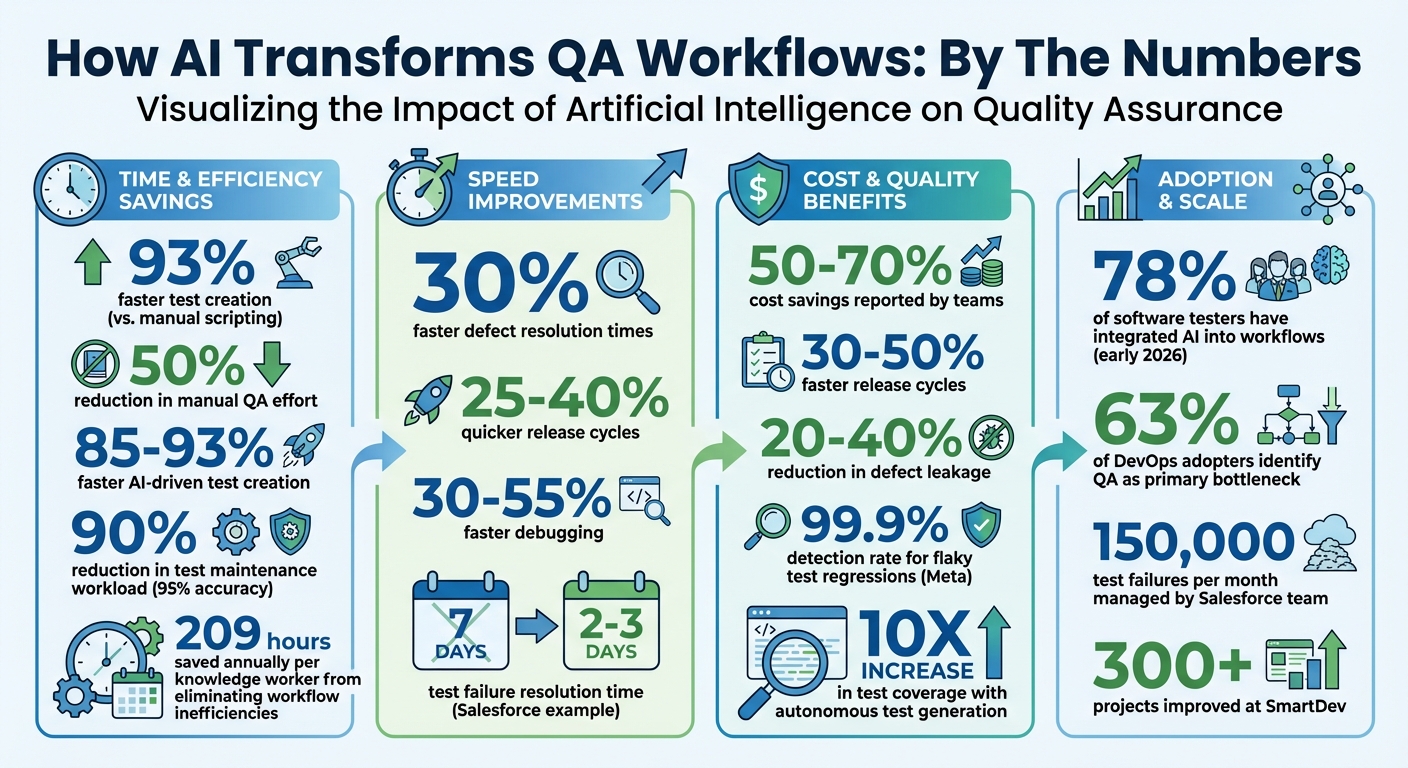
AI-Powered QA: Key Performance Metrics and Impact Statistics
Kevin Surace on The Future of Generative AI and QA Testing | Ep 270 | DevReady Podcast
sbb-itb-7ae2cb2
Common QA Workflow Bottlenecks
Engineering teams often encounter several obstacles in their QA workflows that slow down software delivery and drain resources. These challenges also erode trust in testing systems, making it clear that improvements - like AI-driven solutions - are necessary. Below, we break down some of the most common bottlenecks impacting QA efficiency.
Manual Test Creation and Maintenance
As projects grow, manual test creation and maintenance become increasingly inefficient. Every new feature adds more complexity, requiring additional tests and updates to existing ones. Over time, QA teams may find themselves spending more effort maintaining outdated tests than creating new ones. This imbalance can leave critical functionality untested, often until it's too late to address issues effectively.
Flaky Test Detection
Flaky tests are a major headache for QA teams. These tests produce inconsistent results - even when the code hasn’t changed - causing false positives that disrupt CI/CD pipelines. Teams are forced to investigate these failures, only to discover they’re not actual issues. This inconsistency undermines trust in automated testing, leading developers to ignore warnings or skip testing stages altogether.
The challenge with flaky tests is that their root causes often lie outside the code itself. External factors like network latency, unstable infrastructure, third-party API outages, race conditions, or synchronization problems - such as a UI element failing to load on time - are common culprits. For example, a test might fail simply because a button didn’t render quickly enough. These issues consume valuable engineering time, pulling focus away from building new features and complicating defect triage efforts.
Slow Defect Triage and Prioritization
Defect triage is another area where inefficiencies pile up. When defects are reported piecemeal - like a Slack message here or a screenshot there - manual investigations eat up critical development hours. Engineers often have to sift through extensive logs just to diagnose a single failure, which disrupts workflows and delays resolutions.
Take Salesforce’s Platform Quality Engineering team as an example. In July 2024, they were managing a staggering 150,000 test failures per month. Senior Engineer Manoj Vaitla described how their team used an AI-powered triage system to tackle this challenge:
"The mission of our Platform Quality Engineering team is to serve as the last line of defense before code ships to customers... The TF Triage Agent represents our mission to transform a painful manual process that consumed significant engineering time into an AI-powered solution."
By implementing this AI-driven system, they cut the average test failure resolution time from seven days to just two or three days - a 30% improvement in speed.
The broader picture is equally telling. Statistics show that 63% of DevOps adopters identify QA processes as a primary bottleneck. Additionally, workflow inefficiencies cost knowledge workers an average of 209 hours annually. Without access to real-time data about release risks, product managers struggle to make informed decisions about whether a release is ready. Addressing these delays is essential to improving QA workflows and achieving faster, more reliable software delivery.
How AI Detects QA Workflow Bottlenecks
Advanced AI techniques are now revolutionizing how QA bottlenecks are detected, offering unparalleled precision in identifying inefficiencies.
By continuously monitoring the QA process, AI pinpoints exactly where workflows stumble. It analyzes test execution data, code changes, and failure patterns to uncover breakdowns. As of early 2026, 78% of software testers have integrated AI into their workflows, and the payoff is clear: AI-assisted testing has been shown to cut manual QA effort by 50% in large-scale projects.
Real-Time Pattern Recognition
AI leverages historical test execution data to establish a baseline of "normal" behavior in your QA process. When deviations occur - like a test running unusually long or an unexpected failure in a stable module - the system flags the issue immediately. For example, it can monitor standard flows such as login processes or e-commerce checkouts and detect when application behavior deviates from expected logic.
Unlike basic rule-based automation, modern AI uses pattern recognition through DOM analysis and computer vision to spot subtle UI issues that traditional pixel-matching methods often miss. The emergence of agentic AI takes this further, enabling systems to independently adjust strategies and take ownership of achieving quality objectives in real time.
Predictive Analytics on Code and Test Logs
Predictive analytics digs into commit histories, defect logs, and code changes to forecast potential problem areas. By analyzing historical data, AI identifies modules or features most prone to defects, allowing teams to focus testing efforts where they’re needed most. Time series models predict factors like test execution times and resource demands, helping optimize hardware and personnel allocation to prevent idle time or overcapacity.
These models also analyze past high-traffic events to predict which components might slow down or fail under heavy loads - before they happen. By standardizing data inputs and integrating with CI/CD pipelines, teams can capture logs, screenshots, and code diffs at the time of failure, ensuring accurate predictions.
This predictive approach sharpens automated analyses, paving the way for precise root cause identification.
Automated Root Cause Analysis
AI doesn’t just report failures - it investigates them. Advanced models break down logs into phases like setup, execution, and teardown, filtering out irrelevant noise to focus on the exact moment of failure. By clustering similar defects, AI uncovers systemic issues across builds and uses natural language processing to translate complex error messages into clear, actionable insights.
Failures are categorized into groups like "Product Bug", "Flaky Test", or "Environment Issue" based on specific indicators. For instance, assertion failures and 500-series errors often point to product defects, while network timeouts and database connection errors suggest environmental problems. By correlating runtime data with code structures and recent commits, AI creates a "suspicion cone" to pinpoint the functions most likely causing a regression. This turns hours of debugging into mere minutes.
How Ranger Helps Identify and Resolve QA Bottlenecks
Ranger uses advanced AI techniques to streamline QA processes, from creating tests to resolving defects. By blending AI-driven automation with human QA expertise, it ensures that tests adapt as your product evolves while cutting through unnecessary noise.
Automated Test Creation and Maintenance
Ranger's AI web agent simplifies the testing process by navigating your site and automatically generating adaptive Playwright tests. These tests evolve alongside your product, eliminating the need for manual scripting. To maintain quality, QA experts review each test for clarity and reliability. As Brandon Goren, Software Engineer at Clay, shared:
"Ranger has an innovative approach to testing that allows our team to get the benefits of E2E testing with a fraction of the effort they usually require."
This automation sets a strong foundation for efficient defect management.
AI-Powered Defect Prioritization and Triage
Ranger's AI takes the hassle out of defect triage by filtering out flaky tests and environmental issues, allowing engineers to focus on real bugs and critical problems. It also runs tests in staging and preview environments to catch issues before they reach production. Matt Hooper, Engineering Manager at Yurts, highlighted this benefit:
"Ranger helps our team move faster with the confidence that we aren't breaking things. They help us create and maintain tests that give us a clear signal when there is an issue that needs our attention."
This approach minimizes wasted time on false positives and intermittent failures, keeping teams focused on what matters most.
Real-Time Workflow Alerts and Integration
Ranger integrates seamlessly with tools like Slack and GitHub, delivering test results directly to your team's workspace. Slack alerts automatically notify stakeholders, while GitHub updates speed up pull request reviews. This ensures developers can validate critical workflows before merging code. Jonas Bauer, Co-Founder and Engineering Lead at Upside, explained:
"I definitely feel more confident releasing more frequently now than I did before Ranger. Now things are pretty confident on having things go out same day once test flows have run."
These integrations help maintain a fast and reliable release cycle, keeping engineering teams agile and confident.
Best Practices for Using AI in QA Processes
AI isn't just about spotting bottlenecks - it’s a way to make your QA process more efficient and reliable. By blending AI with your existing QA workflows, you can tap into real-time insights and advanced testing methods to tackle challenges more effectively.
The key to success? Adjust workflows, track meaningful metrics, and let AI handle repetitive tasks. This frees up your team to focus on strategic decisions while keeping human oversight at the core of the process. The result is a system where AI enhances productivity without sidelining critical thinking.
Scale Testing Capacity Based on Project Demands
One of AI's biggest strengths in QA is helping teams scale testing coverage to match project needs. Instead of sticking to a rigid test suite, AI can analyze code commits and prioritize tests for the most relevant changes. This reduces delays in the pipeline while safeguarding critical functionality. For example, you can adjust testing scopes based on Git branches - running focused integration tests for feature branches and full regression tests for release candidates.
During busy development cycles, AI can even generate tests automatically from user stories in tools like Jira or Linear. This keeps testing aligned with feature delivery, eliminating the need for extra manual scripting . These flexible adjustments ensure continuous monitoring and keep your tests reliable over time.
Implement Continuous Monitoring and Self-Healing Tests
AI-powered self-healing features are a game changer for test maintenance, reducing the workload by up to 90% with 95% accuracy. When UI components change, AI updates element locators and scripts automatically, preventing unnecessary test failures. This keeps your test suites running smoothly without constant manual fixes.
Continuous monitoring adds another layer of reliability. By comparing current app behavior to learned baselines, AI can detect issues like performance drops or unusual error patterns in real time. Additionally, tracking metrics like "test debt velocity" helps you understand how quickly tests become outdated, which can directly impact confidence in your QA process.
Track Key Performance Indicators
To measure AI's impact, it’s essential to track specific metrics that highlight improvements in efficiency and quality. For example, monitor escaped defects - bugs that make it to production versus those caught by AI - to evaluate reliability. Keep an eye on Mean Time to Detect (MTTD) to see how quickly AI identifies defects compared to traditional methods.
Other valuable metrics include test creation speed, maintenance reduction, and coverage expansion. Organizations using autonomous test generation have reported up to a 10x increase in test coverage, with AI-driven test creation being 85% to 93% faster than manual scripting. Regularly reviewing these KPIs ensures you’re getting measurable value from AI and helps refine your QA strategy over time.
Conclusion
AI-powered QA tools are reshaping workflows by tackling common bottlenecks with features like real-time pattern recognition, predictive analytics, and automated root cause analysis. These tools help address issues such as flaky tests and slow defect triage. For instance, SmartDev reported cutting its manual QA workload by half across more than 300 projects through AI automation. Similarly, Meta achieved an impressive 99.9% detection rate for flaky test regressions using machine learning models. These examples highlight how combining automation with human expertise can drive substantial improvements.
The key lies in balancing AI capabilities with human oversight. Ranger's "cyborg" model exemplifies this approach: AI agents manage repetitive tasks like test generation and defect triage, while QA experts step in to provide critical contextual understanding and validation - areas where machines fall short.
Integrating AI tools with platforms like Slack and GitHub ensures that workflow disruptions are flagged immediately, minimizing delays from excessive back-and-forth communication. Data shows that teams leveraging AI-driven QA tools achieve several benefits, including 30–55% faster debugging, 25–40% quicker release cycles, and a 20–40% reduction in defect leakage.
However, realizing these advantages requires maintaining human oversight. This ensures that AI-generated recommendations remain explainable, traceable, and tailored to the unique needs of your product, with experienced engineers validating the results.
FAQs
What data does AI need to spot QA bottlenecks?
AI thrives on data like application structure, user workflows, functional requirements, historical test results, code changes, and defect patterns. This data allows AI to pinpoint inefficiencies, refine processes, and boost the precision of testing efforts.
How can teams validate AI triage and root-cause results?
Teams can confirm AI-driven triage and root-cause analysis by leveraging real-time monitoring tools. For example, these tools can verify findings like latency spikes or resource bottlenecks as they occur. Cross-checking AI insights against historical data, logs, and diagnostics adds another layer of precision, ensuring the results are trustworthy.
Pairing AI with human expertise takes validation a step further. In more complex scenarios, experts can review AI-generated findings to ensure they're reliable before any fixes or adjustments are made. This combination of AI and human judgment helps minimize false positives and strengthens the accuracy of identifying root causes.
How do you measure QA ROI after adding Ranger?
You can evaluate QA ROI with Ranger by looking at several key factors: reduced time spent on manual testing, quicker bug detection, better defect prevention, and overall operational efficiency. With its AI-driven platform, Ranger automates testing processes and identifies bugs earlier, leading to cost savings and faster feature rollouts.
Related Blog Posts
Stop babysitting your coding agents. Use Ranger
%201%20(1).svg)
More signals, less noise, faster launches
Let Ranger be your guide to sustainable QA testing.

.png)