%201.svg)
AI Test Failure Analysis: How It Works


AI is transforming how we diagnose test failures in software testing. Instead of spending hours manually reviewing logs and stack traces, AI automates the process, identifying root causes in minutes. Here's how it works:
- Automated Diagnosis: AI analyzes logs, screenshots, and other data to classify failures into categories like "Actual Bug", "UI Change", or "Flaky Test."
- Machine Learning: Techniques like NLP and computer vision detect patterns in errors, even across variations, and suggest solutions.
- Faster Debugging: Teams report debugging times reduced by up to 80%, with many issues resolved in under 5 minutes.
- Improved Accuracy: AI eliminates false positives by filtering out noise from environmental issues or unstable tests.
- Continuous Learning: The system improves over time by learning from validated classifications.
This approach ensures teams focus on real issues, improving testing speed and reliability while reducing repeat failures. AI-powered tools like Ranger integrate seamlessly into workflows, offering features like automated test updates and detailed failure evidence.
AI Is Not Bad at Test Failure Analysis. Your Approach is!
sbb-itb-7ae2cb2
How AI Test Failure Analysis Works
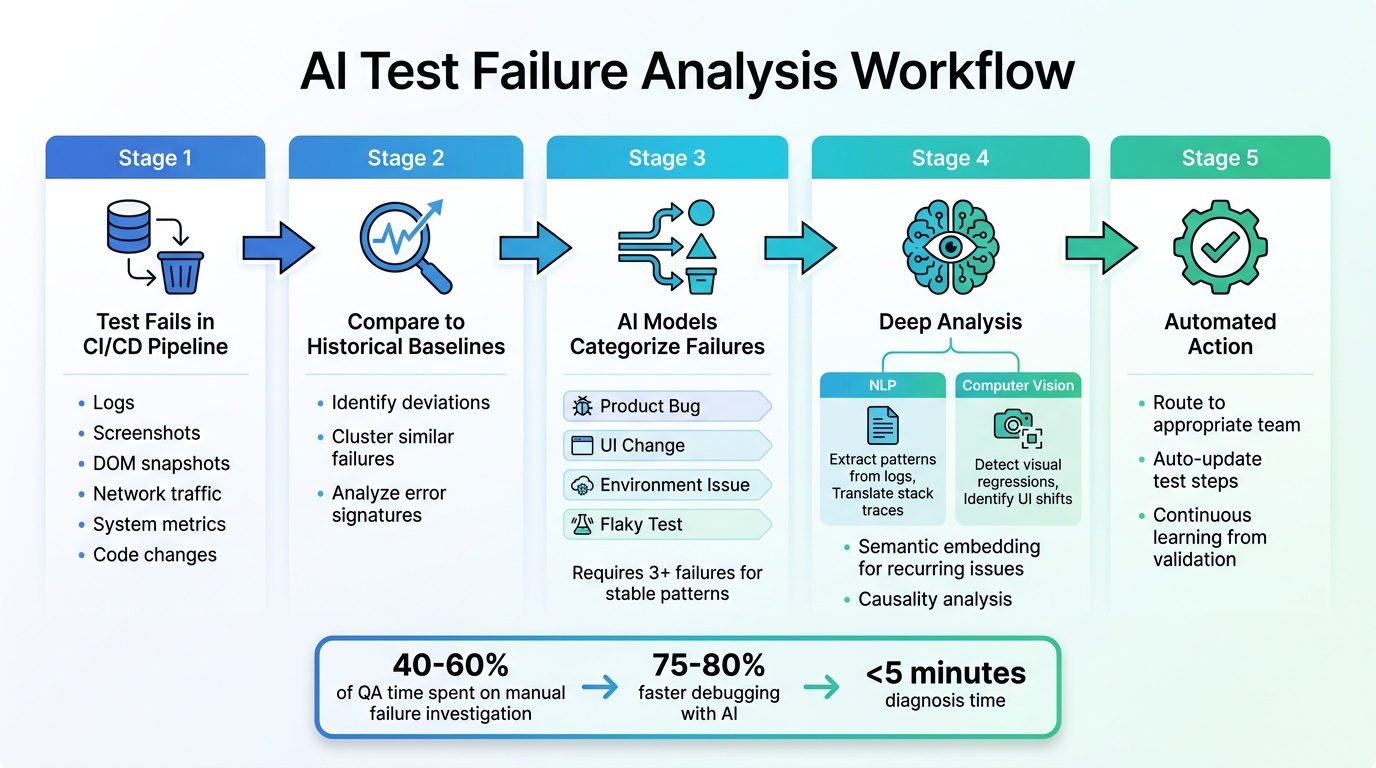
AI Test Failure Analysis Workflow: From Detection to Resolution
The Core Workflow
AI test failure analysis kicks off the moment a test fails in your CI/CD pipeline. At its core, the system pulls together a wealth of data - logs, screenshots, DOM snapshots, network traffic, system metrics, and code changes - to piece together a detailed account of the failure.
Once the data is gathered, the AI compares the current test run to historical baselines, searching for anomalies. These anomalies are deviations from the norm that could signal potential issues. To streamline the process, the system clusters similar failures by analyzing error signatures and stack traces. This clustering ensures your team doesn’t waste time repeatedly investigating the same issue across different tests.
The next step is classification. Here, AI models group failures into actionable categories like "Product Bug", "UI Change", "Environment Issue", or "Flaky Test." They also rank these issues based on their impact, prioritizing those that affect critical user journeys. Some platforms require at least three failures with the same test name to establish stable failure patterns. This focused approach helps teams zero in on the most pressing problems, speeding up resolution and keeping the QA pipeline efficient.
Let’s dive deeper into how machine learning enhances this process.
Machine Learning's Role in Analyzing Failures
Building on the workflow, machine learning takes failure analysis to the next level. It uses techniques like Natural Language Processing (NLP) and Computer Vision to make sense of complex data. NLP, for instance, extracts meaningful patterns from unstructured log data and translates stack traces into plain, understandable language. Meanwhile, computer vision examines screenshots and video recordings to detect visual regressions or shifts in UI elements that might have triggered the failure.
Another powerful tool is semantic embedding, which represents error templates and stack traces as vectors. This allows the AI to find recurring issues based on their meaning rather than relying on exact text matches. For example, even if error messages vary slightly, the system can still identify them as the same underlying problem. Additionally, the AI performs causality analysis, distinguishing immediate causes (like a timeout) from deeper, systemic issues by providing real-time test feedback (such as database connection pool exhaustion).
Consider this: organizations often spend 40–60% of their QA time just figuring out why tests failed instead of improving overall quality. By automating this investigative work, AI-powered systems handle the heavy lifting - processing data, identifying patterns, and correlating issues. Think of it as having a diagnostic partner that learns over time. When engineers validate AI classifications as correct or incorrect, the system retrains itself, becoming even more accurate for your specific application needs.
Key Steps in the Failure Analysis Process
Labeling and Categorizing Failed Tests
Sorting and labeling failed tests is essential for understanding and addressing test failures effectively. Your AI system needs to differentiate between various causes, such as actual product bugs, flaky tests, environmental issues, or script errors. Most teams rely on a standardized set of labels, including:
- Application: Crashes, unhandled exceptions.
- Script: Issues like incorrect selectors or timing problems.
- Device: Hardware-related problems, such as disconnections or low storage.
- Assertion: Failed validations or checks.
- Environment: Interruptions in cloud sessions or test environments.
- Network: Problems like timeouts or DNS failures.
- Framework: Errors during driver initialization.
- Unclassified: Rare or incomplete failure patterns.
These labels help AI systems make precise decisions and improve pattern recognition. As Mythili Raju from TestMu AI explains:
"The Failure Categorization AI feature... learns from your inputs to make test automation more efficient and reduce manual triage time".
By consistently labeling failures, you create a foundation for training AI models to handle similar issues in the future.
Training AI Models with Historical Data
Once failures are categorized, historical data becomes a powerful tool for training AI systems. By analyzing past error logs, metadata (like browser type or operating system), and environmental settings, the AI can identify recurring patterns across thousands of test runs. This process sharpens the system's ability to detect subtle or hidden problems, even when they appear differently in various environments.
Every time you validate or correct an AI classification, the system learns and improves. As TestMu AI notes:
"The more you use it, the smarter it becomes for your specific testing environment".
This continuous learning ensures that the AI adapts to your unique testing needs over time.
Automating Failure Classification
AI can classify failures within seconds using error signatures and historical data. This automation is invaluable for handling the sheer volume of test results generated daily, eliminating the need for manual reviews.
After classification, the AI directs failures to the appropriate team - whether developers, DevOps, or QA. In some cases, it can even auto-update test steps when it identifies a fix with high confidence. This automated process speeds up resolution times and keeps QA pipelines running smoothly. However, it's important to review AI test maintenance alerts in execution reports before fully relying on them for long-term use.
Separating True Failures from False Positives
Common Sources of False Positives
False positives can overwhelm test results and complicate debugging efforts. One major culprit is brittle UI selectors. Tests that depend on CSS classes or text strings often fail when frontend updates introduce even minor changes, even though the application itself is working properly. Timing issues and race conditions are another frequent problem. For instance, a test might check for a particular state before the application has fully loaded, leading to unnecessary failures.
Environment differences also play a role. Discrepancies between local setups and CI environments - like variations in OS versions or library dependencies - can trigger false alarms. Similarly, unstable test data, such as expired tokens or conflicting database records, can cause tests to fail unpredictably, especially when multiple tests run concurrently. A case study showed that replacing fragile CSS selectors with stable data-test-id attributes significantly reduced rerun rates, dropping them from 12% to just 1.2%.
Recognizing these false positives is essential, and AI tools are now stepping in to help filter out these noise-inducing failures for more effective triage.
How AI Improves Failure Triage Accuracy
AI-powered systems analyze failure logs to detect patterns and categorize issues into clear buckets such as "Actual Bug", "UI Change", "Unstable Test (Flaky)", or "Environment Issue." These tools also calculate a flakiness index by dividing the number of failed runs by the total runs. If a test's flakiness exceeds 5%, it is automatically quarantined to prevent it from disrupting the CI pipeline.
Confidence scoring is another helpful feature. AI assigns a confidence level to each failure type, like "Actual Bug - 92% confidence" or "UI Change - 78% confidence", helping teams prioritize their investigations. Additionally, failures with similar stack traces are grouped together, making it easier to identify the root cause of test failures. Meghna Sen from Panto AI explains:
"When you recognize patterns, you convert noisy failures into deterministic problems you can triage, quantify, and fix".
This streamlined approach allows teams to debug issues 75–80% faster than they could with manual methods. AI also enriches test artifacts with correlation IDs and environment metadata, making it easier to determine whether a failure stems from environment drift or an actual defect.
Benefits of AI Test Failure Analysis for QA Teams
Faster QA Processes
AI has transformed how quickly QA teams can diagnose and address test failures. By automating failure classification, debugging times are cut by an impressive 75–80%, with most issues being diagnosed in under 5 minutes.
Automated triage systems categorize failures into buckets like "Actual Bug", "UI Change", "Flaky Test", or "Environment Issue", eliminating the need for hours of manual log reviews. These tools also group similar error patterns, preventing teams from repeatedly investigating the same root cause. Dhruv Rai, Product & Growth Engineer at TestDino, highlights the inefficiency of manual debugging:
"Debugging failing tests manually is slow, costly, and doesn't scale in modern CI/CD. We keep fixing the symptoms, but the real problems linger".
AI takes this further with commit correlation, linking specific failures to the Git commits or Pull Requests that introduced them. This makes it easier for developers to pinpoint the exact changes causing regressions. By streamlining these processes, QA teams can ensure their test suites are both faster and more dependable.
Better Test Suite Reliability
AI doesn’t just speed up QA - it also makes test suites more stable. One way it does this is by identifying and managing unstable or "flaky" tests. When flagged as unreliable, these tests are automatically re-executed, ensuring that only confirmed failures disrupt development workflows. This method has been shown to drop repeat failure rates to below 5%.
Some systems go a step further, automatically rescheduling tests up to two times when errors like "System Aborted" or "Application Flakiness" are detected. This eliminates the need for manual reruns, saving time and effort.
Data-Driven Decision Making
AI also empowers teams to make smarter, data-backed decisions. By analyzing test data, it goes beyond identifying failures to recommend specific fixes, such as updating a UI selector or adding a wait condition. Teams can monitor critical metrics like Mean Time to Resolution (MTTR), Flaky Rate, and Repeat Failure Rate to measure AI's impact on workflow efficiency.
The financial and reputational benefits of these insights are hard to ignore. Fixing a bug after release can cost 100 times more than addressing it during testing. Additionally, 88% of users are unlikely to return to an app after just one bad experience. By catching real bugs before they reach production, AI helps safeguard both revenue and user trust. It also ensures engineering resources are focused on high-priority "Actual Bugs" rather than low-risk flaky tests, keeping teams aligned on what matters most.
Using Ranger for AI-Powered QA Testing
Key Features of Ranger
Ranger streamlines QA testing with AI-driven test failure analysis, acting like an automated QA team integrated into your workflow. Its browser agents test features in real browsers and provide detailed evidence for every failure, including screenshots, video recordings, and Playwright traces.
What sets Ranger apart is its closed-loop iteration system. If an issue arises during testing, the browser agent communicates the failure details to a coding agent (like Claude or Cursor). This coding agent works iteratively to resolve the problem or flags it for human intervention if the issue can't be resolved. As Ranger explains:
"If the browser agent finds an issue, it'll describe it to your coding agent and they'll iterate until it works or your coding agent decides the work is fully blocked and it needs a human in the loop."
Once a feature passes verification, converting it into a permanent end-to-end (E2E) test is as simple as clicking a button. Ranger’s adaptive testing system automatically generates updated Playwright tests, removing the need for manual maintenance. To ensure quality, QA experts review all AI-generated test code to confirm it is both clear and dependable. Brandon Goren, Software Engineer at Clay, highlights:
"Ranger has an innovative approach to testing that allows our team to get the benefits of E2E testing with a fraction of the effort they usually require."
By incorporating these tools, teams can improve test reliability while speeding up their workflows.
Adding Ranger to Your QA Workflow
Integrating Ranger into your QA process is straightforward. It begins with the Ranger CLI. Using the ranger go command during development, you can walk through user flows while automatically capturing detailed evidence. Each task starts with a feature review to define verification needs, turning AI planning into actionable QA steps.
Ranger works seamlessly with platforms like Slack and GitHub. It runs tests on staging or preview environments as code changes, sharing results through GitHub pull requests and providing real-time updates in Slack. This allows teams to tag stakeholders immediately when issues arise. The Feature Review Dashboard centralizes all failure evidence, comments, and change requests in one place. Matt Hooper, Engineering Manager at Yurts, shares:
"Ranger helps our team move faster with the confidence that we aren't breaking things. They help us create and maintain tests that give us a clear signal when there is an issue that needs our attention."
Conclusion
AI is reshaping QA testing by turning what was once reactive guesswork into a precise, data-driven process for identifying and preventing bugs. Through automated failure categorization, correlation of logs and traces, and filtering out false positives, AI ensures your team focuses on real problems instead of wasting time on irrelevant noise.
The impact is clear: debugging speeds up by 75–80%, with diagnoses taking less than five minutes in many cases. Considering that fixing a production bug can cost 100 times more than addressing it earlier, AI becomes a critical tool for protecting both quality and brand reputation.
AI also shifts the focus from troubleshooting after the fact to proactively ensuring reliability. By analyzing historical data, it flags vulnerable areas of code and identifies early signs of test flakiness, reducing repeat failure rates to below 5%. This predictive capability helps prevent issues from ever reaching your users.
Success lies in a balanced approach. Rely on AI for tasks like data correlation, pattern recognition, and initial categorization, but keep human oversight for complex business logic and nuanced validation. A feedback loop is essential for improving accuracy over time, and tracking metrics like Mean Time to Resolution (MTTR) offers valuable insights into your delivery process. This combination of AI and human expertise refines the QA process continuously.
Whether you're working with distributed microservices or more traditional systems, AI-driven test failure analysis provides the speed and precision needed to deliver high-quality software. It allows your team to stay focused on what truly matters: creating exceptional products.
FAQs
What data does AI use to explain a failed test?
AI examines a variety of data points to pinpoint why a test failed. These include logs, network traffic, screenshots, error messages, API traces, locator metadata, and even information from previous successful runs. By pulling together these details, it helps uncover the root cause of failures and offers clear, actionable insights that QA teams can use to address the issue effectively.
How does AI tell a real bug from a flaky test?
AI determines whether a test failure stems from a genuine bug or a flaky test by examining patterns in logs, network activity, screenshots, and other relevant data. By identifying anomalies, it classifies failures into three categories: real bugs, flaky tests, or environmental issues. This process allows teams to concentrate on actual bugs, cutting debugging time by as much as 75-80% and simplifying workflows for more precise test failure analysis.
What setup is required to use Ranger in CI?
To set up Ranger in CI environments, start with a one-time local configuration by creating an encrypted CI profile using the command: ranger profile add [profile_name] --ci. This step securely stores session cookies on your local machine.
After that, install the Ranger tools in your hosted CI environment. Activate the profile and ensure your coding agent has the ability to execute bash commands. For non-interactive setups, you can authenticate by either using a token or setting the RANGER_CLI_TOKEN environment variable.
Related Blog Posts
Stop babysitting your coding agents. Use Ranger
%201%20(1).svg)
More signals, less noise, faster launches
Let Ranger be your guide to sustainable QA testing.

.png)