%201.svg)
5 Tips for Energy-Efficient QA Testing in the Cloud


Want to reduce cloud testing costs and energy use? Here are 5 practical tips to make your QA process more efficient while cutting down on waste:
- Use Spot Instances and Reserved Capacity: Combine Spot Instances for test execution with Reserved Instances for stable infrastructure to save up to 90% on costs and lower idle energy use. This approach also helps mitigate common QA risks associated with infrastructure instability.
- Run Tests in Parallel and Shorten Scripts: Parallel processing reduces test time and energy consumption, while concise scripts prevent delays caused by long-running tests.
- Match Resources to Test Needs: Avoid over-provisioning by choosing the right instance size for each test type, saving up to 30% of cloud spending.
- Automate Resource Cleanup: Remove unused artifacts and idle infrastructure with tools like Terraform or AWS Lambda to minimize waste.
- Monitor Performance and Choose Efficient Hardware: Track resource usage, eliminate redundancies, and use energy-efficient processors like AWS Graviton for better performance per watt.
Key takeaway: Streamlining your testing processes not only saves money but also reduces the environmental impact of cloud-based QA operations. Start small with one or two of these strategies and build from there.
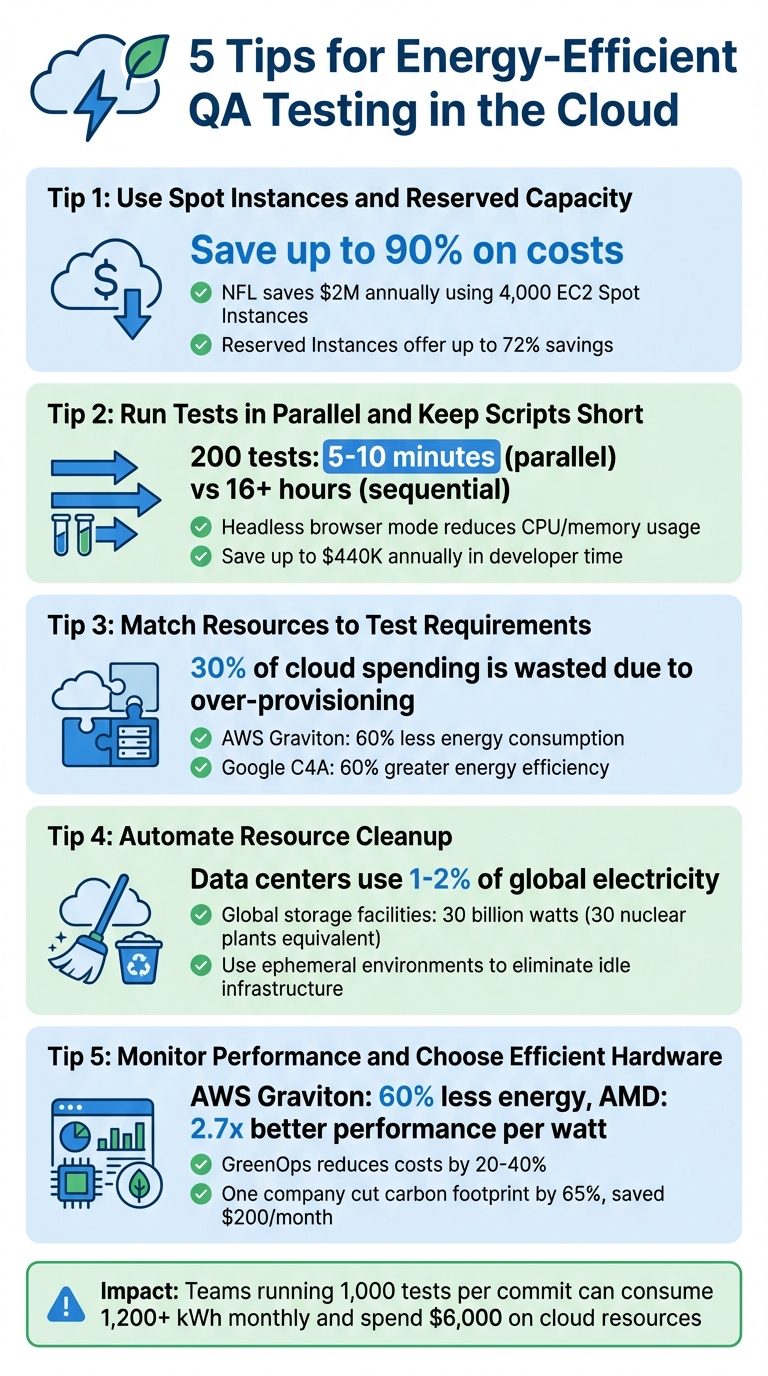
5 Energy-Efficient QA Testing Strategies for Cloud Environments
Improving Testing Efficiency
To truly optimize your workflow, you should also track QA metrics to identify where resource waste occurs.
sbb-itb-7ae2cb2
1. Use Spot Instances and Reserved Capacity
Spot Instances take advantage of unused cloud capacity, offering a cost-effective solution that can slash testing expenses by up to 90% compared to on-demand pricing.
A smart strategy is to combine Reserved Instances for foundational infrastructure - like CI/CD servers or staging databases - with Spot Instances for test execution. Reserved capacity ensures consistent availability while delivering savings of up to 72%. Meanwhile, Spot Instances handle the demanding work of parallel test execution at a fraction of the cost. For instance, the National Football League (NFL) leverages 4,000 Amazon EC2 Spot Instances across over 20 instance types to create its season schedule, saving $2 million annually. Similarly, in October 2025, Wio Bank automated 90% of its non-production environments using Spot VMs, cutting costs significantly while maintaining high performance in its testing and development clusters. This approach not only reduces energy waste but also enhances testing efficiency.
Energy Savings Potential
Running tests during off-peak hours or in regions outside of business hours can maximize Spot Instance capacity and ease the strain on the power grid. Expanding across various instance types - including older hardware generations - further increases the availability of idle capacity. This ensures that tests utilize underused resources rather than driving demand for additional infrastructure. By adopting these practices, QA teams can effectively lower both carbon emissions and operational costs.
Ease of Implementation
One challenge with Spot Instances is the risk of interruptions. AWS provides a 2-minute warning, while Azure and Google Cloud offer only 30 seconds. To mitigate this, testing workflows should be designed to handle interruptions gracefully. Using at least six different instance types across multiple availability zones can help minimize disruptions. Additionally, implementing checkpointing allows long-running tests to save progress and resume from the last state. Configuring Auto Scaling groups in capacity-optimized mode ensures that the most stable resource pools are automatically selected.
"The fundamental best practice when using Spot Instances is to be flexible."
– Pranaya Anshu and Sid Ambatipudi, AWS
2. Run Tests in Parallel and Keep Scripts Short
Running tests in parallel can drastically reduce the time required for test execution. For example, a suite of 200 tests can be completed in just 5–10 minutes with parallel processing, compared to over 16 hours if run sequentially. This method also aligns well with other strategies aimed at reducing energy usage by cutting down active resource time.
The total runtime of parallel tests depends on the length of the slowest test, not the combined time of all tests. This makes it essential to keep individual test scripts concise. A single, lengthy test - say, 30 minutes - can hold up the entire process if all other tests finish in just 5 minutes. To avoid delays, break down complex end-to-end tests into smaller, modular components.
Energy Savings Potential
Parallel testing ensures that CPUs and memory are consistently utilized, avoiding idle periods between tests. Running tests in headless browser mode - where the user interface isn't rendered - further reduces CPU and memory usage. Shortening the overall test execution window is key to reducing energy consumption, as servers continue to draw power even when tests are idle.
Cost Efficiency
Parallel testing doesn't just save energy; it can also significantly cut costs. Sequential testing wastes valuable developer time, potentially costing organizations up to $440,000 annually. By reducing build times by just 15%, teams could enable one additional deployment per developer each week. On the financial side, cloud providers typically charge around $130 per node for smaller parallel setups (under 25 nodes), with costs dropping to approximately $100 per node as the scale increases.
Ease of Implementation
To make parallel testing seamless, ensure that tests run independently. For example, Java's ThreadLocal can help avoid shared state issues. Using a test case prioritization tool or Test Impact Analysis (TIA) ensures you run only the tests affected by recent code changes, reducing unnecessary parallel sessions. Automating resource cleanup to immediately decommission cloud infrastructure after tests finish can further optimize the process.
"Before BrowserStack, it took eight test engineers a whole day to test. Now it takes an hour. We can release daily if we wanted to."
– Martin Schneider, Delivery Manager
3. Match Resources to Test Requirements
Optimizing energy use in testing isn’t just about execution efficiency - it’s also about using the right resources for the job. Pairing cloud resources with specific test requirements can significantly reduce both energy consumption and costs. A staggering 30% of cloud spending is wasted due to inefficiencies, much of it from running tests on oversized instances. For example, lightweight API tests need far fewer resources than load tests designed to simulate thousands of users.
To start, categorize your workloads and prioritize testing risks. Unit tests typically require minimal CPU and memory, while UI tests, which involve browser environments, demand more. Integration tests with database interactions fall somewhere in the middle. Cloud providers offer resource options tailored to these needs: general-purpose machines handle standard tasks, compute-optimized ones are ideal for CPU-heavy processes, and memory-optimized instances excel for in-memory testing.
Energy Savings Potential
Choosing the right instance size doesn’t just save money - it also reduces energy use. For example, AWS Graviton processors consume up to 60% less energy while delivering comparable performance to other EC2 instances. Similarly, Google’s C4 VMs offer 40% better price-performance compared to their C3 counterparts, with the C4A processor achieving 60% greater energy efficiency over equivalent x86 processors.
Profiling your CPU, memory, and data transfer over a 30-day period is key to matching resources accurately. Tools like Azure Advisor and Google Cloud Rightsizing Recommendations analyze usage patterns and suggest machine types suited to your actual needs. This avoids provisioning for peak capacity when most tests run well below that threshold.
By aligning resource allocation with test demands, you can achieve cost-effective scaling while maintaining energy efficiency.
Cost Efficiency
For workloads that aren’t constant, consider using burstable instances or serverless platforms like Cloud Run to cut costs significantly.
"Poor cloud resource management, such as leaving environments running unnecessarily or over-provisioning, can quickly undermine any potential sustainability gains."
– Tech Carbon Standard
Ease of Implementation
Autoscaling tools like Horizontal Pod Autoscaler (HPA) or Managed Instance Groups, combined with Infrastructure-as-Code (IaC), can dynamically adjust resources and ensure they’re decommissioned after testing. Test Impact Analysis (TIA) is another powerful strategy, running only the tests affected by code changes. This can slash costs and energy use by over 50%.
4. Automate Resource Cleanup and Test Optimization
After ensuring efficient resource allocation, the next step is automating resource cleanup. This approach minimizes energy waste by removing unused digital artifacts that can otherwise linger unnecessarily.
Cloud environments often accumulate leftover test artifacts like logs, screenshots, and temporary databases after every test run. If these artifacts aren't cleaned up, they remain stored persistently, consuming energy 24/7. It's worth noting that data centers are responsible for about 1% to 2% of global electricity usage. On a larger scale, global digital storage facilities use an estimated 30 billion watts of electricity - roughly the same as 30 nuclear power plants.
Automating this cleanup process can make a huge difference. For example, Infrastructure-as-Code (IaC) tools like Terraform can deploy AWS Lambda functions to identify and remove unused EBS volumes, idle Elastic IP addresses, and orphaned load balancers. Additionally, AWS Data Lifecycle Manager allows you to set up lifecycle policies that automatically delete snapshots and logs after a specific retention period.
Energy Savings Potential
Ephemeral environments are a game-changer for energy efficiency. By spinning up containerized test instances only when needed, running tests, and tearing them down immediately, you eliminate idle infrastructure. AWS Fargate is particularly effective for this, as it handles short-lived test environments automatically, avoiding the energy drain caused by "always-on" setups.
Optimizing storage also plays a key role. Automated data deduplication and compression reduce the amount of stored data, which directly lowers the energy required for both storage and data transmission. Regularly cleaning up orphaned resources not only cuts storage costs but also significantly reduces energy use.
By integrating these automated strategies into your testing processes, you can achieve both energy efficiency and cost savings without disrupting your workflows.
Ease of Implementation
Achieving these energy savings doesn’t have to be complicated. Simple cleanup and optimization measures can go a long way.
Start by setting aggressive retention policies to automatically delete non-critical test artifacts. Structure your CI/CD pipelines with fail-fast logic to stop execution immediately when a critical test fails, preventing unnecessary resource usage on downstream tests. To safeguard essential infrastructure, use specific tags like "KeepResource" or "DoNotDelete" to exempt them from automated cleanup scripts.
"Efficiency isn't just green - it's excellent engineering."
– Twinkle Joshi, Writer
Automation tools like Ranger (https://ranger.net) can further simplify managing your test infrastructure. These platforms ensure resources are only allocated when necessary, helping you maintain an efficient and sustainable testing lifecycle.
5. Monitor Performance and Choose Energy-Efficient Infrastructure
After automating resource cleanup, the next step is to actively monitor test performance and select hardware that prioritizes energy efficiency. Performance monitoring is essential to ensure that every active component is working effectively. Without this visibility, inefficiencies can lead to wasted energy and unnecessary costs.
Why monitoring matters: Metrics like "VM Uptime vs. Use Ratio" can expose inactive environments (often called "zombie" environments) that remain powered on without performing any tests. Similarly, tracking the "Redundancy Ratio" helps pinpoint overlapping or unnecessary tests that consume resources without adding value. Regular monitoring uncovers inefficiencies that might otherwise go unnoticed.
Energy Savings Potential
Choosing the right infrastructure can significantly lower energy use. For instance, AWS Graviton processors are designed to use up to 60% less energy while maintaining the same performance level as other EC2 instances. A 2026 study demonstrated that AMD-powered m8a.metal-48xl bare-metal instances consumed 307 watts compared to Intel's 526 watts, delivering 2.7x better performance per watt.
Incorporating real-time grid data into resource scheduling can further optimize energy use. Carbon-aware scheduling aligns workloads with times when the grid's carbon intensity is lower. For example, by scheduling resource-heavy tests during off-peak hours or in regions with cleaner energy sources, teams can reduce their environmental impact. In March 2025, a SaaS company reported cutting their carbon footprint by 65% and saving $200 per month by migrating workloads from AWS us-east-1 (Virginia) to us-west-2 (Oregon).
Cost Efficiency
Adopting sustainable cloud practices - often referred to as GreenOps - can also lower costs. These practices typically reduce infrastructure expenses by 20% to 40%. Optimizing test suites by removing redundant cases can push savings even further, cutting cloud resource costs by over 50%.
"Sustainable cloud practices (GreenOps) don't just help the planet - they typically reduce costs by 20-40% while often improving performance."
– CloudCostChefs Team
Tools like AWS Trusted Advisor can analyze actual usage patterns, helping you right-size your instances to match your exact testing needs. Additionally, code-level profiling tools such as Amazon CodeGuru Profiler and SusScanner can identify parts of your code that consume excessive CPU or memory, enabling targeted improvements to reduce energy consumption.
Ease of Implementation
You don’t need to completely overhaul your infrastructure to get started. Continuous monitoring and incremental changes can lead to long-term energy savings. For example, implementing Test Impact Analysis (TIA) allows you to monitor code changes and run only the tests impacted by those changes, which significantly reduces unnecessary compute cycles. For a more detailed look at power usage, bare-metal instances can provide access to Model-Specific Register (MSR) data, which is often unavailable on standard instances due to hypervisor restrictions.
Platforms like Ranger (https://ranger.net) make the process even easier by offering hosted test infrastructure that automatically scales based on actual demand. This eliminates the need for manual resource allocation and ensures energy is only consumed when tests are actively running. By combining monitoring tools, smart infrastructure choices, and automated platforms like Ranger, you can create a testing environment that’s both energy-efficient and cost-effective while supporting your broader sustainability goals.
Conclusion
Energy-efficient QA testing offers a smarter way to cut costs while reducing environmental impact. Software testing often mirrors production environments and involves running extensive regression suites repeatedly, which can lead to substantial IT-related emissions. For instance, a team running 1,000 tests per commit across five branches can consume over 1,200 kWh of energy and spend $6,000 on cloud resources every month.
By adopting energy-conscious testing strategies, teams can reduce costs and streamline their processes. These methods not only enhance system reliability and speed up feedback loops but also significantly lower cloud resource consumption.
"In the era of sustainable digital transformation, Green Quality Engineering is not just good for the planet - it's good for the business."
– Craig Risi, Quality Engineering Lead
Platforms like Ranger (https://ranger.net) simplify this transition. Ranger’s cloud-hosted infrastructure scales automatically based on actual demand, ensuring energy is used only when tests are actively running. By integrating such tools, your QA operations can become even more energy-efficient.
The benefits of these practices extend far beyond immediate savings. Adopting energy-efficient testing today helps your organization comply with future environmental regulations and meet the growing demand for responsible development. It also builds a more resilient testing operation - one capable of handling peak demand, protecting your brand reputation, and speeding up time-to-market. With data centers projected to emit approximately 2.5 billion metric tons of CO₂-equivalent emissions by 2030, every step toward optimization makes a difference.
Start small by implementing one or two strategies, such as Test Impact Analysis to run only necessary tests, scheduling resource-heavy tasks during off-peak hours, using energy-efficient processors like AWS Graviton, or leveraging Ranger's automated infrastructure. These steps can set the foundation for a cost-effective, reliable, and environmentally responsible QA process.
FAQs
How do I prevent Spot Instance interruptions from breaking test runs?
To reduce the impact of Spot Instance interruptions, consider using an Auto Scaling group to automatically replace any instances that get interrupted. Ensure your instances are prepared with pre-configured AMIs to allow for fast recovery. Regularly back up important data to persistent storage solutions like Amazon S3 or EBS for added security. Additionally, design your applications with fault-tolerant architectures, such as using queues or distributed systems, to break tasks into smaller units and maintain system reliability even during interruptions.
Which test types should I parallelize first to save the most energy?
To make the most of your energy savings, focus on running smoke tests and critical regression tests in parallel. These tests are typically smaller and quicker, allowing them to run at the same time. This strategy not only cuts down on overall testing time but also trims resource usage, making the process more efficient and less energy-intensive.
What metrics best reveal wasted cloud resources in QA environments?
To identify wasted cloud resources in QA environments, focus on a few key metrics:
- Gap Between Maximum and Actual Computing Load: This highlights the difference between the resources allocated and those actually used. A significant gap often signals over-provisioning.
- Idle Resource Runtime: Look at how long resources remain active without performing any meaningful tasks. Extended idle times can indicate inefficiencies.
- Underutilized Provisioned Resources: These are resources that are consistently operating below their capacity, suggesting they might be scaled down or reconfigured.
By analyzing resource utilization data and keeping a close eye on cloud spending, you can uncover inefficiencies and take steps to optimize your resources.
Related Blog Posts
Stop babysitting your coding agents. Use Ranger
%201%20(1).svg)
More signals, less noise, faster launches
Let Ranger be your guide to sustainable QA testing.

.png)