%201.svg)
End-to-End Security in Cloud QA Testing


End-to-end security in cloud QA testing ensures your entire testing process - from code commits to execution - remains protected. It focuses on safeguarding data, infrastructure, and applications while addressing vulnerabilities early in the software development lifecycle (SDLC). Here’s what you need to know:
- Shift Left: Run security checks early in development using tools like static code analysis and Infrastructure as Code (IaC) scanning.
- Cloud-Specific Challenges: Misconfigured storage, insecure APIs, and supply chain risks are common vulnerabilities in cloud QA environments.
- DevSecOps Integration: Embedding security into CI/CD pipelines helps catch vulnerabilities before production.
- Zero Trust: Adopt principles like least privilege access and continuous verification to minimize risks.
- Data Protection: Encrypt sensitive test data, use tools like AWS Secrets Manager for credential management, and comply with regulations like GDPR.
- Pipeline Security: Secure CI/CD pipelines by enforcing signed commits, rotating secrets, and isolating build environments.
- AI Risks: In AI-driven QA, protect against prompt injection, secure models, and use synthetic data for privacy.
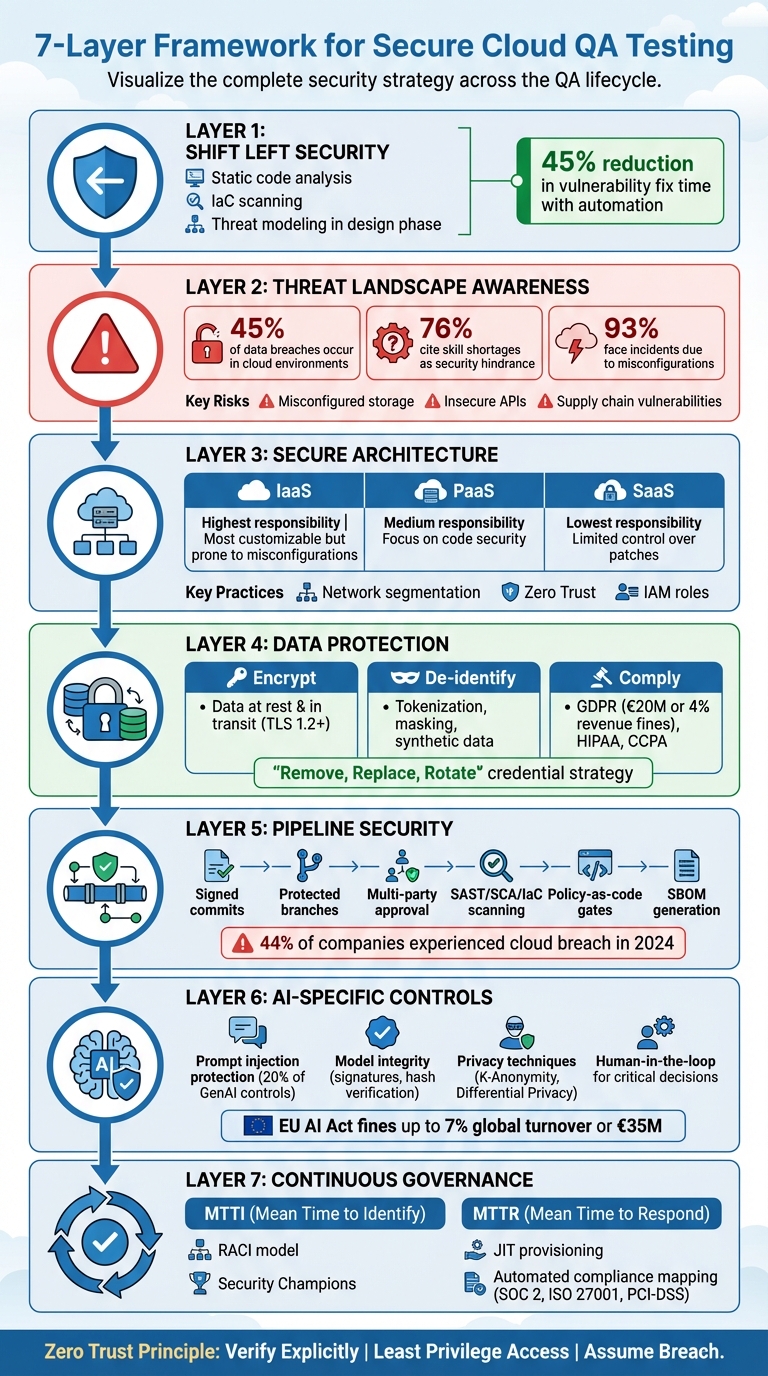
7-Layer Framework for Secure Cloud QA Testing Implementation
Automated Security Testing with Selenium & OWASP ZAP | Part 16
sbb-itb-7ae2cb2
Understanding the Cloud QA Threat Landscape
Continuing our dive into integrated security measures, let’s take a closer look at the specific threats that cloud QA environments face.
Key Risks in Cloud QA Testing
Cloud QA environments come with their own set of challenges, distinct from traditional setups. One major issue is public object storage. Misconfigured storage buckets can leave sensitive data exposed to unauthorized access. Another common vulnerability lies in insecure APIs and gateways. When API gateways accept user input without proper validation, attackers can exploit this to compromise critical business systems.
Supply chain vulnerabilities are another concern. Teams often rely on publicly available software packages or third-party libraries. Without thorough vetting, these can introduce known security flaws directly into the testing process. Consider this: 45% of data breaches occur in cloud environments, and 76% of cybersecurity professionals report that skill shortages hinder their ability to secure these environments. These figures emphasize the pressing need to address cloud-specific threats in QA workflows.
| Service Model | Developer Responsibility | Security Impact |
|---|---|---|
| IaaS | Highest: OS, Network, Data, Apps | Most customizable but prone to misconfigurations |
| PaaS | Medium: App code, Auth, Data access | Providers handle OS and container security; developers focus on code |
| SaaS | Lowest: Configuration, Admin tweaks | Simplest to manage but offers limited control over security patches |
How QA Processes Create Security Vulnerabilities
Even QA workflows can unintentionally create security risks. A common issue is hardcoded secrets - like API keys, user credentials, or private keys - being stored in version control systems. If attackers gain access, they can exploit these credentials. Another pitfall is verbose logging. While helpful for debugging, these logs may capture sensitive data, such as Social Security numbers or health information, leaving it unprotected in log files.
"Writing secure code is the customer's responsibility. Cloud service providers do not patch the code when a vulnerability exists." - Tenable
Testing environments that don’t mirror production setups can also cause problems. Vulnerabilities unique to production systems may go unnoticed if the configurations don’t match. On the flip side, running destructive tests - like those that delete or corrupt data - directly in production can disrupt business operations. Additionally, overprivileged QA accounts can make test environments insecure, especially when new services lack proper access controls.
These examples underscore the importance of adopting structured frameworks to assess and mitigate risks.
Using Risk Assessment Frameworks
Risk assessment frameworks provide a systematic way to manage cloud QA vulnerabilities. For example, the NIST Risk Management Framework (RMF) offers a six-step process - Categorize, Select, Implement, Assess, Authorize, Monitor - to address security and privacy risks throughout the system development life cycle. Similarly, NIST SP 800-53 catalogs security and privacy controls, while SP 800-53A focuses on assessment methodologies to ensure these controls are properly implemented.
The Microsoft Security Development Lifecycle (SDL) pushes for early-stage security practices like static code analysis and automated scanning of Infrastructure as Code (IaC). OWASP Threat Modeling helps identify potential attackers, techniques, and vulnerabilities specific to your application architecture before testing begins. Meanwhile, the CISA Zero Trust Maturity Model guides organizations toward architectures that verify every access request, regardless of its origin. Tools like a Software Bill of Materials (SBOM), which tracks component dependencies, are also invaluable for managing supply chain risks.
Building Secure Cloud-Based QA Environments
Creating secure QA environments starts with a layered approach to security, incorporating centralized identity management and temporary, least-privilege credentials. This "defense in depth" strategy ensures security is embedded at every level. For example, segregating QA environments from production and other workloads - using separate cloud accounts or projects based on function and data sensitivity - minimizes the risk of cross-contamination. Infrastructure hardening takes it further by deploying virtual machines and containers with pre-hardened images (like Amazon Machine Images), ensuring each instance begins with a secure baseline. Real-time monitoring, alerting, and auditing are essential for quick responses to potential issues.
"Automated software-based security mechanisms improve your ability to securely scale more rapidly and cost-effectively."
– AWS Well-Architected Framework
Automation plays a key role in maintaining consistency. By defining security controls as code - using Infrastructure as Code (IaC) and version-controlled templates - you can enforce uniform security measures across all environments. Tools like the Microsoft Cloud Security Benchmark (MCSB) v2, which includes over 420 policy-based controls for monitoring security posture, and Amazon S3's design for 99.999999999% durability of objects, highlight the reliability of well-configured cloud systems. These practices lay the groundwork for building secure and effective QA architectures.
Designing Secure QA Architectures
A secure QA architecture relies on network segmentation and centralized identity and access management (IAM). Dividing environments into isolated segments - such as using virtual private clouds (VPCs) for different testing stages - helps contain potential breaches. Cloud providers like AWS, Azure, and Google Cloud Platform offer tools such as AWS CloudTrail and Amazon GuardDuty to continuously monitor for unauthorized activity.
Centralized IAM ensures that only authenticated users, devices, and services can access resources. Assigning temporary credentials to compute instances (e.g., EC2, Lambda, or containers) through IAM roles reduces risks tied to credential misuse.
For destructive tests - those that may delete or corrupt data - using isolated clones of production environments is crucial. Pre-provisioned "clean rooms", created with tools like AWS CloudFormation, provide a safe space for testing or forensic investigations. Incorporating static code analysis and automated scanning of IaC early in the development cycle (a "shift-left" approach) can catch vulnerabilities before deployment.
Encryption and Secrets Management in QA
Data encryption and secrets management are vital for securing QA environments. Encrypt data both at rest and in transit, using secure protocols like TLS/HTTPS and managed cryptographic keys. For example, test databases or storage snapshots should be encrypted with server-side encryption.
Hard-coded credentials, such as API keys or passwords, are a common vulnerability. Instead, use centralized services like AWS Secrets Manager, Azure Key Vault, or Google Cloud KMS to securely store, manage, and rotate credentials. The "Remove, Replace, Rotate" strategy helps address credential security: remove unnecessary credentials, replace long-term ones with temporary alternatives (via IAM roles or security token services), and rotate any secrets that can't be replaced.
"The most secure credential is one that you do not have to store, manage, or handle."
– AWS Well-Architected Framework
AWS Secrets Manager, for instance, offers encryption, auditing, fine-grained access controls, and automatic credential rotation. Tools like Amazon CodeGuru or git-secrets can scan repositories to ensure no hard-coded secrets are committed. Adding multi-factor authentication (MFA) for critical deletion operations and setting up CloudWatch alarms to track cryptographic key usage can further protect against data loss.
| Credential Type | Suggested Strategy | Implementation Tool |
|---|---|---|
| IAM Access Keys | Replace with IAM Roles | AWS IAM / Roles Anywhere |
| SSH Keys | Replace with Programmatic Access | EC2 Instance Connect / Systems Manager |
| Database Passwords | Rotate Automatically | AWS Secrets Manager / Azure Key Vault |
| API/OAuth Tokens | Store and Rotate | AWS Secrets Manager |
| Data at Rest | Encrypt by Default | AWS KMS / Azure Disk Encryption |
| Data in Transit | Enforce TLS/HTTPS | Load Balancer Listeners / CloudFront |
Modern security also demands a Zero Trust mindset, where every access point is treated as a potential risk.
Implementing Zero-Trust Principles in QA
Zero Trust operates on three key principles: verify explicitly, use least privilege access, and assume breach. It treats every entity as potentially compromised, requiring constant verification.
"Zero Trust security is a model where application components or microservices are considered discrete from each other and no component or microservice trusts any other."
– AWS Security Pillar
A core tactic in Zero Trust is microsegmentation, which treats application components and microservices as separate entities with granular policies. This limits lateral movement if a breach occurs. Continuous verification evaluates every access request in real time, factoring in user identity, device health, location, and potential anomalies. For example, if a tester's device shows signs of compromise, access can be revoked immediately.
Research shows that organizations use an average of 1,000 apps, with 80% of employees relying on unauthorized "shadow IT" tools. In QA, where unsanctioned tools may be employed for testing, Zero Trust involves identifying and controlling these applications. Microsoft Defender for Cloud Apps, for instance, catalogs over 16,000 cloud apps and evaluates more than 90 risk factors.
To strengthen Zero Trust in QA environments, eliminate static credentials, implement Just-In-Time (JIT) and Just-Enough-Access (JEA) policies, and verify device health before granting access. Automating secrets management to centrally store, manage, and rotate credentials adds another layer of security. Coupled with continuous monitoring, these practices create a resilient Zero Trust framework for cloud-based QA operations.
Data Protection and Privacy in Cloud QA Testing
Test data often contains sensitive customer information - names, credit card details, health records, and Social Security numbers. Without proper security measures, QA environments can become vulnerable entry points for data breaches. For instance, in 2024, a financial services firm used Microsoft Purview to scan over 200 Azure Storage accounts and 50 SQL databases. Within a week, they identified 15,000 regulated data assets, slashing discovery time from months to just days.
Non-compliance with regulations like GDPR can result in fines of up to €20 million or 4% of annual global revenue, whichever is higher. To avoid such penalties, organizations must treat test data with the same care as production data by implementing encryption, access controls, and lifecycle management from the outset. This brings us to the critical task of managing test data securely.
Managing Test Data Securely
The first step is identifying sensitive data. Tools like Amazon Macie, Microsoft Purview, or Google Sensitive Data Protection can automatically detect and label PII (Personally Identifiable Information), PHI (Protected Health Information), and PCI (Payment Card Information) across repositories. Microsoft Purview, for example, can automatically apply "Highly Confidential" labels when it detects three or more PII patterns in a single asset.
Once identified, sensitive data should be de-identified. Techniques like tokenization (replacing real data with random tokens), format-preserving encryption (encrypting data while maintaining its structure), or masking (hiding specific fields) help retain data utility without exposing real values.
Another effective approach is synthetic data, which creates artificial datasets that mimic real data characteristics without containing any actual sensitive information. This eliminates compliance risks entirely. Automated tools can also apply encryption at scale, securing thousands of documents in a matter of hours. To further reduce risks, limit direct database access for testers. Instead, use applications with specific permissions to transform or move data, minimizing human interaction and simplifying audit trails.
Meeting Regulatory Compliance Requirements
After securing test data, align your practices with regulatory requirements like GDPR, HIPAA, CCPA, and SOC 2. A key principle is data minimization - only collect the personal data absolutely necessary for QA purposes.
"The GDPR's privacy-by-design standard ensures that privacy is at the forefront rather than an afterthought."
– Linford & Co
Data residency is another critical factor. Use resource location policies to ensure test data is stored and processed within specific geographic regions, as required by law. For added security, store encryption keys outside the cloud provider's environment, granting access only when fully justified.
Retention policies are equally important. GDPR mandates that personal data be deleted or securely disposed of once it's no longer needed. Define clear timelines - such as 30 or 90 days - and automate deletion using lifecycle management tools. AWS S3 Object Lock or Glacier Vault Lock can enforce mandatory access controls, preventing even root users from altering data until the retention period expires.
Access governance should follow Zero Trust principles. Use multi-factor authentication (MFA) and identity and access management (IAM) to secure test environments. Attribute-based access control (ABAC) and resource tagging can further restrict access. For example, tagging resources with "Project=QA_Test" ensures only authorized QA roles can interact with them.
Organizations using unified privacy platforms have reported cutting audit times in half and expediting deal closures by providing real-time compliance evidence. Automating evidence collection through APIs and dashboards that map controls to regulations like GDPR and CCPA can streamline this process.
| Compliance Requirement | Cloud Strategy/Tool | Key Action |
|---|---|---|
| Data Residency | Resource Location Policies | Restrict data storage to specific regions |
| Data Classification | Sensitive Data Protection/Purview | Automatically tag and tokenize PII |
| Access Control | IAM & VPC Service Controls | Create security perimeters |
| Encryption | TLS 1.2+ / Default Encryption | Protect data at rest and in transit |
| Monitoring | Security Command Center/Sentinel | Get real-time alerts for violations |
Handling Test Artifacts Securely
Test artifacts - such as logs, screenshots, test reports, database snapshots, and configuration files - often contain sensitive information, mirroring the systems they document. For example, a screenshot of a payment form might display credit card details, or a log file might include API keys or session tokens. These artifacts require the same level of protection as production data.
Encrypt all artifacts using modern cryptographic standards like TLS 1.2/1.3 for data in transit and customer-managed keys for data at rest. Block public access to storage buckets (e.g., S3), block storage snapshots (e.g., EBS), and database snapshots (e.g., RDS) to prevent accidental exposure. Tools like AWS Config rules or Azure Policy can automatically detect and fix snapshots set to "public".
Administrative connections should be routed through secure bastions like Azure Bastion instead of exposing management interfaces directly to the internet. Replace outdated protocols like FTP and unencrypted HTTP with secure alternatives like SFTP, FTPS, or HTTPS for all artifact transfers. Enable MFA delete for critical test artifacts to prevent accidental or malicious deletions.
A healthcare provider using Microsoft Defender for Storage and SQL in 2024 detected unusual bulk download activity from a compromised service principal within 48 hours of implementation. Automated playbooks isolated the compromised identity and alerted the Security Operations Center within 15 minutes, averting a potential large-scale data breach.
Behavioral analytics can also help monitor unusual data movements, such as bulk downloads of test reports or off-hours access to database snapshots. Azure's Insider Risk Management, for instance, can flag "data theft by departing users" by identifying unusual file downloads occurring 30 to 90 days before an employee's resignation. AWS KMS adds another layer of protection by enforcing a mandatory waiting period of 7 to 30 days before permanently deleting encryption keys, ensuring a safety net to prevent irreversible data loss.
To maintain a secure environment, audit access using tools like AWS CloudTrail or Azure Monitor. Establish strict data retention and destruction policies to ensure sensitive information isn't stored longer than necessary for QA purposes. Properly managing test artifacts strengthens compliance efforts and supports a robust cloud QA security framework.
Securing Test Automation and Pipelines
CI/CD pipelines play a central role in cloud-based QA but also introduce serious security risks. In 2024, 44% of companies reported experiencing a cloud data breach within the past year, and 93% faced security incidents due to misconfigurations. Without proper security measures, pipelines become prime targets for attackers looking to inject malicious code, steal credentials, or compromise production systems.
Some of the most concerning vulnerabilities include Poisoned Pipeline Execution (PPE) and dependency chain abuse, where attackers exploit flaws to inject malicious code or manipulate dependencies. Weak pipeline integrity checks - like bypassing protected branches - can allow unverified code to reach production without proper reviews. Another persistent issue is the use of embedded credentials in repositories, which remains a risky practice despite being avoidable. Strengthening pipeline security is critical to prevent these vulnerabilities from escalating.
Securing CI/CD Pipelines for QA
The cornerstone of pipeline security is a strong source code management (SCM) strategy. This includes disabling auto-merge rules, requiring signed commits, and enabling protected branches to block untrusted code from entering the pipeline. Implementing multi-party approvals for pull requests ensures that no single developer can bypass the review process, reducing the risk of insider threats and accidental deployments.
For managing credentials, follow a "Remove, Replace, Rotate" approach. Remove unnecessary secrets, replace long-term API keys with temporary IAM roles, and automate secret rotation using tools like AWS Secrets Manager or HashiCorp Vault.
"The most secure credential is one that you do not have to store, manage, or handle." – AWS Well-Architected Framework
Avoid logging plaintext passwords or tokens; instead, use formats like JSON or syslog for audit trails while ensuring sensitive data is not exposed.
Policy-as-code (PaC) tools such as OPA, Kyverno, or AWS CloudFormation Guard can enforce security baselines during build and test phases. Configure pipelines to halt deployment ("break the build") if high-risk vulnerabilities or non-compliant assets are detected. Use code signing and hash checks against lockfiles to verify artifact integrity and prevent supply chain attacks. Isolating build nodes in separate environments can further limit lateral movement in the event of a breach. Apply the principle of least privilege to pipeline secrets, resource access, and operating system permissions. Additionally, generate a Software Bill of Materials (SBOM) for every release to monitor dependencies and address supply chain risks.
| Vulnerability Category | Specific Risk | Mitigation Strategy |
|---|---|---|
| Flow Control | Bypassing PR reviews | Enable protected branches and enforce multi-party approvals |
| IAM | Over-privileged identities | Use temporary credentials and "deny by default" permissions |
| Supply Chain | Malicious dependencies | Use version pinning, hash verification, and private repositories |
| Configuration | Hardcoded secrets | Implement secret scanning tools (e.g., git-leaks) and centralized vaults |
| Integrity | Pipeline Poisoning (PPE) | Store CI configurations outside the app repo and require strict review of config changes |
Test automation frameworks also need tailored security measures to safeguard execution environments.
Best Practices for Test Automation Frameworks
Secure test automation frameworks by implementing strict role-based access control (RBAC), rotating API tokens regularly, and committing lockfiles to ensure consistent dependency versions. Limit the permissions granted to test automation identities. For instance, a test script should only access specific S3 buckets or API actions like s3:GetObject rather than having full administrative rights.
Enable detailed audit logging to monitor authentication events and configuration changes. Logs should be in JSON or syslog format and sent to a SIEM for analysis, ensuring sensitive data like plaintext passwords and API keys are never recorded. Use dependency graphs to focus on vulnerabilities that are actually exploitable in the deployed environment instead of addressing every reported CVE. Avoid running test containers as root and use minimal, verified base images like Alpine or Distroless to reduce the attack surface. In zero-trust setups, employ mutual TLS (mTLS) for internal microservice communication during testing to ensure both ends of a connection are verified.
Integrate security testing tools like Static Application Security Testing (SAST), Software Composition Analysis (SCA), and Infrastructure-as-Code (IaC) scanning early in the pipeline. This "shift-left" strategy equips developers with the tools to catch issues before deployment.
As automation evolves, AI-driven testing introduces its own set of security challenges that require specialized attention.
AI-Powered QA Testing and Security
AI-driven QA testing brings unique risks that demand targeted controls. In a GenAI framework, prompt security accounts for roughly 20% of overall controls. Protect against direct and indirect prompt injection by implementing input filtering, isolating system and user prompts, and using behavioral analysis to detect anomalies.
Ensure model integrity with digital signatures, hash verification, and fine-grained access controls like RBAC or ABAC. Deploy models in hardened containers and monitor their runtime for unusual activity.
"AI models represent valuable intellectual property and require comprehensive protection throughout their lifecycle from development to deployment." – GenAI Security Framework
To safeguard data privacy, use techniques like K-Anonymity or Differential Privacy for PII detection and anonymization. Synthetic data generation can maintain privacy while preserving statistical accuracy for testing. Automated validation pipelines should detect hallucinations, perform fact-checking, and filter content before it reaches downstream systems. Non-compliance with high-risk AI regulations, such as the EU AI Act, can result in fines of up to 7% of global turnover or €35M.
Introduce human-in-the-loop (HITL) reviews for critical AI outputs and decision-making scenarios to mitigate overreliance on automated systems. Platforms like Ranger combine AI-powered test creation with human oversight, ensuring that automated tests are reviewed by experienced engineers before deployment. This approach addresses OWASP LLM09 (Overreliance) by maintaining expert validation in critical scenarios.
Maintain an SBOM for AI components, including pre-trained models and third-party datasets, to mitigate risks from compromised dependencies. Use model cards to document the capabilities, limitations, and training data sources for audit trails and compliance. Finally, restrict AI systems to the minimum permissions necessary to avoid granting them undue autonomy.
Continuous Security Validation and Governance in QA
When it comes to cloud QA, security validation can't just be a one-and-done task. Threats evolve, dependencies shift, and new vulnerabilities pop up every day. Companies that weave automated scanning and remediation into their workflows report an impressive 45% reduction in the time it takes to fix vulnerabilities. This proactive approach embeds testing throughout the software development lifecycle, creating a seamless connection between continuous testing and ongoing governance. Together, they strengthen the secure QA framework we’ve discussed earlier.
Integrating Security Testing into QA
A solid security strategy begins with threat modeling during the design phase, long before any code is written. By addressing potential risks upfront, this "shift-left" approach prevents costly fixes down the line.
A robust testing process should include a mix of tools like SAST, DAST, SCA, and IaC scanning, each targeting vulnerabilities at different stages of development. Adding pre-commit hooks to your pipelines can block static secret exposures and even halt the build when high or medium-risk vulnerabilities are detected. This ensures flawed code doesn’t slip through the cracks. To manage supply chain risks, generate a Software Bill of Materials (SBOM) for every release.
Don’t stop there - simulation exercises are key to validating your defenses. Red Team operations mimic real-world attackers, while Blue Teams practice responding to these threats. These exercises test both the strength of your technical defenses and the readiness of your team under pressure. Together, these practices extend the layered security measures we’ve previously covered.
Maintaining Continuous Compliance
To stay ready for audits, map QA security controls directly to standards like SOC 2, ISO 27001, and PCI DSS 4.0. Cloud benchmarks often align with these frameworks, simplifying compliance checks. Real-time dashboards can centralize security data, helping you monitor detection and remediation times.
Automating enforcement with Policy as Code ensures secure configurations across the board with minimal manual effort. This approach avoids the inconsistencies that often come with manual reviews. By linking security findings to automated ticketing systems and dashboards, you can streamline compliance and remediation processes.
Track metrics like Mean Time to Identify (MTTI) and Mean Time to Respond (MTTR) to gauge the effectiveness of your incident response efforts. These numbers can reveal whether your security program is improving or needs adjustments.
Governance and Access Management
Strong governance starts with clear roles and responsibilities. Using a RACI (Responsible, Accountable, Consulted, Informed) model can help define who does what under the Shared Responsibility Model. Appointing "Security Champions" within QA and development teams can bridge the gap between centralized security teams and day-to-day operations. These champions promote a culture of security awareness and enable faster, more informed decision-making.
Building on Zero Trust principles, access should be granted based on continuous verification rather than static credentials. Centralized identity management for personnel and managed identities for applications can ensure consistent access control across QA environments. To further reduce risk, use Just-In-Time (JIT) provisioning for administrative accounts instead of relying on perpetual credentials.
Regularly auditing permissions helps enforce the principle of least privilege. As the AWS Well-Architected Framework puts it:
"Governance is the way that decisions are guided consistently without depending solely on the good judgment of the people involved".
Automated guardrails can keep your organization within its risk tolerance and budget, freeing teams to focus on testing while staying aligned with security standards. By embedding governance at every stage of testing, your security framework remains both cohesive and adaptable.
Platforms like Ranger make it easier to integrate security validation into testing workflows. By combining AI-driven test creation with human oversight, Ranger ensures automated tests meet governance standards before they’re deployed. Its Slack and GitHub integrations streamline security alerts and bug triaging, enabling continuous compliance monitoring without slowing down development.
Conclusion: Implementing Secure Cloud QA Testing
Securing cloud-based QA testing demands a consistent, multi-layered approach that combines robust defenses, regular validation, and well-defined governance. This approach should align with every phase of your QA lifecycle, complementing earlier security protocols for a seamless integration.
Start by embracing a shift-left strategy - integrating tools like Static Application Security Testing (SAST) and Infrastructure as Code (IaC) scanning early in the development process. Minimize vulnerabilities by using network segmentation, such as placing backend servers and databases in private subnets without direct internet access. As highlighted in the AWS Well-Architected Framework:
"The goal of automated testing is to provide a programmatic way of detecting potential issues early and often throughout the development lifecycle".
Simulated attack drills, where Red Teams mimic attackers and Blue Teams practice responses, are another key component. These exercises not only test technical defenses but also prepare your team for real-world scenarios. Additionally, tools like AWS Secrets Manager or Azure Key Vault help automate secrets management, while Web Application Firewalls (WAFs) act as gatekeepers, blocking common attack attempts at entry points. Together, these measures build a proactive defense framework.
Maintaining continuous compliance is just as important, especially as 54% of business and IT leaders globally express concerns about the growing challenges of secure data management amid AI adoption. Align your security measures with established frameworks like SOC 2, ISO 27001, or PCI-DSS, and use automated tools to monitor configurations against these standards. Tools like Ranger demonstrate how AI-driven testing can work alongside expert oversight, ensuring that automated tests adhere to both security and governance requirements. With integrations for platforms like Slack and GitHub, Ranger simplifies security alerts and bug tracking, enabling teams to stay compliant without slowing down development.
FAQs
What are the top security challenges in cloud-based QA testing?
Cloud-based QA testing comes with its own set of security hurdles, largely due to the dynamic and shared characteristics of these environments. Often, test data closely resembles production data, which makes safeguarding it a top priority. Without proper protection, sensitive customer details or proprietary code could be exposed. On top of that, the shared infrastructure in public cloud environments demands rigorous isolation measures to avoid cross-tenant vulnerabilities.
Adding to the complexity are the integrations that modern QA pipelines rely on - think CI/CD tools, version control systems, and test automation platforms. Each of these connections introduces potential security risks, whether through insecure APIs, outdated libraries, or poorly managed credentials. To counteract these risks, integrating automated security protocols, like vulnerability scans and enforcing least-privilege access, becomes a necessity.
The flexibility of cloud environments also poses challenges, particularly around misconfigurations and compliance issues. Features like auto-scaling test clusters or temporary storage buckets, while convenient, can unintentionally expose sensitive data or breach regulations such as GDPR or CCPA. To address this, continuous monitoring and automated enforcement of policies are crucial for ensuring both security and regulatory compliance throughout the testing lifecycle.
Why is integrating security into CI/CD pipelines important for cloud QA testing?
Integrating security into CI/CD pipelines helps catch vulnerabilities and misconfigurations early in the development process. By automating security checks at every stage, teams gain quick and dependable feedback, which minimizes risks and enhances the overall quality of cloud-based QA testing.
This forward-thinking method not only protects sensitive data but also simplifies the testing process, enabling teams to deliver secure, high-performing software with greater speed and efficiency.
Why is adopting a Zero Trust approach essential for securing QA environments?
A Zero Trust approach plays a crucial role in securing QA environments by removing automatic trust and requiring continuous verification for every user, device, and request before granting access. This strategy reduces risks by enforcing least-privilege access, which helps protect sensitive test data, code, and integrations from potential threats.
Through explicit validation and ongoing monitoring, Zero Trust ensures that QA processes remain protected from unauthorized access, creating a safer and more reliable testing environment.
Related Blog Posts
Stop babysitting your coding agents. Use Ranger
%201%20(1).svg)
More signals, less noise, faster launches
Let Ranger be your guide to sustainable QA testing.

.png)