%201.svg)
Ultimate Guide to AI Skills for QA Teams



Here’s what you need to know:
- AI-driven testing tools reduce script maintenance by up to 70% and improve CI/CD pipeline stability by nearly 50%.
- QA roles are shifting from manual test execution to managing AI systems, analyzing data, and ensuring model reliability.
- Key skills for QA teams include understanding machine learning, crafting effective AI prompts, and using data analysis to prioritize bugs.
- AI tools like Ranger automate test generation and maintenance, saving time and resources while improving accuracy.
Why this matters: By 2026, over 70% of testing organizations will use AI in their workflows. QA professionals who adapt to these changes will be better equipped to handle the demands of modern software development.
The article provides a roadmap for building AI expertise, including a 90-day training plan, practical examples, and actionable tips for integrating AI into QA workflows.
The 5 Skills QA Engineers MUST Master to Survive the AI Revolution | QA QE AI Career Roadmap
Technical Skills for AI-Powered QA
AI-powered QA brings a shift in mindset compared to traditional testing methods. Unlike conventional software that provides consistent outputs, AI systems often deliver probabilistic results, meaning the same input might yield different outcomes. This requires testers to rethink their approach and develop new skills. Let’s dive into the essentials: machine learning, prompt engineering, and data analysis.
Machine Learning Basics
To work effectively with AI systems, QA professionals need a solid understanding of machine learning principles. Here are the three main paradigms and how they apply to QA:
- Supervised learning: Useful for tasks like defect prediction and classifying bug reports.
- Unsupervised learning: Helps identify anomalies in system logs.
- Reinforcement learning: Optimizes test execution paths for better efficiency.
It’s also crucial to understand potential pitfalls. Overfitting happens when a model is too tailored to its training data, making it unreliable in new scenarios. On the other hand, underfitting means the model is too simplistic, missing important patterns. Another issue, data leakage, occurs when test data unintentionally influences training, leading to misleading performance results.
Interpreting performance metrics is another key skill. While accuracy provides a general sense of correctness, it doesn’t tell the whole story. Metrics like precision (the proportion of flagged bugs that are actual issues), recall (how many real bugs are detected), and the F1-score (a balance of precision and recall) offer deeper insights. For instance, if an AI tool claims 95% accuracy, understanding whether it refers to precision, recall, or something else helps assess its relevance to your tasks. These metrics guide QA teams in validating AI outputs and focusing on the most critical tests. With AI adoption growing, Gartner predicts that by 2026, over 70% of testing organizations will incorporate AI-driven automation into their workflows.
Prompt Engineering for Test Creation
Crafting effective prompts is now a core skill for QA teams. A well-structured prompt typically includes four key elements: Role (the AI’s persona), Context (the system or scenario being tested), Task (the specific request), and Constraints (any limitations or formatting requirements). For example, instead of vaguely asking, "Write test cases for login", you could specify:
"You are a QA analyst testing a banking app's login API. Generate 10 test cases covering positive, negative, and boundary conditions. Present the results in a table with inputs, expected outputs, and validation notes."
Refining prompts is just as important as creating them. Start broad and gradually narrow the focus. For example, when testing session handling, begin with general authentication scenarios, then target specifics like token expiration or refresh logic. You might even request outputs in Gherkin format for better clarity. Using few-shot learning - providing one or two examples - can further improve results.
Between 2024 and 2025, Health Innovations demonstrated the power of prompt refinement. By developing a four-phase framework, they created 2,400 categorized prompts across 15 domains. This effort improved response accuracy from 67% to 92%, reduced bias incidents from 28% to 5%, and cut safety violations from 12% to under 1%. Treating prompts like APIs - with version control, clear ownership, and governance - proved essential.
Data Analysis and Bug Prioritization
AI generates an enormous amount of test data, and making sense of it is crucial. Predictive defect analysis uses historical test results, code complexity, and developer patterns to pinpoint modules most likely to fail. This shifts QA from chasing bugs to managing risks. Instead of running every test on every build, intelligent test selection prioritizes tests based on recent code changes and risk levels. This approach transforms QA into a more strategic role.
However, trusting AI tool recommendations requires careful oversight. Key performance indicators like hallucination rates (false information generation), prompt sensitivity (how much results change with slight wording adjustments), and data drift exposure (when training data no longer reflects current conditions) help teams evaluate AI reliability. If an AI tool flags a module as high-risk, it’s essential to verify the reasoning and ensure it aligns with team insights.
Flaky tests - those that fail intermittently - are another challenge. AI can monitor test stability over time, identifying unreliable scripts and reducing false positives. Teams using AI-powered tools have reported up to a 70% reduction in maintenance effort. Considering that fixing bugs in production can cost 100 times more than addressing them during requirements gathering, mastering data analysis and prioritization is a game-changer for QA teams.
Automation and Tooling Skills
Transitioning to AI-driven automation frameworks requires a new mindset. Instead of relying on brittle, selector-based scripts, teams should adopt intent-based test design. This approach focuses on user goals rather than specific UI elements, ensuring tests remain stable even when the interface changes.
QA teams must stay proficient in traditional tools like Selenium, Playwright, and Cypress while incorporating AI features such as self-healing and smart assertions. This hybrid strategy allows teams to build on existing tools while minimizing maintenance challenges.
Designing Scalable Test Automation Frameworks
Start small. Choose a UI-heavy module with frequent changes to pilot self-healing capabilities and measure ROI before scaling to the entire test suite. During this pilot phase, audit historical test data for inconsistencies, as they are responsible for 47% of failures in production AI systems.
Data management is a critical skill here. AI models rely heavily on clean, well-organized, and versioned input data. When production data isn't available due to privacy concerns, teams can create synthetic data to simulate edge cases and rare scenarios. Establishing a Center of Excellence (CoE) can help standardize practices, share expertise, and streamline AI adoption across teams.
Integrating AI Tools into CI/CD Pipelines
Incorporating AI testing tools into CI/CD pipelines like Jenkins or GitHub Actions enables smarter workflows. AI tools can analyze code changes and trigger only the relevant tests - for example, modifying payment logic would initiate payment-specific tests rather than running the entire suite. This approach can cut regression testing time by 50% and improve defect detection rates by 30%.
Adopt a tiered testing strategy. Use fast smoke tests to block deployments if they fail, while running more extensive regression tests asynchronously to avoid slowing down the pipeline. To manage costs and latency, configure AI testing tools to activate only for significant changes or errors, rather than every minor update. Integrate AI outputs with tools like Slack, Jira, or Microsoft Teams to provide actionable insights, such as failure reasoning, instead of just stack traces.
Currently, 81% of software development teams use AI tools in their testing workflows for tasks like planning, management, or test creation. Yet, 55% of teams relying on open-source frameworks still spend over 20 hours weekly on test maintenance, even with AI support. The difference lies in integration quality. Teams that stage AI tasks - like parsing data before reasoning - achieve over 90% intent preservation, compared to around 70% for monolithic AI runs. These practices are key to maximizing AI's potential.
Evaluating and Optimizing AI Models
Testing AI systems requires a different set of metrics. Focus on tracking hallucination rates (incorrect outputs), false positives (flagging non-issues), and self-healing success rates (instances where AI fixes a test without human input). Because AI outputs are non-deterministic, tests should validate properties (e.g., "output is shorter than input") rather than exact matches.
Model evaluation involves multiple techniques, such as heuristics, expert reviews, AI-to-AI scoring, and pairwise comparisons. Key metrics include time-to-feedback (how quickly issues are flagged for developers) and release confidence scores (used to decide whether to proceed with production).
To safeguard proprietary data, test AI models in a secure sandbox environment before full deployment. Use standardized templates like CSV, JSON, or BPMN for clean test data generation. Running AI models can be resource-intensive, with GPU-based instances costing $500 to $3,000 per month, so monitor usage closely to avoid unexpected expenses.
Soft Skills for Human-AI Collaboration
Technical expertise alone isn’t enough to master AI testing tools. QA teams also need the ability to question, interpret, and guide AI outputs instead of simply accepting them at face value. As Marija Koceva, QA Engineer at TestDevLab, explains:
"A strong tester doesn't ask, 'Did AI say this is okay?' They ask, 'Does this actually make sense for our users?'"
Critical Thinking for Problem Solving
AI tools can churn out hundreds of test cases in minutes, but they can’t decide which bugs matter most to users or align with business goals. That’s where human judgment becomes indispensable. Critical thinking means questioning both the system and AI outputs. For example, when AI suggests a test case, ask yourself: Does this reflect real user behavior, or is it just ticking off technical requirements?
Currently, only 23.87% of developers use AI tools for software testing. This gap exists partly because teams haven’t yet developed the critical thinking skills needed to validate AI outputs. Spotting "hallucinations" - cases where AI produces results that seem correct but are actually wrong - is crucial. QA professionals must also identify overlooked edge cases and assess AI models for potential bias. Shifting from isolated screen tests to scenario-based thinking can help uncover issues that affect complete user journeys.
This mindset forms the foundation for effective collaboration between teams and AI tools.
Team Communication and Collaboration
Once critical evaluation is in place, strong communication ensures that individual insights drive team-wide improvements. Using AI effectively requires bridging the gap between technical teams, AI systems, and stakeholders. QA professionals play a key role in translating AI risks - like hallucinations or bias - into actionable insights that legal, compliance, and business teams can grasp.
Erin Mosbaugh of Atlassian sums it up well:
"Treat AI as a sparring partner, not an oracle."
This approach means questioning AI’s outputs, demanding clear evidence, and validating results thoroughly. A collaborative mindset like this can lead to real, measurable benefits across teams.
One practical strategy is pair testing for AI behavior. In this setup, one team member verifies, "Did the AI do what we asked?" while another evaluates, "Does this response make sense for a human?" This dual approach helps catch ambiguous or flawed outputs that might slip past a single reviewer. Communication skills like these are essential as teams work to expand their AI expertise.
sbb-itb-7ae2cb2
Using Ranger's AI-Powered Testing Platform
Put your skills into action with a platform designed to make testing smarter and more efficient. Ranger blends AI-driven test generation with human oversight, giving QA teams the tools they need to pinpoint real bugs while ensuring quality. This approach connects your expertise with modern testing workflows.
Traditional QA vs. Ranger-Enhanced Workflows
Switching from traditional QA to a workflow powered by AI changes how teams operate. Instead of spending hours manually creating and maintaining fragile scripts, QA professionals now focus on refining AI-generated Playwright tests to ensure they meet standards for reliability and clarity.
| Aspect | Traditional QA | Ranger-Enhanced Workflow |
|---|---|---|
| Test Creation | Manual scripting or brittle recording | AI web agent generates adaptive Playwright tests |
| Maintenance | High manual upkeep as UI changes | Automated test updates |
| Triage | Exhaustive review of failures | Automated triage highlights real bugs |
| Infrastructure | Team-managed test runners | Hosted infrastructure provided by Ranger |
| Review Process | Internal peer review | Ranger QA experts review AI-generated code |
| Velocity | Slowed by manual testing bottlenecks | Faster testing with CI/CD integration on staging |
Brandon Goren, a Software Engineer at Clay, highlights the real-world benefits of Ranger:
"Ranger has an innovative approach to testing that allows our team to get the benefits of E2E testing with a fraction of the effort they usually require."
Applying Skills with Ranger Features
Ranger's features make QA tasks smoother and more effective, complementing the technical expertise you've developed. For example, understanding machine learning helps you grasp how Ranger's web agent navigates websites and adjusts to UI changes. Similarly, prompt engineering lets you define the critical workflows the AI should focus on, while data analysis skills help you interpret Slack and GitHub notifications to prioritize issues.
The human-in-the-loop approach ensures that your judgment remains vital. Instead of blindly relying on AI outputs, you review and refine Playwright code that's already been vetted by experts. Jonas Bauer, Co-Founder and Engineering Lead at Upside, explains how this process boosts confidence:
"I definitely feel more confident releasing more frequently now than I did before Ranger. Now things are pretty confident on having things go out same day once test flows have run."
Integrating Ranger into your CI/CD pipeline automates testing, while Slack alerts and staging environment tests help catch bugs before they reach production. This combination of AI and human expertise ensures a reliable and efficient testing process.
Skill Development Roadmap for QA Teams
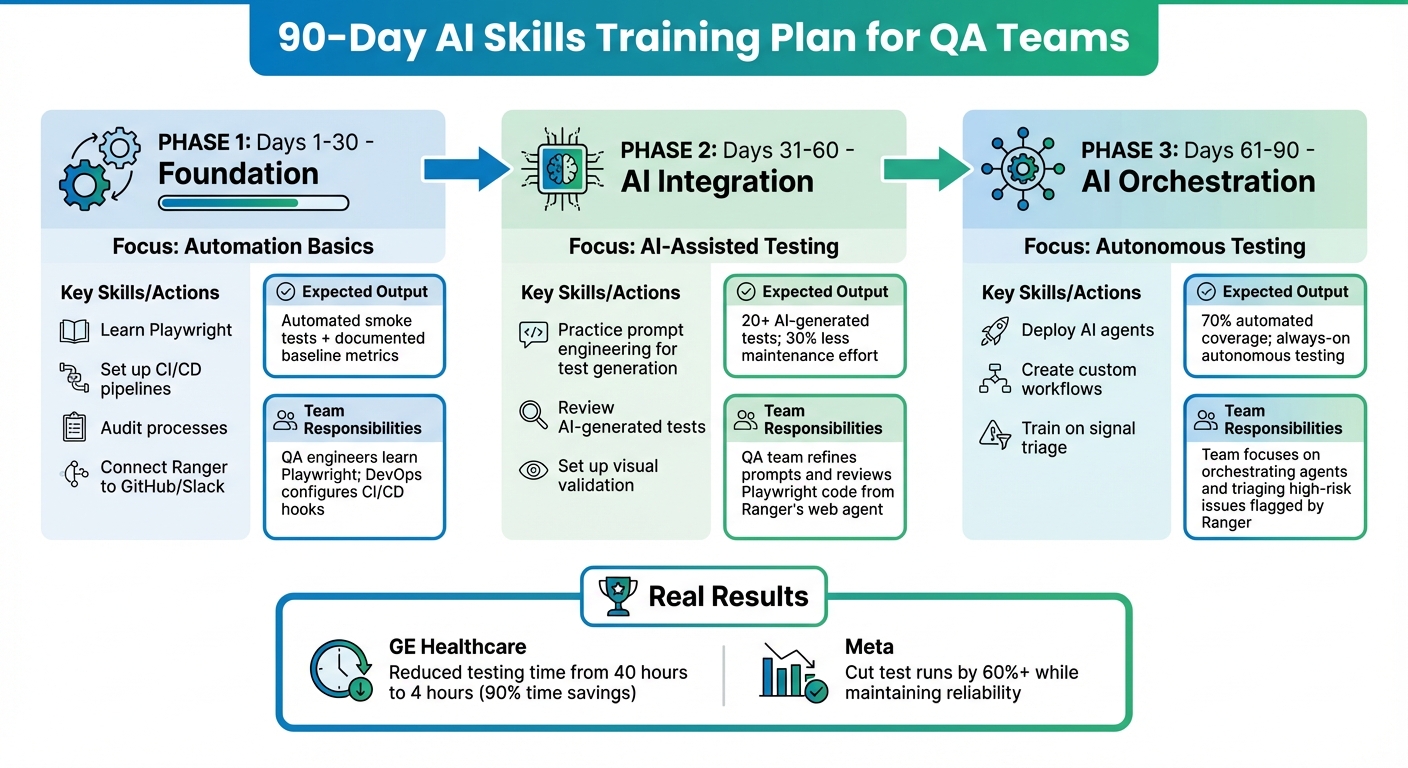
90-Day AI Skills Training Plan for QA Teams
Building AI expertise requires a balanced approach that combines hands-on practice with foundational knowledge. This roadmap is designed to guide QA teams through a structured transition to AI-powered workflows, complementing the technical and interpersonal skills they already possess.
Start by evaluating your current manual processes. Document the time spent on repetitive tasks to establish clear metrics for return on investment (ROI). This baseline helps identify which workflows to automate first. Before introducing AI, ensure your processes are well-organized with strong documentation and consistent naming conventions - this groundwork is essential.
Begin with low-risk areas like regression suites or unstable UI tests. Track regression times and script maintenance efforts to measure the impact of automation. Engage QA engineers early in tool evaluations to encourage buy-in and minimize resistance. This initial groundwork sets the stage for a phased training plan outlined below.
90-Day Training Plan
This three-month phased approach helps teams gradually build AI skills while delivering tangible improvements.
| Phase | Focus Area | Skills/Actions | Expected Output | Team Responsibilities |
|---|---|---|---|---|
| Days 1-30: Foundation | Automation Basics | Learn Playwright, set up CI/CD pipelines, audit processes, and connect Ranger to GitHub/Slack | Automated smoke tests and documented baseline metrics | QA engineers learn Playwright; DevOps configures CI/CD hooks |
| Days 31-60: AI Integration | AI-Assisted Testing | Practice prompt engineering for test generation, review AI-generated tests, and set up visual validation | 20+ AI-generated tests; 30% less maintenance effort | QA team refines prompts and reviews Playwright code from Ranger's web agent |
| Days 61-90: AI Orchestration | Autonomous Testing | Deploy AI agents, create custom workflows, and train on signal triage | 70% automated coverage; always-on autonomous testing | Team focuses on orchestrating agents and triaging high-risk issues flagged by Ranger |
For example, in June 2025, GE Healthcare adopted an AI testing platform that automated complex workflows. This reduced testing time from 40 hours to just 4 hours, saving the QA team 90% of their labor time. Similarly, in January 2026, Meta used machine learning to predict which regression tests would detect bugs based on recent code changes. This approach cut test runs by more than 60% while maintaining reliability.
By following these phases, you can seamlessly integrate Ranger's capabilities into your workflows. In Phase 1, connect Ranger to your staging environment and enable Slack notifications. During Phase 2, focus on refining prompts to improve AI-generated test quality. By Phase 3, your team will be adept at triaging risks using Ranger's signal filtering system.
Keep human oversight at the core of your process. AI is not a replacement for your team but a collaborator. Ranger’s expert reviewers ensure that AI-generated code is readable, reliable, and meets your quality standards. This partnership between your team and AI tools enhances both speed and accuracy, preparing your QA team for the demands of AI-driven testing.
Conclusion
AI-powered testing is becoming a game-changer for QA teams aiming to keep up with the rapid pace of modern development cycles. By 2025, it's predicted that 70% of organizations will use AI to assist with tasks like test creation, execution, and maintenance. The skills highlighted in this guide - such as understanding machine learning, mastering prompt engineering, and fostering human-AI collaboration - are pivotal for making this transition successful.
The key lies in blending AI automation with human expertise. This approach allows AI to handle tasks like test generation, while your team focuses on critical areas like code quality, bug triage, and strategic decision-making. In fact, AI-driven automation tools can cut script maintenance efforts by as much as 70%, giving your team more time to tackle the work that truly requires human insight.
To get started, focus on one frequently changing UI module, set baseline metrics, and use a 90-day plan to monitor progress. Practical examples show that AI-powered testing can significantly optimize QA workflows, delivering tangible results.
The future of QA is all about adaptability. Rather than wrestling with scripts that constantly break due to UI changes, modern QA teams are turning to AI agents capable of creating self-healing tests and filtering out unreliable failures. Platforms like Ranger exemplify this shift by combining AI-driven test creation with human oversight, ensuring tests remain clear, dependable, and focused on catching real issues.
FAQs
What key AI skills should QA teams focus on developing?
QA teams leveraging AI-powered testing tools need a balanced skill set that blends technical expertise with soft skills to excel in the ever-changing world of quality assurance.
On the technical front, it's crucial to know how to work with AI-driven automation tools, test complex AI models like large language models (LLMs), and design test cases that yield meaningful insights. Teams should also be skilled in interpreting AI-generated outputs, managing test data, and monitoring AI systems for issues such as bias or inaccuracies. These capabilities are key to ensuring precise and ethical testing practices.
At the same time, soft skills play a vital role. Strong collaboration and communication abilities help teams integrate AI tools seamlessly into their workflows. Plus, the capacity to combine human judgment with AI oversight ensures better decision-making and more reliable results. Together, these skills empower QA professionals to boost testing efficiency and adapt to the growing role of automation in software testing.
What steps can QA teams take to successfully integrate AI tools into their workflows?
To bring AI tools into QA workflows effectively, start by taking a close look at your current processes. Pinpoint areas where AI can make the biggest difference - think automating repetitive tasks or expanding test coverage. Begin with clear goals and focus on small, impactful use cases. This approach lets you test AI solutions, analyze the outcomes, and fine-tune your strategy as needed.
Once you’ve seen success in the initial phase, shift your attention to choosing tools that fit your unique requirements. Make sure your data and infrastructure are ready, and invest time in training your team to use the technology confidently. Integrating AI tools with systems like CI/CD pipelines or collaboration platforms like Slack and GitHub can make workflows even smoother.
Don’t forget to regularly monitor and update your AI models to keep them accurate and responsive to evolving needs. By taking these steps, QA teams can boost efficiency, catch defects more effectively, and cut down on manual work - all while ensuring high-quality results.
What challenges come with using AI in QA, and how can teams overcome them?
Integrating AI into quality assurance (QA) comes with its own set of hurdles. Some of the most common issues include unreliable test results, lack of transparency in AI decision-making, and data privacy concerns. AI systems can sometimes generate inconsistent or incorrect outputs, which raises questions about their reliability. On top of that, understanding how AI arrives at its conclusions can be tricky, making it harder to trust the system. And when workflows involve sensitive data, incorporating AI tools can get even more complicated.
To tackle these challenges, teams should take a few key steps:
- Ensure data security: Use methods like anonymization and encryption to protect sensitive information.
- Keep human oversight in place: Always have a person review and validate the AI's outputs to catch potential errors.
- Start small: Begin with pilot projects to test AI tools on a smaller scale before rolling them out more broadly.
- Monitor performance regularly: Continuously track how the AI is performing to catch issues early.
- Promote transparency: Clearly document and share how the AI operates to build trust and confidence in its results.
By taking these precautions, teams can reduce risks and make AI a more reliable part of their QA processes.
Related Blog Posts
Stop babysitting your coding agents. Use Ranger
%201%20(1).svg)
More signals, less noise, faster launches
Let Ranger be your guide to sustainable QA testing.

.png)